Beginner Level Questions
1. What is JavaScript?
- JavaScript is a high-level, interpreted programming language used to make websites interactive and dynamic. It is one of the core technologies of the web, along with HTML and CSS.
- It runs directly in the browser (like Chrome, Firefox, etc.).
- Used to create dynamic effects like form validation, popups, animations, interactive maps, etc.
- JavaScript can also be used on the server side using platforms like Node.js.
2. How do you declare a variable in JavaScript?
You can declare variables using var, let, or const.
var name = "Ravi"; // Old way, function-scoped
let age = 25; // Modern way, block-scoped
const city = "Delhi"; // Constant, cannot be changed
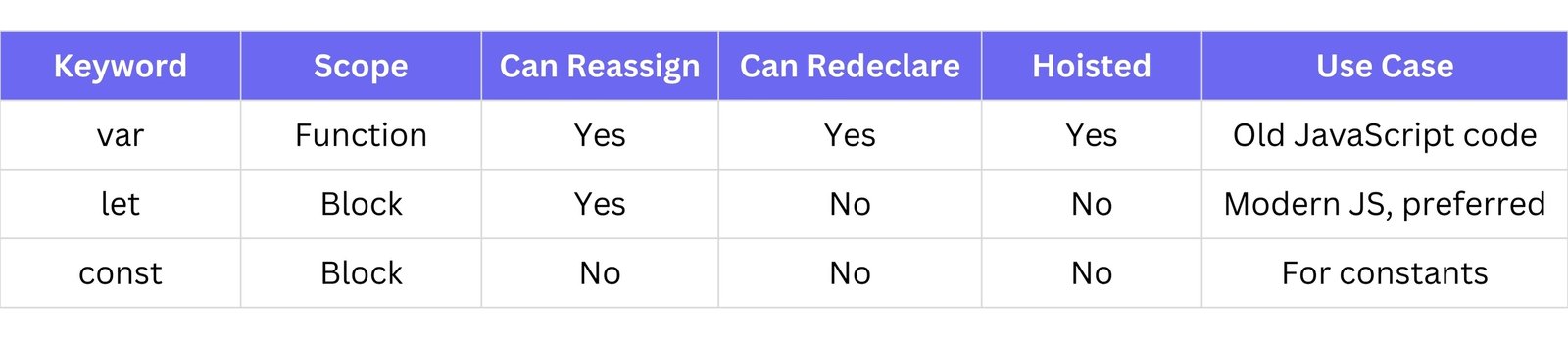
var: Can be redeclared and updated. Function scoped.let: Can be updated but not redeclared in the same scope. Block scoped.const: Cannot be updated or redeclared. Block scoped.
3. What are the data types in JavaScript?
JavaScript supports two main types:
Primitive Data Types:
String: Text - "Hello"Number: Numeric values - 42, 3.14Boolean: true or falseUndefined: A variable that has been declared but not given a valueNull: An empty or non-existent valueSymbol: Unique and immutable value (used for object properties)BigInt: For very large integers
Non-Primitive Data Types:
Object: Collection of key-value pairsArray: Ordered list of values (which is a special kind of object)Function: A block of reusable code
4. What is the difference between var, let, and const?
var a = 1;
let b = 2;
const c = 3;
5. How do you write a comment in JavaScript?
Single-line comment:
// This is a single-line comment
Multi-line comment:
/*
This is a multi-line comment
Useful for longer explanations
*/
6. What is the difference between == and ===?
==: Loose equality: compares value only (converts types if needed)===: Strict equality: compares both value and type
Example:
5 == '5' // true (value is same, type is different)
5 === '5' // false (value is same, but types differ)
Always prefer === to avoid unexpected bugs.
7. What is an array in JavaScript?
An array is a data structure used to store multiple values in a single variable.
let colors = ["red", "green", "blue"];
- Arrays can contain any data type: strings, numbers, objects, even functions.
- Items in an array are indexed, starting from 0.
Example:
console.log(colors[0]); // Output: "red"
8. How do you create an array?
There are two main ways:
Using square brackets:
let fruits = ["apple", "banana", "orange"];
Using the Array constructor:
let fruits = new Array("apple", "banana", "orange");
The first method (square brackets) is more common and preferred.
9. What is an object in JavaScript?
An object is a collection of key-value pairs.
let person = {
    name: "Ravi",
    age: 25,
    city: "Ahmedabad"
};
Each value is accessed using the key:
console.log(person.name); // Output: Ravi
Objects can also contain arrays, functions, or even other objects.
10. How do you write a function?
A function is a block of code designed to perform a particular task. It can be reused.
Basic function:
function greet() {
    console.log("Hello!");
}
greet(); // Calling the function
Function with parameters:
function add(a, b) {
    return a + b;
}
console.log(add(5, 3)); // Output: 8
Arrow function (modern syntax):
const multiply = (x, y) => x * y;
11. What are conditional statements?
Conditional statements allow you to make decisions in your program based on conditions (true/false).
Types of conditional statements:
Example:
let age = 18;
if (age >= 18) {
    console.log("You are an adult");
} else {
    console.log("You are a minor");
}
12. What is the syntax of a for loop?
A for loop is used to run a block of code multiple times.
Syntax:
for (initialization; condition; update) {
    // code to run
}
Example:
for (let i = 0; i < 5; i++) {
    console.log(i);
}
This will print numbers 0 to 4.
13. What is the syntax of a while loop?
A while loop keeps running as long as the condition is true.
Syntax:
while (condition) {
    // code to run
}
Example:
let i = 0;
while (i < 5) {
    console.log(i);
    i++;
}
14. What does typeof return?
typeof is an operator that returns the data type of a value.
Example:
typeof "hello"    // "string"
typeof 42         // "number"
typeof true       // "boolean"
typeof undefined  // "undefined"
typeof null       // "object" (this is a known bug in JS)
15. What is null in JavaScript?
null is a special value that represents no value or empty value.
It's intentionally assigned to a variable to say: "This has no value."
let a = null;
console.log(a); // null
16. What is undefined in JavaScript?
undefined means a variable has been declared but not assigned any value yet.
let x;
console.log(x); // undefined
It's also the default return value of functions that don't return anything.
17. What is NaN?
NaN stands for "Not a Number".
It is returned when a math operation fails or gives an invalid number.
let result = "hello" / 5;
console.log(result); // NaN
NaN is of type "number" but represents something that's not a valid number.
18. What is an event in JavaScript?
An event is something that happens in the browser like a click, hover, keypress, etc.
JavaScript can listen to these events and run code in response.
document.getElementById("btn").addEventListener("click", function() {
    // Using a custom message box instead of alert() as per instructions
    console.log("Button clicked!"); // Placeholder for custom message box
});
19. What is the use of alert()?
alert() is used to show a popup message box to the user with an OK button.
// alert("Welcome to the website!"); // Replaced with console.log as per instructions
console.log("Welcome to the website!"); // Placeholder for custom message box
Note: It pauses all other JavaScript code until the user clicks OK.
20. What is a prompt box?
A prompt() is used to ask the user for input and returns what the user types.
// let name = prompt("What is your name?"); // Replaced with console.log as per instructions
let name = "User"; // Placeholder for prompt input
console.log("Hello, " + name);
The input is always returned as a string.
21. What is the use of confirm()?
The confirm() method is used to ask the user to confirm something.
- It shows a dialog box with OK and Cancel buttons.
- Returns
true if the user clicks OK.
- Returns
false if the user clicks Cancel.
// let result = confirm("Are you sure you want to delete?"); // Replaced with console.log as per instructions
let result = true; // Placeholder for confirm result
if (result) {
    console.log("Deleted");
} else {
    console.log("Cancelled");
}
22. What is type coercion?
Type coercion is the process where JavaScript automatically converts one data type to another when needed.
let result = "5" + 2; // "52" (string)
let result2 = "5" - 2; // 3 (number)
"5" + 2 → string coercion (converts 2 to "2")"5" - 2 → number coercion (converts "5" to 5)
23. How do you convert a string to a number?
You can convert a string to a number using:
Methods:
Number("123") // 123parseInt("123") // 123parseFloat("123.45") // 123.45+"123" // 123 (unary plus)
Example:
let str = "42";
let num = Number(str);
console.log(typeof num); // "number"
24. What is a string in JavaScript?
A string is a sequence of characters inside quotes (single, double, or backticks).
let name = "Rudra";
let greeting = `Hello, ${name}`; // Template literal
25. What are string methods in JavaScript?
String methods help you manipulate and work with strings.
Common methods:
.length - Returns string length.toUpperCase() - Converts to uppercase.toLowerCase() - Converts to lowercase.slice(start, end) - Extracts a part of the string.indexOf("text") - Finds index of text.replace("old", "new") - Replaces text.trim() - Removes spaces
Example:
let text = " Hello World ";
console.log(text.trim().toUpperCase()); // "HELLO WORLD"
26. How do you add an element to an array?
Use .push() to add an element at the end of an array.
let fruits = ["apple", "banana"];
fruits.push("orange");
console.log(fruits); // ["apple", "banana", "orange"]
27. How do you remove an element from an array?
Use .pop() to remove the last element, and shift() to remove the first element.
let fruits = ["apple", "banana", "orange"];
fruits.pop();   // removes "orange"
fruits.shift(); // removes "apple"
console.log(fruits); // ["banana"]
28. What is the difference between push() and pop()?
.push() adds an element to the end of an array..pop() removes the last element from the array.
let arr = [1, 2];
arr.push(3); // [1, 2, 3]
arr.pop();   // [1, 2]
console.log(arr);
29. What is slice() vs splice()?
slice(start, end)
- Returns a shallow copy of a portion of the array.
- Does not modify the original array.
splice(start, deleteCount, item1, item2, ...)
- Modifies the original array by removing/adding elements.
let arr = [1, 2, 3, 4, 5];
let sliced = arr.slice(1, 3); // [2, 3]
console.log("Sliced:", sliced);
console.log("Original after slice:", arr); // Original array unchanged

arr.splice(1, 2, "a", "b");
console.log("Original after splice:", arr); // arr becomes [1, "a", "b", 4, 5]
30. What is the use of console.log()?
console.log() is used to print messages or values to the browser's console.
It's mainly used for debugging and testing code output.
let x = 10;
console.log("The value of x is:", x); // prints to console
31. What is a function parameter vs an argument?
- Parameter: A placeholder used when defining a function.
- Argument: The actual value passed to the function when it's called.
function greet(name) { // name is a parameter
    console.log("Hello " + name);
}
greet("Rudra"); // "Rudra" is an argument
Intermediate Level Questions
32. What is a return statement?
The return statement is used to send a value back from a function to where it was called.
Without return, the function returns undefined.
function add(a, b) {
    return a + b;
}
let result = add(5, 3); // result will be 8
console.log("Result of add function:", result);
33. What is the scope of a variable?
Scope defines where a variable can be accessed in your code.
Types of scope:
- Global scope – accessible anywhere
- Local scope – accessible only inside functions or blocks
34. What are global and local variables?
- Global variable: Declared outside any function or block; accessible everywhere.
- Local variable: Declared inside a function or block; accessible only there.
let globalVar = "outside";

function test() {
    let localVar = "inside";
    console.log(globalVar); // "outside" (accessible)
    console.log(localVar);  // "inside" (accessible)
}
test();
// console.log(localVar); // Error: localVar is not defined (not accessible outside function)
35. How do you access object properties?
You can access properties in two ways:
- Dot notation:
object.key
- Bracket notation:
object["key"]
let person = {
    name: "Rudra",
    age: 19
};
console.log(person.name);    // "Rudra"
console.log(person["age"]);  // 19
36. How do you loop through an object?
Use a for...in loop to loop through keys of an object.
let person = {
    name: "Rudra",
    age: 19
};
for (let key in person) {
    console.log(key + ": " + person[key]);
}
37. What is the difference between for...in and for...of?
for...in: Loops through keys/properties (used for objects).for...of: Loops through values in iterable objects (like arrays, strings).
// for...in for objects
let obj = { a: 1, b: 2 };
for (let key in obj) {
    console.log(key); // "a", "b"
}

// for...of for arrays
let arr = [10, 20];
for (let value of arr) {
    console.log(value); // 10, 20
}
38. How do you handle errors in JavaScript?
Use try...catch blocks to handle errors without crashing the program.
try {
    let result = unknownFunction(); // This function does not exist
} catch (error) {
    console.log("An error occurred: " + error.message);
}
39. What is the Math object?
The Math object provides mathematical operations and constants.
Common methods:
Math.round(4.6) → 5Math.floor(4.9) → 4Math.ceil(4.1) → 5Math.random() → random number (0 to <1)Math.max(5, 10) → 10Math.min(5, 10) → 5
Example:
console.log(Math.round(4.6)); // 5
console.log(Math.random());   // A random number like 0.789...
40. What are Boolean values?
Boolean values represent true or false.
Used in:
- Conditions
- Comparisons
- Logical operations
let isLoggedIn = true;
let isEmpty = false;
console.log(5 > 3);     // true
console.log("a" === "b"); // false
41. What is hoisting in JavaScript?
Hoisting is JavaScript’s default behavior of moving declarations to the top of their scope before the code execution starts.
- Variables declared with
var are hoisted but initialized with undefined.
- Functions declared using function declarations are hoisted with their complete definition.
console.log(x); // undefined (var x is hoisted but not initialized yet)
var x = 10;
console.log(x); // 10

hello(); // "Hello" (function declaration is hoisted)
function hello() {
    console.log("Hello");
}
42. What are closures?
A closure is a function that remembers its lexical scope even when the function is executed outside that scope.
Here, inner function still has access to x, even after outer has finished executing.
function outer() {
    let x = 10;
    return function inner() {
        console.log(x); // inner function has access to 'x' from outer's scope
    };
}
let closureFunc = outer();
closureFunc(); // 10
43. What is lexical scope?
Lexical scope refers to the scope in which a function was created, not the scope in which it is called.
Functions have access to variables in their own scope and the outer (lexical) scopes.
function outer() {
    let x = 10;
    function inner() {
        console.log(x); // 'inner' has access to 'x' from 'outer'
    }
    inner();
}
outer(); // 10
44. What is the this keyword?
The this keyword refers to the current object in which the function is called. The value of this depends on how the function is called.
- In a regular function,
this refers to the global object or undefined in strict mode.
- In an object method,
this refers to the object the method is called on.
let person = {
    name: "Rudra",
    greet: function() {
        console.log("Hello, " + this.name); // 'this' refers to 'person'
    }
};
person.greet(); // "Hello, Rudra"
45. What is event bubbling?
Event bubbling is when an event is triggered on an element, and it propagates upwards through its ancestors (parent elements) until it reaches the document.
If you click the button, the event will bubble up, and the div's click handler will also be triggered.
document.querySelector("button").addEventListener("click", function() {
    console.log("Button clicked!");
});
document.querySelector("div").addEventListener("click", function() {
    console.log("Div clicked!");
});
// If button is inside div, clicking button will log "Button clicked!" then "Div clicked!"
46. What is event capturing?
Event capturing is the opposite of event bubbling. In capturing, the event is triggered on the top-most ancestor first, and then it travels down to the target element.
If you click the button, the event will be captured by the div first.
document.querySelector("div").addEventListener("click", function() {
    console.log("Div captured!"); // This will run first
}, true); // true enables capturing phase
document.querySelector("button").addEventListener("click", function() {
    console.log("Button clicked!");
});
// If button is inside div, clicking button will log "Div captured!" then "Button clicked!"
47. What are arrow functions?
Arrow functions are a shorter syntax for writing functions. They also do not have their own this value, which is useful in certain contexts.
Arrow functions do not bind their own this, instead, they inherit this from the surrounding lexical context.
Syntax:
const add = (a, b) => a + b;
Example (showing this behavior):
const person = {
    name: "Rudra",
    greet: () => {
        console.log(this.name); // 'this' does not refer to 'person' here (will be undefined or global object's name)
    }
};
person.greet(); // undefined (or global object's name if not in strict mode)
48. What is the difference between function declaration and expression?
Function Declaration: A function is declared with the function keyword, and it is hoisted, so it can be called before it is defined.
greet(); // "Hello"
function greet() {
    console.log("Hello");
}
Function Expression: A function is assigned to a variable. It is not hoisted, so it must be called after it’s defined.
// greetExpression(); // Error: Cannot access 'greetExpression' before initialization
const greetExpression = function() {
    console.log("Hello from expression");
};
greetExpression(); // "Hello from expression"
49. What is the difference between synchronous and asynchronous code?
Synchronous code: Runs one operation at a time, blocking the execution of subsequent operations until the current one finishes.
console.log("Start");
console.log("End");
// Output: Start, End
Asynchronous code: Runs non-blocking, allowing other operations to continue while waiting for a task (like fetching data) to complete.
console.log("Start");
setTimeout(() => {
    console.log("Middle");
}, 1000);
console.log("End");
// Output: Start, End, Middle (due to the timeout)
50. What is a callback function?
A callback function is a function passed as an argument to another function and is invoked after a certain task is completed.
Here, callback() is executed after greet() finishes.
function greet(name, callback) {
    console.log("Hello " + name);
    callback();
}
greet("Rudra", function() {
    console.log("Callback executed!");
});
51. What is the bind() method?
The bind() method is used to bind a function to a specific object. It allows you to set the value of this for the function, ensuring it always refers to a specific object, regardless of how the function is called.
const person = {
    name: "Rudra",
    greet: function() {
        console.log("Hello " + this.name);
    }
};
const greetPerson = person.greet.bind(person); // 'this' is always 'person'
greetPerson(); // "Hello Rudra"
52. What is the call() and apply() method?
Both call() and apply() are used to call a function with a specified this value and arguments, but they differ in how arguments are passed:
call(): Arguments are passed individually.apply(): Arguments are passed as an array.
function greet(city, country) {
    console.log("Hello " + this.name + " from " + city + ", " + country);
}
const person = { name: "Rudra" };

greet.call(person, "Vadodara", "India"); // "Hello Rudra from Vadodara, India"
greet.apply(person, ["Vadodara", "India"]); // "Hello Rudra from Vadodara, India"
53. What is the spread operator?
The spread operator (...) is used to unpack elements from an array or object and spread them into another array or object.
For arrays:
const arr1 = [1, 2, 3];
const arr2 = [...arr1, 4, 5]; // [1, 2, 3, 4, 5]
console.log(arr2);
For objects:
const person = { name: "Rudra", age: 19 };
const copyPerson = { ...person, city: "Vadodara" }; // { name: "Rudra", age: 19, city: "Vadodara" }
console.log(copyPerson);
54. What is the rest parameter?
The rest parameter (...) allows you to represent an indefinite number of arguments as an array.
It must be the last parameter in the function signature.
function sum(...numbers) {
    return numbers.reduce((acc, num) => acc + num, 0);
}
console.log(sum(1, 2, 3, 4)); // 10
55. What is destructuring?
Destructuring is a shorthand way to extract values from objects or arrays and assign them to variables.
Array destructuring:
const arr = [1, 2, 3];
const [a, b] = arr; // a = 1, b = 2
console.log(`a = ${a}, b = ${b}`);
Object destructuring:
const person = { name: "Rudra", age: 19 };
const { name, age } = person; // name = "Rudra", age = 19
console.log(`name = ${name}, age = ${age}`);
56. What is a template literal?
A template literal is a way to embed expressions inside a string using backticks (`) instead of quotes.
You can use ${} to embed variables or expressions.
let name = "Rudra";
let greeting = `Hello, ${name}!`; // "Hello, Rudra!"
console.log(greeting);
Template literals can also span multiple lines:
let message = `This is
a multi-line string.`;
console.log(message);
57. What is the use of setTimeout()?
The setTimeout() method is used to execute a function after a specified delay (in milliseconds). It returns a unique identifier that can be used to cancel the timeout with clearTimeout().
setTimeout(() => {
    console.log("Hello after 2 seconds!");
}, 2000);
58. What is the use of setInterval()?
The setInterval() method is used to repeatedly execute a function with a fixed time delay (in milliseconds). It returns a unique identifier that can be used to cancel the interval with clearInterval().
setInterval(() => {
    console.log("This will repeat every 3 seconds.");
}, 3000);
59. What is clearTimeout() and clearInterval()?
clearTimeout(): Cancels a timeout previously set with setTimeout().clearInterval(): Cancels an interval previously set with setInterval().
let timeoutId = setTimeout(() => {
    console.log("This won't run.");
}, 5000);
clearTimeout(timeoutId); // This message is cancelled and won't appear

let intervalId = setInterval(() => {
    console.log("This message will repeat.");
}, 2000);
clearInterval(intervalId); // This repetition is cancelled
60. What is the difference between map() and forEach()?
forEach(): Executes a provided function once for each array element. It does not return a new array; it modifies the original array if needed.map(): Creates and returns a new array with the results of calling the provided function on every element in the original array.
forEach does not return anything, whereas map returns a new array.
const numbers = [1, 2, 3, 4];

// forEach
numbers.forEach(num => console.log(num * 2)); // Logs 2, 4, 6, 8 (no new array)

// map
const doubled = numbers.map(num => num * 2); // [2, 4, 6, 8] (new array)
console.log(doubled);
61. What is the use of filter() method?
The filter() method creates a new array containing elements that pass a certain test (i.e., return true in the callback function).
- Does not change the original array.
- Returns only the elements that match the condition.
const numbers = [1, 2, 3, 4];
const even = numbers.filter(num => num % 2 === 0); // [2, 4]
console.log(even);
62. What is the reduce() method?
The reduce() method executes a reducer function on each element of the array and returns a single output value.
Useful for summing, averaging, flattening arrays, etc.
const numbers = [1, 2, 3, 4];
const sum = numbers.reduce((accumulator, current) => accumulator + current, 0); // 10
console.log(sum);
63. What is prototypal inheritance?
Prototypal inheritance means objects can inherit properties and methods from other objects via the [[Prototype]] chain (__proto__ or Object.getPrototypeOf()).
Enables code reuse and shared behavior.
const parent = { greet: function() { console.log("Hello"); } };
const child = Object.create(parent);
child.greet(); // "Hello"
64. What are constructor functions?
Constructor functions are special functions used to create and initialize objects. When called with the new keyword, they return a new object.
function Person(name) {
    this.name = name;
    this.sayHi = function() {
        console.log("Hi, I'm " + this.name);
    };
}
const p1 = new Person("Rudra");
p1.sayHi(); // "Hi, I'm Rudra"
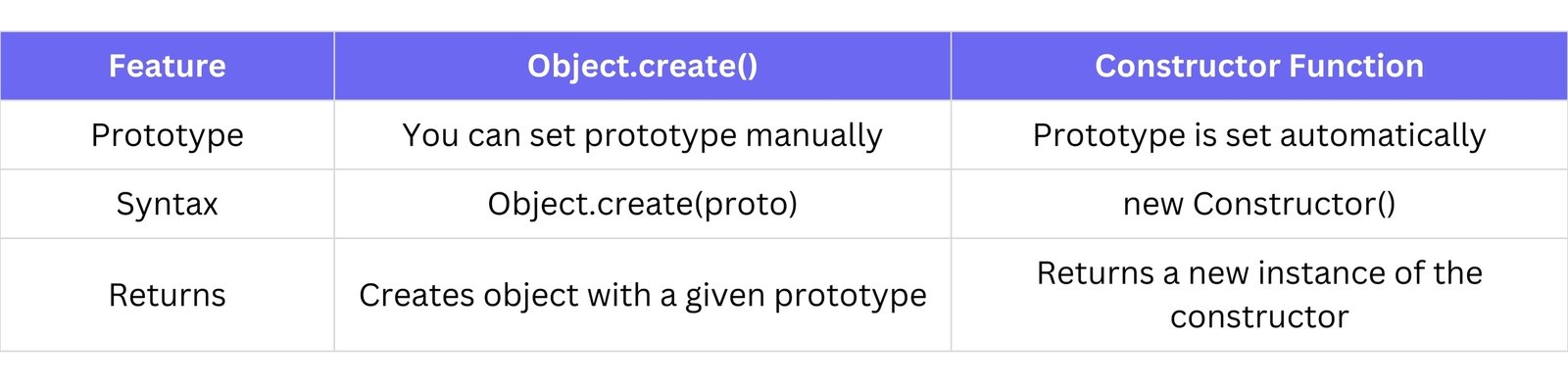
65. What is the difference between Object.create() and constructor function?
const parent = { greet: () => console.log("Hello") };
const obj1 = Object.create(parent); // obj1 inherits from 'parent'

function Person() {
    this.name = "Rudra";
}
const obj2 = new Person(); // obj2 is an instance of Person
console.log(obj1); // {} with __proto__ pointing to parent
console.log(obj2); // Person { name: "Rudra" }
66. What are classes in JavaScript?
Classes are blueprints for creating objects. They are syntactic sugar over prototypal inheritance.
class Person {
    constructor(name) {
        this.name = name;
    }
    greet() {
        console.log(`Hello, I'm ${this.name}`);
    }
}
const p = new Person("Rudra");
p.greet(); // "Hello, I'm Rudra"
67. What is the super keyword?
The super keyword is used to:
- Call the constructor of a parent class inside a subclass.
- Access parent methods in a child class.
class Animal {
    constructor(name) {
        this.name = name;
    }
    speak() {
        console.log(`${this.name} makes a sound`);
    }
}

class Dog extends Animal {
    constructor(name) {
        super(name); // Calls parent constructor
    }
    speak() {
        super.speak(); // Calls parent method
        console.log(`${this.name} barks`);
    }
}
const myDog = new Dog("Buddy");
myDog.speak();
// Output:
// Buddy makes a sound
// Buddy barks
68. What are getters and setters?
Getters and setters are special methods to get and set object properties.
class Person {
    constructor(name) {
        this._name = name; // Conventionally, use _ for private-like properties
    }
    get name() {
        return this._name;
    }
    set name(newName) {
        this._name = newName;
    }
}
const p = new Person("Rudra");
console.log(p.name); // Rudra (calls getter)
p.name = "Parth";    // Calls setter
console.log(p.name); // Parth
69. What is the difference between mutable and immutable data types?
let arr = [1, 2];
arr.push(3); // arr is now [1, 2, 3] (mutable)
console.log("Mutable array:", arr);

let str = "Hello";
// str[0] = "J"; // This won't change the string (immutable)
str = "Jello"; // Creates a new string
console.log("Immutable string:", str);
70. What are JavaScript modules?
Modules are reusable blocks of code that export variables, functions, or classes and can be imported into other files.
module.js example:
// module.js
export const name = "Rudra";
export function greet() {
    console.log("Hello!");
}
main.js example:
// main.js
import { name, greet } from './module.js';
console.log(name); // "Rudra"
greet();           // "Hello!"
Modules help with code organization, reusability, and maintainability.
Advanced Level Questions
71. What is the difference between default and named exports?
Default Export:
- Only one default export per file.
- Imported without curly braces.
// utils.js
export default function greet() {
    console.log("Hello");
}

// app.js
import greet from './utils.js';
greet();
Named Export:
- Can have multiple named exports.
- Must import using curly braces
{}.
// math.js
export const add = (a, b) => a + b;
export const sub = (a, b) => a - b;

// app.js
import { add, sub } from './math.js';
console.log(add(5, 3)); // 8
72. What is an Immediately Invoked Function Expression (IIFE)?
An IIFE is a function that runs immediately after it is defined. It's used to create a private scope.
- Avoids polluting global scope.
- Common in older JavaScript before
let/const.
(function () {
    console.log("IIFE executed!");
})();
73. What is the module pattern?
The module pattern is a design pattern used to encapsulate private variables and expose only public methods.
- Combines IIFE + closures.
- Useful for data privacy.
const counterModule = (function () {
    let count = 0; // Private variable

    return {
        increment: function () {
            count++;
            return count;
        },
        reset: function () {
            count = 0;
        }
    };
})();

console.log(counterModule.increment()); // 1
console.log(counterModule.increment()); // 2
// console.log(counterModule.count); // undefined (private)
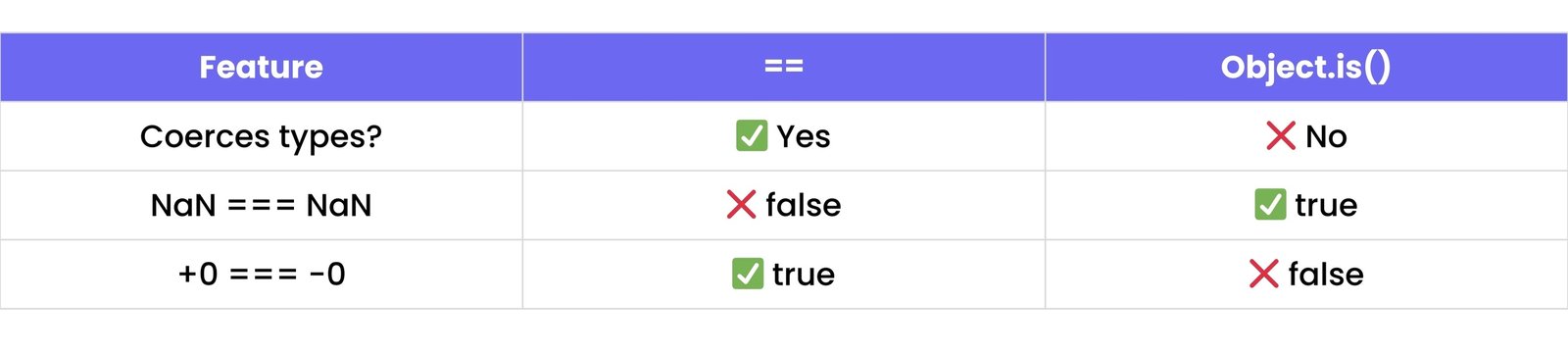
74. What is the difference between == and Object.is()?
console.log(0 == '0');         // true
console.log(Object.is(0, '0')); // false

console.log(NaN == NaN);       // false
console.log(Object.is(NaN, NaN)); // true
75. What is a Symbol?
A Symbol is a unique and immutable data type, often used as object keys to avoid property conflicts.
Every symbol is unique, even with same description.
const id = Symbol("id");
const user = {
    [id]: 123
};
console.log(user[id]); // 123
const anotherId = Symbol("id");
console.log(user[anotherId]); // undefined (because Symbols are unique)
76. What are JavaScript data structures?
JavaScript data structures include ways to store and organize data:
- Primitive types:
string, number, boolean, null, undefined, symbol, bigint.
- Non-primitive (reference) types:
objects, arrays, maps, sets.
Common structures:
- Array
- Object
- Set
- Map
- Stack (via array)
- Queue (via array)
77. What is a Set?
A Set is a collection of unique values (no duplicates allowed).
Has methods like .add(), .delete(), .has(), .clear().
const set = new Set();
set.add(1);
set.add(2);
set.add(1); // Duplicate, won't be added
console.log(set); // Set { 1, 2 }
78. What is a Map?
A Map stores key-value pairs where keys can be any type (even objects).
- Maintains insertion order.
- Has
.set(), .get(), .has(), .delete().
const map = new Map();
map.set('name', 'Rudra');
map.set(1, 'One');
console.log(map.get('name')); // "Rudra"
console.log(map.get(1));      // "One"
79. What are WeakMap and WeakSet?
These are memory-efficient versions of Map and Set:
- Keys in
WeakMap must be objects.
- They do not prevent garbage collection (no memory leaks).
WeakSet is similar, only stores objects, and no iteration.
WeakMap Example:
const wm = new WeakMap();
let obj = {};
wm.set(obj, "data");
obj = null; // 'obj' can now be garbage collected, and its entry in wm will be removed
// console.log(wm.get(obj)); // This would be undefined if obj was garbage collected
80. What is the difference between in and hasOwnProperty()?
const obj = { name: 'Rudra' };
console.log('name' in obj);            // true
console.log(obj.hasOwnProperty('name')); // true

console.log('toString' in obj);        // true (inherited from Object.prototype)
console.log(obj.hasOwnProperty('toString')); // false
81. What are Promises?
A Promise is an object representing the eventual completion (or failure) of an asynchronous operation.
States of a Promise:
pending → initial statefulfilled → operation completedrejected → operation failed
const promise = new Promise((resolve, reject) => {
    setTimeout(() => resolve("Done!"), 1000);
});

promise.then((result) => console.log(result)); // Logs "Done!" after 1 second
82. What is async/await?
async/await is syntactic sugar for writing asynchronous code in a more readable way.
async function always returns a promise.await pauses the function until the promise is resolved.
async function getData() {
    try {
        const result = await fetch('https://api.example.com/data');
        const data = await result.json();
        console.log(data);
    } catch (error) {
        console.error("Error fetching data:", error);
    }
}
getData();
83. What is the event loop?
The event loop is what allows JavaScript (single-threaded) to handle asynchronous tasks (like setTimeout, fetch, etc.) without blocking.
It moves tasks from callback queue or microtask queue to the call stack when it's empty.
84. What is the call stack?
The call stack is a LIFO (Last In, First Out) data structure that stores function execution context.
- When a function is called, it's pushed onto the stack.
- When it returns, it's popped off.
function first() {
    console.log("First function");
    second();
}
function second() {
    console.log("Second function");
}
first();
// Call stack: first() -> second() -> pop second() -> pop first()
85. What is a microtask queue?
The microtask queue stores tasks like:
.then() handlersawait resolutionsqueueMicrotask()
Microtasks run after the current call stack is empty, but before the next macro task (like setTimeout).
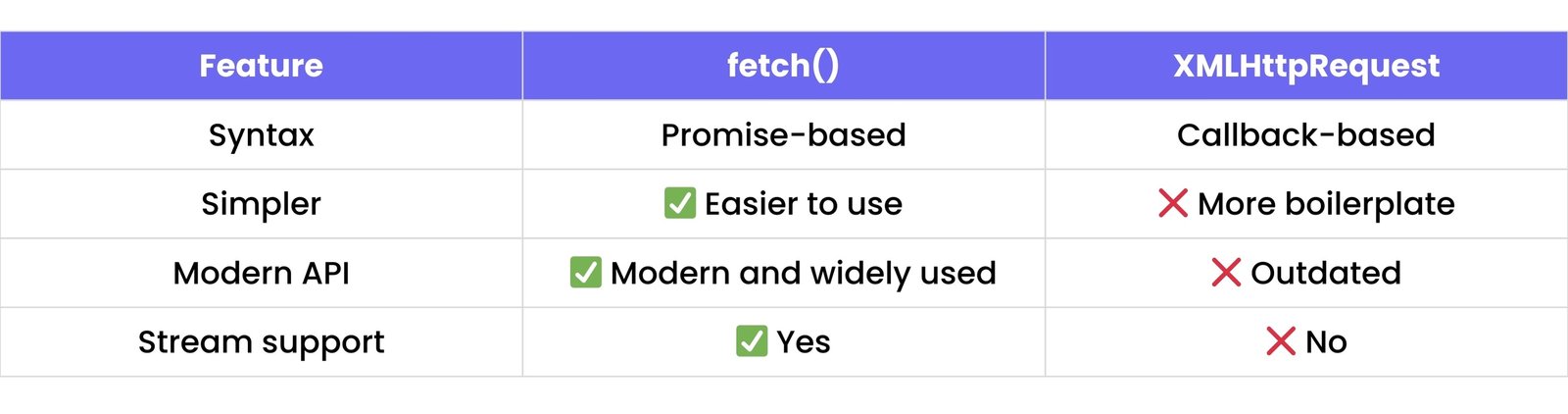
86. What is the fetch API?
The fetch() API is used to make network requests and returns a promise.
Replaces XMLHttpRequest.
fetch('https://api.example.com/data')
    .then(res => res.json())
    .then(data => console.log(data))
    .catch(error => console.error("Fetch error:", error));
87. What is the difference between fetch and XMLHttpRequest?
88. What is CORS?
CORS (Cross-Origin Resource Sharing) is a browser security feature that controls whether a resource from one origin (domain) can be accessed by another.
If a website tries to request data from another domain, the server must allow it via headers.
Example (a common server response header):
Access-Control-Allow-Origin: *
89. What is JSON?
JSON (JavaScript Object Notation) is a text format for storing and exchanging data, structured as key-value pairs.
{
    "name": "Rudra",
    "age": 19
}
90. How do you parse and stringify JSON?
JSON.stringify() → converts JavaScript object to JSON stringJSON.parse() → converts JSON string to JavaScript object
const obj = { name: "Rudra", age: 19 };
const json = JSON.stringify(obj);
console.log("Stringified JSON:", json);
const parsed = JSON.parse(json);
console.log("Parsed object:", parsed);
91. What is a polyfill?
A polyfill is a piece of code (usually JavaScript) used to implement modern features in older browsers that do not support them.
Example: If Array.prototype.includes() is not supported in an old browser, you can write a polyfill:
// Polyfill for Array.prototype.includes()
if (!Array.prototype.includes) {
    Array.prototype.includes = function(element) {
        return this.indexOf(element) !== -1;
    };
}
const myArray = [1, 2, 3];
console.log(myArray.includes(2)); // true
92. What is transpilation?
Transpilation is the process of converting code from one version or language to another, usually for compatibility.
Example: ES6+ JavaScript → ES5 JavaScript
Tools like Babel are used for transpilation.
93. What is Babel?
Babel is a JavaScript transpiler that converts modern JavaScript (ES6+) into older versions (like ES5) so it works in all browsers.
- Supports plugins, presets
- Also helps with JSX in React
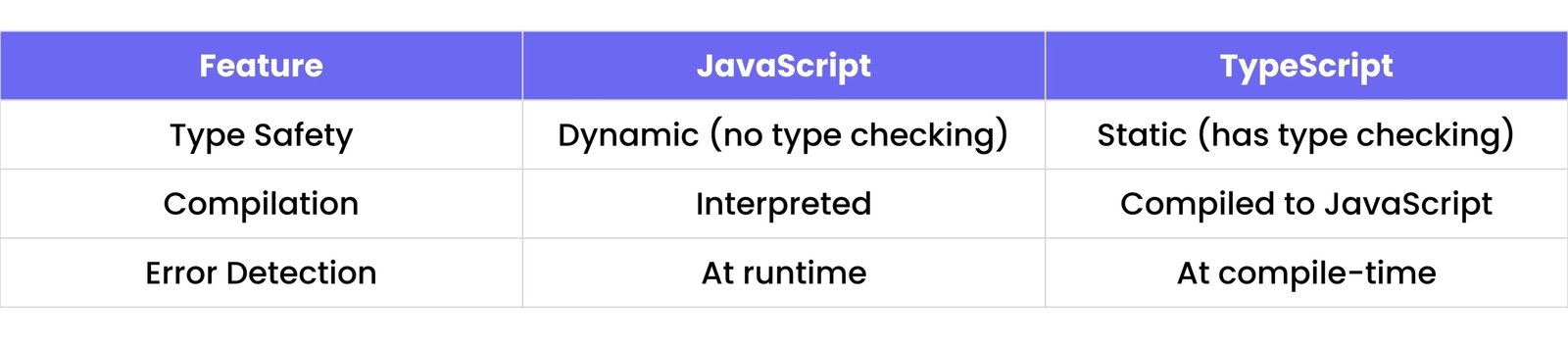
94. What is TypeScript and how is it different from JavaScript?
TypeScript is a superset of JavaScript developed by Microsoft.
let age: number = 25; // Type annotation for number
// age = "twenty five"; // This would cause a compile-time error in TypeScript
console.log(age);
95. What is debouncing?
Debouncing is a technique to limit how often a function runs. It ensures the function runs after a delay once the event stops firing.
Use case: Typing in a search box — wait until the user stops typing.
function debounce(fn, delay) {
    let timeout;
    return function(...args) {
        clearTimeout(timeout);
        timeout = setTimeout(() => fn.apply(this, args), delay);
    };
}

// Example usage:
// const handleSearch = debounce(() => console.log("Searching..."), 500);
// document.getElementById("searchInput").addEventListener("keyup", handleSearch);
96. What is throttling?
Throttling limits a function to run once in a specified interval, even if triggered repeatedly.
Use case: Listening to scroll or resize events.
function throttle(fn, interval) {
    let lastCall = 0;
    return function(...args) {
        const now = Date.now();
        if (now - lastCall > interval) {
            lastCall = now;
            fn.apply(this, args);
        }
    };
}

// Example usage:
// const handleScroll = throttle(() => console.log("Scrolling..."), 200);
// window.addEventListener("scroll", handleScroll);
97. What is memory leak?
A memory leak happens when memory is no longer needed but not released, causing the app to use more memory over time.
Common causes:
- Unused DOM references
- Global variables not cleared
- Forgotten timers or event listeners
98. How does garbage collection work in JavaScript?
JavaScript uses automatic garbage collection to free up memory that’s no longer used.
- It checks for unreachable objects (not referenced anywhere) and removes them.
- Uses algorithms like mark-and-sweep.
99. What is a higher-order function?
A higher-order function is a function that either:
- Takes another function as an argument, or
- Returns a function
Example (using map and a function that returns a function):
// map is a higher-order function because it takes a function as an argument
const numbers = [1, 2, 3];
const doubled = numbers.map(num => num * 2);
console.log(doubled);

// createGreeter is a higher-order function because it returns a function
function createGreeter(greeting) {
    return function(name) {
        console.log(`${greeting}, ${name}!`);
    };
}
const sayHello = createGreeter("Hello");
sayHello("Alice"); // Hello, Alice!
100. What is a generator function?
A generator function is a special function that can be paused and resumed using the yield keyword.
function* idGenerator() {
    let id = 1;
    while (true) {
        yield id++;
    }
}
const gen = idGenerator();
console.log(gen.next().value); // 1
console.log(gen.next().value); // 2
101. What are tagged template literals?
Tagged template literals are a way to customize the output of template literals using a tag function.
strings contains the literal strings.values contains the interpolated values.- Use cases: localization, sanitizing HTML, styling strings.
function highlight(strings, ...values) {
    let str = '';
    strings.forEach((s, i) => {
        str += s;
        if (values[i]) {
            str += `<strong>${values[i]}</strong>`;
        }
    });
    return str;
}
const name = "Alice";
const age = 30;
const message = highlight`Hello, my name is ${name} and I am ${age} years old.`;
console.log(message);
// Output: Hello, my name is <strong>Alice</strong> and I am <strong>30</strong> years old.
102. What is optional chaining (?.)?
Optional chaining allows you to safely access deeply nested properties without throwing errors if a reference is null or undefined.
const user = {
    address: {
        street: "123 Main St"
    }
};
console.log(user.address?.street);    // "123 Main St"
console.log(user.contact?.email);     // undefined (no error)
// console.log(user.contact.email); // Would throw an error without ?.
103. What is nullish coalescing (??)?
Nullish coalescing returns the right-hand value only if the left-hand value is null or undefined (not 0, false, or "").
Use ?? when you only want to replace null or undefined, not falsy values like 0 or false.
const value1 = null ?? "default"; // "default"
const value2 = undefined ?? "default"; // "default"
const value3 = 0 ?? "default";    // 0 (0 is not null/undefined)
const value4 = "" ?? "default";   // "" ("" is not null/undefined)
console.log(value1, value2, value3, value4);
104. What are private class fields?
Private class fields in JavaScript start with # and are only accessible within the class.
class Counter {
    #count = 0; // Private field

    increment() {
        this.#count++;
        console.log(this.#count);
    }
}
const counter = new Counter();
counter.increment(); // 1
// console.log(counter.#count); // SyntaxError: Private field '#count' must be declared in an enclosing class
105. What are dynamic imports?
Dynamic imports allow you to import JavaScript modules asynchronously using import().
Great for:
- Code splitting
- Lazy loading features
- Improving performance
// Suppose 'myModule.js' contains: export default () => console.log("Module loaded!");
async function loadModule() {
    const module = await import('./myModule.js');
    module.default(); // "Module loaded!"
}
loadModule();