1. Introduction to C++
1.1 What is C++?
C++ is a powerful, high-performance, general-purpose programming language developed by Bjarne Stroustrup as an extension of the C language. It supports object-oriented, procedural, and generic programming paradigms.
1.2 History & Features
- Created by: Bjarne Stroustrup
- Released: 1979 (as C with Classes), renamed to C++ in 1983
- Key Features:
- Object-Oriented (Classes, Objects, Inheritance, Polymorphism, Abstraction, Encapsulation)
- Platform Independent (compiled code is specific, but source is portable)
- Memory Management (manual control with pointers)
- Rich Standard Library (STL)
- High Performance (close to hardware)
- Compatibility with C
1.3 Applications of C++
C++ is widely used in:
- Game Development (Unreal Engine, Unity)
- Operating Systems (Windows, macOS, Linux kernels)
- High-Performance Computing
- Embedded Systems
- Databases (MySQL, MongoDB)
- Browsers (Chrome, Firefox)
- Graphics and CAD software
1.4 Basic Program Structure
A simple C++ program:
#include <iostream> // Include input/output stream library

int main() { // Main function: program execution starts here
    std::cout << "Hello, C++!" << std::endl; // Print to console
    return 0; // Indicate successful execution
}
#include <iostream>: Includes the header for input/output operations.int main(): The main function, the entry point of every C++ program.std::cout: Standard output stream (console).<<: Insertion operator, used to send data to the stream.std::endl: Inserts a new line character and flushes the output buffer.return 0;: Indicates that the program executed successfully.
2. BASIC SYNTAX
2.1 Variables
Variables are named storage locations for data. You must declare a variable's type before using it.
int age = 25;           // Integer
double price = 19.99;   // Floating-point number
char initial = 'J';     // Single character
bool isActive = true;   // Boolean (true/false)
std::string name = "Alice"; // String (requires #include <string>)
2.2 Data Types
C++ has fundamental (primitive) and derived data types.
- Fundamental Data Types:
int: Integers (e.g., 10, -5)float: Single-precision floating-point numbers (e.g., 3.14f)double: Double-precision floating-point numbers (e.g., 3.14159)char: Single characters (e.g., 'A', 'b')bool: Boolean values (true or false)void: Represents the absence of type (e.g., for functions that don't return a value)
- Derived Data Types: Arrays, Pointers, References, Structures, Unions, Classes.
2.3 Type Casting
Converting one data type to another.
- Implicit Conversion (Automatic): Done by the compiler when safe (e.g.,
int to double).
int num_int = 9;
double num_double = num_int; // Implicit: num_double is 9.0
Explicit Conversion (Manual): Requires a cast operator.
double pi = 3.14;
int rounded_pi = (int)pi; // C-style cast: rounded_pi is 3

// C++ style casts (preferred)
int static_cast_pi = static_cast<int>(pi); // static_cast: 3
2.4 Comments
Used to explain code; ignored by the compiler.
// This is a single-line comment

/* This is a
 * multi-line comment */
2.5 Input/Output (cin/cout)
To get input from the user, use std::cin. To print output, use std::cout.
#include <iostream>
#include <string> // For std::string

int main() {
    std::string name;
    int age;

    std::cout << "Enter your name: ";
    std::getline(std::cin, name); // Read a line of text including spaces

    std::cout << "Enter your age: ";
    std::cin >> age; // Read an integer

    std::cout << "Hello, " << name << "! You are " << age << " years old." << std::endl;

    return 0;
}
3. OPERATORS
Operators are symbols that perform operations on variables and values.
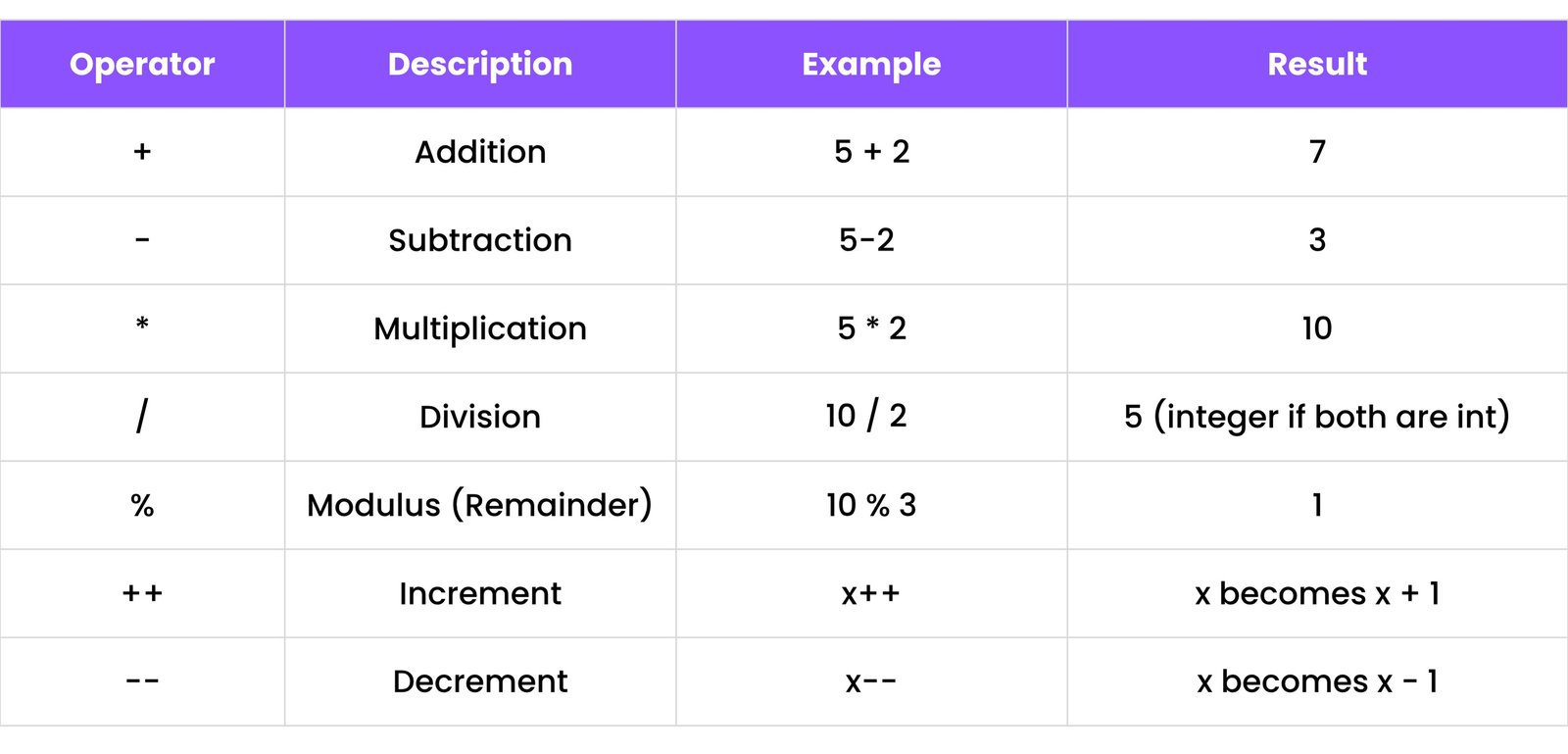
3.1 Arithmetic Operators
Used for mathematical calculations.
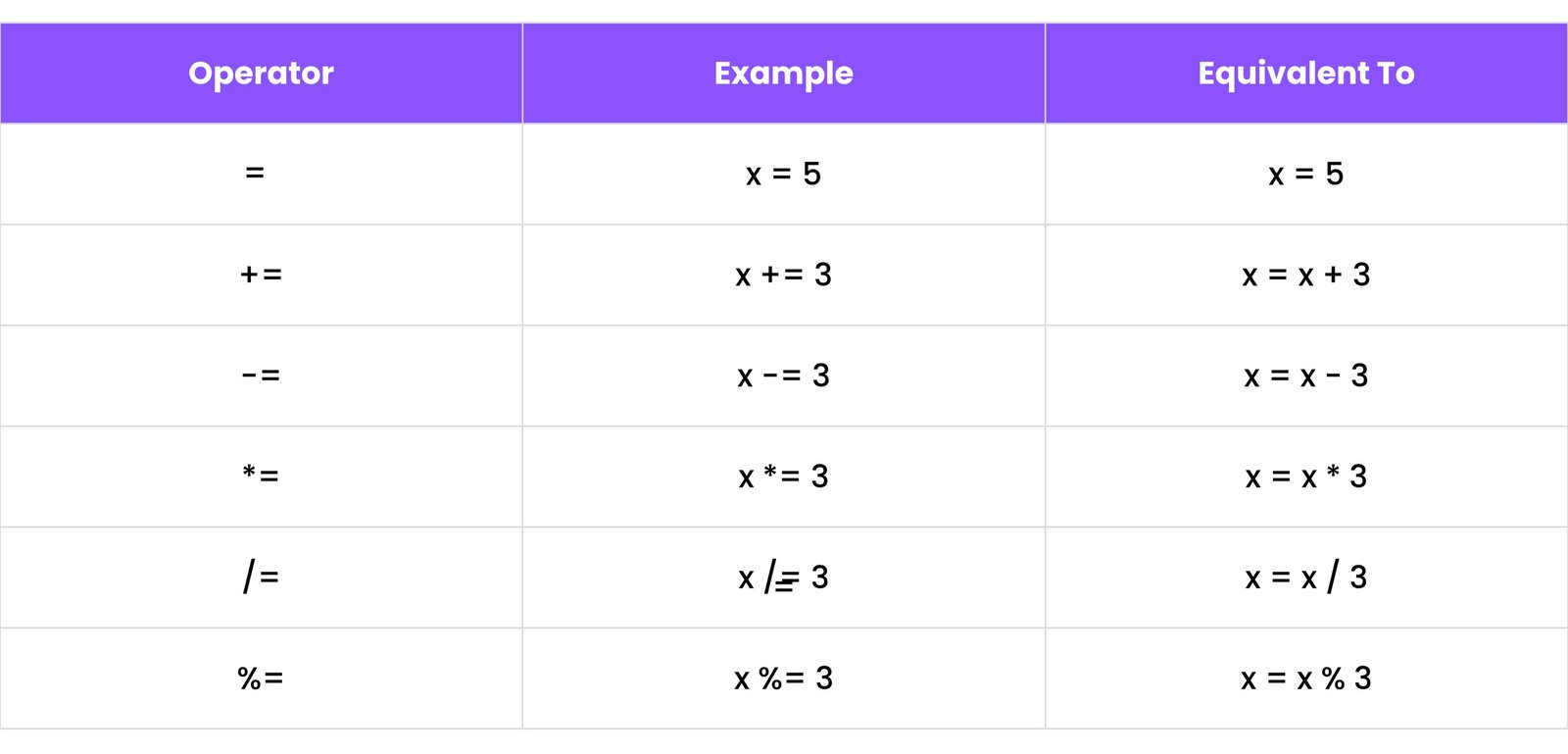
3.2 Assignment Operators
Used to assign values to variables.
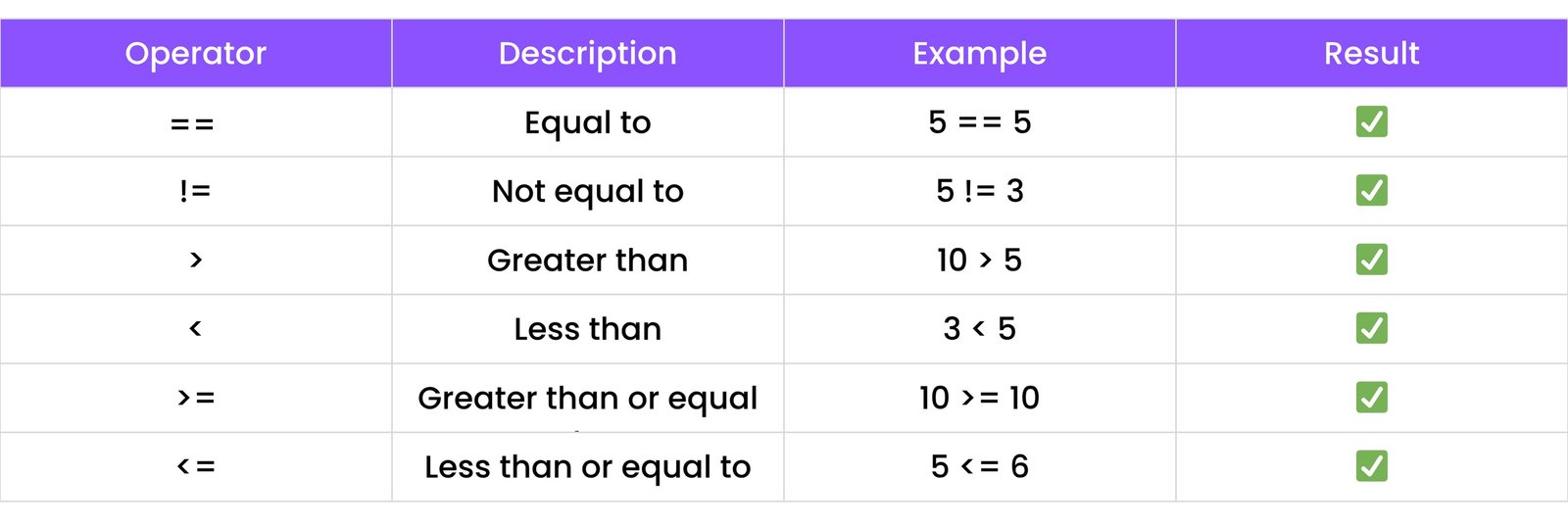
3.3 Comparison Operators
Used to compare two values, returning a boolean (true or false).
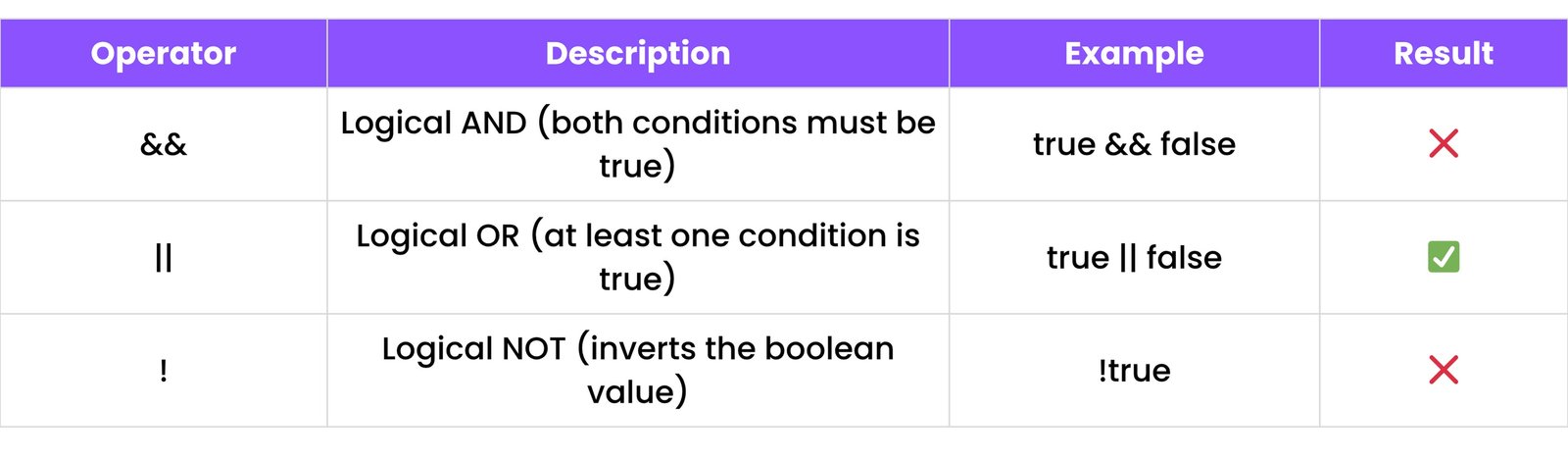
3.4 Logical Operators
Used to combine conditions.
3.5 Bitwise Operators
Used for operations on individual bits of numbers (e.g., &, |, ^, ~, <<, >>). More common in low-level programming.
3.6 Ternary Operator
A short way to write an if...else statement.
int a = 10;
int b = 5;
int max = (a > b) ? a : b; // max will be 10
It means: if a > b, then max = a, else max = b.
3.7 Operator Precedence
Some operations happen before others (e.g., multiplication before addition). Parentheses () can be used to override precedence.
int result = 5 + 2 * 3; // result will be 11 (2 * 3 is calculated first)
4. CONTROL FLOW
Control flow statements determine the order in which instructions are executed based on conditions.
4.1 if, else if, else
Used to execute different blocks of code based on conditions.
#include <iostream>

int main() {
    int age = 15;
    if (age < 13) {
        std::cout << "You are a child" << std::endl;
    } else if (age >= 13 && age < 18) {
        std::cout << "You are a teenager" << std::endl;
    } else {
        std::cout << "You are an adult" << std::endl;
    }
    return 0;
}
4.2 switch Statement
Checks a variable against multiple possible values.
#include <iostream>

int main() {
    int day = 3;
    switch (day) {
        case 1:
            std::cout << "Monday" << std::endl;
            break;
        case 2:
            std::cout << "Tuesday" << std::endl;
            break;
        case 3:
            std::cout << "Wednesday" << std::endl;
            break;
        default:
            std::cout << "Other day" << std::endl;
    }
    return 0;
}
5. LOOPS
Loops allow you to execute a block of code repeatedly.
5.1 for Loop
Executes a block of code a specific number of times.
#include <iostream>

int main() {
    for (int i = 0; i < 5; i++) {
        std::cout << i << std::endl; // Prints 0 to 4
    }
    return 0;
}
5.2 while Loop
Executes a block of code as long as a specified condition is true.
#include <iostream>

int main() {
    int i = 0;
    while (i < 3) {
        std::cout << i << std::endl;
        i++;
    }
    return 0;
}
5.3 do...while Loop
Similar to while, but guarantees the block of code executes at least once before checking the condition.
#include <iostream>

int main() {
    int i = 0;
    do {
        std::cout << i << std::endl;
        i++;
    } while (i < 3);
    return 0;
}
5.4 Loop Control (break, continue)
break: Terminates the loop entirely.continue: Skips the current iteration and proceeds to the next iteration of the loop.
#include <iostream>

int main() {
    for (int i = 1; i <= 5; i++) {
        if (i == 3) {
            continue; // Skips 3
        }
        if (i == 5) {
            break;    // Stops at 5
        }
        std::cout << i << std::endl;
    }
    // Output:
    // 1
    // 2
    // 4
    return 0;
}
5.5 Range-based for Loop (C++11 onwards)
A convenient way to iterate over elements of a range (like arrays or containers).
#include <iostream>
#include <vector> // For std::vector

int main() {
    std::vector<int> numbers = {10, 20, 30};
    for (int num : numbers) { // Iterates through each element
        std::cout << num << std::endl;
    }
    // Output:
    // 10
    // 20
    // 30
    return 0;
}
6. ARRAYS
Arrays are used to store multiple values of the same data type in a contiguous memory location.
6.1 Single-Dimensional Arrays
#include <iostream>
#include <string>

int main() {
    // Declaration and initialization
    int numbers[5] = {10, 20, 30, 40, 50};
    std::string names[] = {"Alice", "Bob", "Charlie"}; // Size inferred

    // Accessing elements (index starts from 0)
    std::cout << "First number: " << numbers[0] << std::endl; // Output: 10
    std::cout << "Second name: " << names[1] << std::endl;   // Output: Bob

    // Change an element
    numbers[0] = 100;
    std::cout << "Changed first number: " << numbers[0] << std::endl; // Output: 100

    // Iterating through an array
    std::cout << "All numbers: ";
    for (int i = 0; i < 5; i++) {
        std::cout << numbers[i] << " ";
    }
    std::cout << std::endl; // Output: All numbers: 100 20 30 40 50

    return 0;
}
6.2 Multi-Dimensional Arrays
Arrays of arrays, used to represent tables or matrices.
#include <iostream>

int main() {
    int matrix[2][3] = { // 2 rows, 3 columns
        {1, 2, 3},
        {4, 5, 6}
    };

    // Accessing elements: matrix[row_index][column_index]
    std::cout << "Element at [1][0]: " << matrix[1][0] << std::endl; // Output: 4

    // Iterating through a 2D array
    for (int i = 0; i < 2; i++) { // Rows
        for (int j = 0; j < 3; j++) { // Columns
            std::cout << matrix[i][j] << " ";
        }
        std::cout << std::endl;
    }
    // Output:
    // 1 2 3
    // 4 5 6
    return 0;
}
6.3 Dynamic Arrays (using new and delete)
Arrays whose size is determined at runtime. Memory is allocated on the heap.
#include <iostream>

int main() {
    int size;
    std::cout << "Enter array size: ";
    std::cin >> size;

    int* dynamicArray = new int[size]; // Allocate memory for 'size' integers

    for (int i = 0; i < size; i++) {
        dynamicArray[i] = i * 10;
    }

    std::cout << "Dynamic Array elements: ";
    for (int i = 0; i < size; i++) {
        std::cout << dynamicArray[i] << " ";
    }
    std::cout << std::endl;

    delete[] dynamicArray; // Deallocate memory when no longer needed
    dynamicArray = nullptr; // Good practice to set to nullptr
    return 0;
}
7. STRINGS
C++ has two main ways to handle strings: C-style strings (character arrays) and C++ std::string objects.
7.1 C-style Strings (char arrays)
Null-terminated character arrays. Less safe and harder to manage than std::string.
#include <iostream>
#include <cstring> // For strlen, strcpy, etc.

int main() {
    char greeting[20] = "Hello"; // C-style string
    std::cout << greeting << std::endl; // Output: Hello

    // Concatenation
    char name[] = " World";
    strcat(greeting, name); // Appends name to greeting
    std::cout << greeting << std::endl; // Output: Hello World

    // Length
    std::cout << "Length: " << strlen(greeting) << std::endl; // Output: 11

    return 0;
}
7.2 C++ Strings (std::string)
The preferred way to handle strings in modern C++. Part of the Standard Library, providing more functionality and safety.
#include <iostream>
#include <string> // Include for std::string

int main() {
    std::string s1 = "Hello";
    std::string s2 = "World";

    // Concatenation
    std::string fullString = s1 + " " + s2;
    std::cout << fullString << std::endl; // Output: Hello World

    // Length
    std::cout << "Length: " << fullString.length() << std::endl; // Output: 11

    // Accessing characters
    std::cout << "First char: " << fullString[0] << std::endl; // Output: H

    // Substring
    std::string sub = fullString.substr(6, 5); // Start index 6, length 5
    std::cout << "Substring: " << sub << std::endl; // Output: World

    // Comparison
    if (s1 == "Hello") {
        std::cout << "s1 is Hello" << std::endl; // Output: s1 is Hello
    }

    return 0;
}
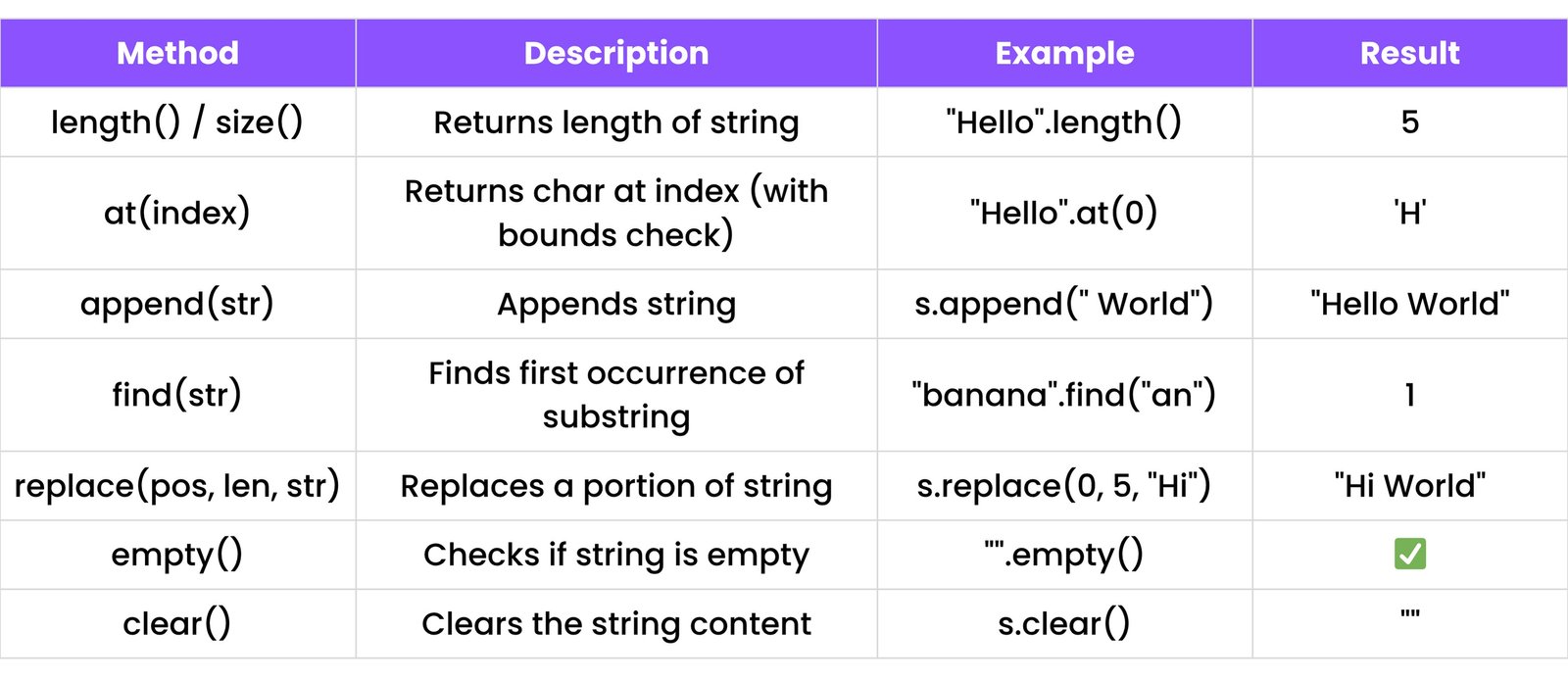
7.3 String Methods (std::string)
8. FUNCTIONS
Functions are blocks of code that perform a specific task. They promote modularity and code reusability.
8.1 Defining and Calling Functions
#include <iostream>

// Function declaration (prototype)
void sayHello();
void greet(std::string name);
int add(int a, int b);

int main() {
    sayHello(); // Calling the function
    greet("Alice"); // Calling with an argument
    int sum = add(5, 3); // Calling and storing the returned value
    std::cout << "Sum: " << sum << std::endl; // Output: Sum: 8
    return 0;
}

// Function definition
void sayHello() {
    std::cout << "Hello!" << std::endl;
}

void greet(std::string name) {
    std::cout << "Hi, " << name << std::endl;
}

int add(int a, int b) {
    return a + b;
}
8.2 Function Overloading
Allows multiple functions to have the same name but different parameters (number, type, or order of parameters).
#include <iostream>

// Function to add two integers
int add(int a, int b) {
    return a + b;
}

// Function to add two doubles (overloaded)
double add(double a, double b) {
    return a + b;
}

// Function to add three integers (overloaded)
int add(int a, int b, int c) {
    return a + b + c;
}

int main() {
    std::cout << "Sum (int): " << add(2, 3) << std::endl;       // Calls int add(int, int)
    std::cout << "Sum (double): " << add(2.5, 3.5) << std::endl; // Calls double add(double, double)
    std::cout << "Sum (3 ints): " << add(1, 2, 3) << std::endl; // Calls int add(int, int, int)
    return 0;
}
8.3 Recursion
A function that calls itself. Requires a base case to prevent infinite recursion.
#include <iostream>

// Factorial function using recursion
int factorial(int n) {
    if (n == 0 || n == 1) { // Base case
        return 1;
    } else {
        return n * factorial(n - 1); // Recursive call
    }
}

int main() {
    std::cout << "Factorial of 5: " << factorial(5) << std::endl; // Output: 120
    return 0;
}
8.4 Pass by Value vs. Pass by Reference
- Pass by Value: A copy of the argument is passed to the function. Changes inside the function do not affect the original variable.
#include <iostream>

void incrementByValue(int num) {
    num++; // Increments the copy
    std::cout << "Inside function (by value): " << num << std::endl;
}

int main() {
    int x = 10;
    incrementByValue(x);
    std::cout << "Outside function (original x): " << x << std::endl; // x is still 10
    return 0;
}
Pass by Reference: The memory address of the argument is passed. Changes inside the function directly affect the original variable.
#include <iostream>

void incrementByReference(int &num) { // & indicates reference
    num++; // Increments the original variable
    std::cout << "Inside function (by reference): " << num << std::endl;
}

int main() {
    int y = 10;
    incrementByReference(y);
    std::cout << "Outside function (original y): " << y << std::endl; // y is now 11
    return 0;
}
9. OBJECT-ORIENTED PROGRAMMING (OOP)
C++ is a multi-paradigm language, with strong support for Object-Oriented Programming (OOP). OOP helps organize code using objects, which are instances of classes.
9.1 Classes and Objects
A class is a blueprint for creating objects. An object is an instance of a class.
#include <iostream>
#include <string>

class Car { // Class definition
public: // Access specifier: members are accessible from outside the class
    std::string color; // Attribute (member variable)
    int year;

    void start() { // Method (member function)
        std::cout << "The " << color << " car is starting." << std::endl;
    }
};

int main() {
    Car myCar; // Create an object (instance) of Car
    myCar.color = "Red"; // Access and set attributes
    myCar.year = 2020;

    std::cout << "My car is " << myCar.color << " and made in " << myCar.year << "." << std::endl;
    myCar.start(); // Call a method

    Car anotherCar;
    anotherCar.color = "Blue";
    anotherCar.start();

    return 0;
}
9.2 Constructors
A special member function that is automatically called when an object is created. Used to initialize object attributes.
#include <iostream>
#include <string>

class Dog {
public:
    std::string name;
    int age;

    // Default Constructor (no parameters)
    Dog() {
        name = "Unknown";
        age = 0;
        std::cout << "Default Dog created." << std::endl;
    }

    // Parameterized Constructor
    Dog(std::string n, int a) {
        name = n;
        age = a;
        std::cout << name << " (age " << age << ") created." << std::endl;
    }

    void bark() {
        std::cout << name << " barks!" << std::endl;
    }
};

int main() {
    Dog dog1; // Calls default constructor
    dog1.bark(); // Output: Unknown barks!

    Dog dog2("Buddy", 3); // Calls parameterized constructor
    dog2.bark(); // Output: Buddy barks!

    return 0;
}
9.3 Destructors
A special member function that is automatically called when an object is destroyed (goes out of scope or is explicitly deleted). Used to release resources (e.g., dynamically allocated memory).
#include <iostream>

class MyResource {
public:
    MyResource() {
        std::cout << "Resource acquired." << std::endl;
    }

    ~MyResource() { // Destructor (starts with ~)
        std::cout << "Resource released." << std::endl;
    }
};

int main() {
    MyResource r1; // Resource acquired. (when r1 is created)
    {
        MyResource r2; // Resource acquired. (when r2 is created)
    } // Resource released. (when r2 goes out of scope)
    return 0;
} // Resource released. (when r1 goes out of scope)
9.4 Encapsulation
Bundling data (attributes) and methods that operate on the data within a single unit (class). It involves restricting direct access to some of an object's components (data hiding) and providing controlled access via public methods (getters/setters).
#include <iostream>
#include <string>

class Student {
private: // Private members are only accessible from within the class
    std::string name;
    int age;

public: // Public members are accessible from outside
    // Setter for name
    void setName(std::string n) {
        name = n;
    }

    // Getter for name
    std::string getName() {
        return name;
    }

    // Setter for age with validation
    void setAge(int a) {
        if (a > 0) {
            this->age = a;
        } else {
            std::cout << "Age cannot be negative!" << std::endl;
        }
    }

    // Getter for age
    int getAge() {
        return age;
    }
};

int main() {
    Student s;
    s.setName("Bob");
    s.setAge(20);
    std::cout << "Student: " << s.getName() << ", Age: " << s.getAge() << std::endl; // Output: Student: Bob, Age: 20

    s.setAge(-5); // Output: Age cannot be negative!
    return 0;
}
9.5 Inheritance
Allows a new class (derived/child class) to inherit properties and behaviors from an existing class (base/parent class). Promotes code reusability.
#include <iostream>
#include <string>

// Base class
class Animal {
public:
    std::string species;

    Animal(std::string s) : species(s) {} // Constructor

    void eat() {
        std::cout << species << " is eating." << std::endl;
    }
};

// Derived class
class Dog : public Animal { // Dog inherits publicly from Animal
public:
    std::string breed;

    Dog(std::string b) : Animal("Canine"), breed(b) {} // Call base class constructor

    void bark() {
        std::cout << breed << " barks!" << std::endl;
    }
};

int main() {
    Dog myDog("Golden Retriever");
    myDog.eat();  // Inherited method
    myDog.bark(); // Dog's own method
    // Output:
    // Canine is eating.
    // Golden Retriever barks!
    return 0;
}
9.6 Polymorphism (Virtual Functions)
The ability of an object to take on many forms. In C++, it's primarily achieved through virtual functions and pointers/references to base classes.
#include <iostream>
#include <string>

class Animal {
public:
    virtual void makeSound() { // virtual keyword enables runtime polymorphism
        std::cout << "Animal makes a sound." << std::endl;
    }
};

class Dog : public Animal {
public:
    void makeSound() override { // override keyword (C++11)
        std::cout << "Dog barks!" << std::endl;
    }
};

class Cat : public Animal {
public:
    void makeSound() override {
        std::cout << "Cat meows!" << std::endl;
    }
};

int main() {
    Animal* myAnimal1 = new Dog(); // Base class pointer pointing to derived object
    Animal* myAnimal2 = new Cat();

    myAnimal1->makeSound(); // Output: Dog barks! (Runtime polymorphism)
    myAnimal2->makeSound(); // Output: Cat meows!

    delete myAnimal1;
    delete myAnimal2;
    return 0;
}
9.7 Abstraction (Abstract Classes and Pure Virtual Functions)
Hiding complex implementation details and showing only essential features. Achieved using abstract classes (classes with at least one pure virtual function).
#include <iostream>

class Shape { // Abstract class
public:
    // Pure virtual function (makes Shape abstract)
    virtual double getArea() = 0;

    void display() {
        std::cout << "This is a shape." << std::endl;
    }
};

class Circle : public Shape {
private:
    double radius;
public:
    Circle(double r) : radius(r) {}
    double getArea() override { // Must implement pure virtual function
        return 3.14159 * radius * radius;
    }
};

int main() {
    // Shape s; // Error: Cannot create object of abstract class
    Circle c(5.0);
    std::cout << "Area of Circle: " << c.getArea() << std::endl; // Output: Area of Circle: 78.53975
    c.display(); // Output: This is a shape.
    return 0;
}
10. POINTERS
Pointers are variables that store memory addresses of other variables. They are fundamental to C++ for direct memory manipulation and dynamic memory allocation.
10.1 Pointer Declaration and Initialization
#include <iostream>

int main() {
    int var = 10;      // Declare an integer variable
    int* ptr = &var;   // Declare a pointer 'ptr' and store the address of 'var'

    std::cout << "Value of var: " << var << std::endl;      // Output: 10
    std::cout << "Address of var: " << &var << std::endl;    // Output: (memory address)
    std::cout << "Value of ptr (address): " << ptr << std::endl; // Output: (same memory address)
    std::cout << "Value at address ptr points to (*ptr): " << *ptr << std::endl; // Output: 10 (dereferencing)

    *ptr = 20; // Change value of var through pointer
    std::cout << "New value of var: " << var << std::endl; // Output: 20

    int* nullPtr = nullptr; // C++11 way to declare a null pointer
    // int* oldNullPtr = NULL; // C-style null pointer
    return 0;
}
10.2 Pointers and Arrays
Array names can often be treated as pointers to their first element.
#include <iostream>

int main() {
    int arr[] = {10, 20, 30};
    int* p = arr; // p points to arr[0]

    std::cout << "arr[0] using pointer: " << *p << std::endl;       // Output: 10
    std::cout << "arr[1] using pointer arithmetic: " << *(p + 1) << std::endl; // Output: 20

    // Iterate using pointer
    for (int i = 0; i < 3; i++) {
        std::cout << *(arr + i) << " ";
    }
    std::cout << std::endl; // Output: 10 20 30

    return 0;
}
10.3 Dynamic Memory Allocation (new and delete)
Allocate memory on the heap at runtime.
#include <iostream>

int main() {
    // Allocate memory for a single integer
    int* singleInt = new int;
    *singleInt = 100;
    std::cout << "Dynamically allocated int: " << *singleInt << std::endl;
    delete singleInt; // Release memory
    singleInt = nullptr; // Prevent dangling pointer

    // Allocate memory for an array of integers
    int* dynamicArray = new int[5];
    for (int i = 0; i < 5; i++) {
        dynamicArray[i] = (i + 1) * 10;
    }
    std::cout << "Dynamically allocated array: ";
    for (int i = 0; i < 5; i++) {
        std::cout << dynamicArray[i] << " ";
    }
    std::cout << std::endl;
    delete[] dynamicArray; // Release array memory
    dynamicArray = nullptr;

    return 0;
}
10.4 Pointers to Objects
Pointers can point to objects, allowing dynamic creation and manipulation of objects.
#include <iostream>
#include <string>

class Person {
public:
    std::string name;
    Person(std::string n) : name(n) {}
    void introduce() {
        std::cout << "Hi, I'm " << name << std::endl;
    }
};

int main() {
    Person* p1 = new Person("Alice"); // Create object dynamically
    p1->introduce(); // Access members using -> operator (arrow operator)
    // Equivalent to (*p1).introduce();

    delete p1; // Release memory
    p1 = nullptr;
    return 0;
}
11. FILE HANDLING
C++ uses streams for file input/output operations. The <fstream> header provides classes for file handling.
11.1 Writing to a File
Use ofstream to write data to a file.
#include <fstream> // For file stream operations
#include <iostream>
#include <string>

int main() {
    std::ofstream outFile("example.txt"); // Create or open file for writing

    if (outFile.is_open()) { // Check if file was opened successfully
        outFile << "Hello from C++!" << std::endl;
        outFile << "This is a new line." << std::endl;
        outFile.close(); // Close the file
        std::cout << "Data written to example.txt" << std::endl;
    } else {
        std::cout << "Unable to open file for writing." << std::endl;
    }
    return 0;
}
11.2 Reading from a File
Use ifstream to read data from a file.
#include <fstream> // For file stream operations
#include <iostream>
#include <string>

int main() {
    std::ifstream inFile("example.txt"); // Open file for reading
    std::string line;

    if (inFile.is_open()) {
        while (std::getline(inFile, line)) { // Read line by line
            std::cout << line << std::endl;
        }
        inFile.close(); // Close the file
    } else {
        std::cout << "Unable to open file for reading." << std::endl;
    }
    return 0;
}
11.3 Appending to a File
Use ofstream with std::ios::app mode to append data.
#include <fstream>
#include <iostream>

int main() {
    std::ofstream outFile("example.txt", std::ios::app); // Open in append mode

    if (outFile.is_open()) {
        outFile << "This line is appended." << std::endl;
        outFile.close();
        std::cout << "Data appended to example.txt" << std::endl;
    } else {
        std::cout << "Unable to open file for appending." << std::endl;
    }
    return 0;
}
12. EXCEPTION HANDLING
C++ uses try, throw, and catch keywords to handle runtime errors (exceptions) gracefully, preventing program crashes.
12.1 try, throw, catch
try: A block of code where exceptions might occur.throw: Used to throw an exception when an error condition is detected.catch: A block of code that handles the exception thrown by the try block.
#include <iostream>
#include <string>

double divide(double numerator, double denominator) {
    if (denominator == 0) {
        throw std::string("Division by zero error!"); // Throw a string as an exception
    }
    return numerator / denominator;
}

int main() {
    try {
        double result1 = divide(10, 2);
        std::cout << "10 / 2 = " << result1 << std::endl; // Output: 5

        double result2 = divide(10, 0); // This will throw an exception
        std::cout << "This line will not be executed." << std::endl;
    }
    catch (std::string& msg) { // Catch the string exception
        std::cout << "Caught exception: " << msg << std::endl; // Output: Caught exception: Division by zero error!
    }
    catch (...) { // Catch-all block for any other exception type
        std::cout << "Caught an unknown exception." << std::endl;
    }

    std::cout << "Program continues after exception handling." << std::endl;
    return 0;
}
12.2 Standard Exceptions
C++ Standard Library provides a hierarchy of exception classes (in <exception> and other headers like <stdexcept>).
std::exception: Base class for all standard exceptions.std::runtime_error: For errors detectable only at runtime (e.g., std::overflow_error).std::logic_error: For errors in the internal logic of the program (e.g., std::invalid_argument, std::out_of_range).std::bad_alloc: Thrown by new when memory allocation fails.
#include <iostream>
#include <stdexcept> // For standard exceptions

int main() {
    try {
        int* myarray = new int[1000000000000ULL]; // Attempt to allocate huge memory
    }
    catch (const std::bad_alloc& e) { // Catch specific exception
        std::cout << "Memory allocation failed: " << e.what() << std::endl;
    }
    catch (const std::exception& e) { // Catch any other standard exception
        std::cout << "Caught a standard exception: " << e.what() << std::endl;
    }
    return 0;
}
13. STANDARD TEMPLATE LIBRARY (STL)
The STL is a powerful set of C++ template classes and functions that provide common data structures and algorithms. It's highly efficient and reusable.
13.1 Containers
Objects that store data. Common containers:
std::vector: Dynamic array. Resizable, fast random access.
#include <iostream>
#include <vector>

int main() {
    std::vector<int> nums = {10, 20, 30};
    nums.push_back(40); // Add element to end
    std::cout << "Size: " << nums.size() << std::endl; // Output: Size: 4
    std::cout << "First element: " << nums[0] << std::endl; // Output: 10
    nums.pop_back(); // Remove last element (40)

    for (int n : nums) { // Range-based for loop
        std::cout << n << " ";
    }
    std::cout << std::endl; // Output: 10 20 30
    return 0;
}
std::list: Doubly linked list. Efficient insertions/deletions anywhere, but no random access.
#include <iostream>
#include <list>

int main() {
    std::list<int> myList = {1, 2, 3};
    myList.push_front(0); // Add to front
    myList.push_back(4);  // Add to back

    for (int n : myList) {
        std::cout << n << " ";
    }
    std::cout << std::endl; // Output: 0 1 2 3 4
    return 0;
}
std::map: Associative array (key-value pairs). Keys are unique and sorted.
#include <iostream>
#include <map>
#include <string>

int main() {
    std::map<std::string, int> ages;
    ages["Alice"] = 30;
    ages["Bob"] = 25;
    ages["Charlie"] = 35;

    std::cout << "Alice's age: " << ages["Alice"] << std::endl; // Output: 30

    for (const auto& pair : ages) { // Iterate through map
        std::cout << pair.first << ": " << pair.second << std::endl;
    }
    // Output (sorted by key):
    // Alice: 30
    // Bob: 25
    // Charlie: 35
    return 0;
}
std::set: Stores unique elements in sorted order.
#include <iostream>
#include <set>

int main() {
    std::set<int> uniqueNums = {5, 2, 8, 2, 5};
    uniqueNums.insert(10);

    for (int n : uniqueNums) {
        std::cout << n << " ";
    }
    std::cout << std::endl; // Output: 2 5 8 10
    return 0;
}
13.2 Iterators
Objects that act like pointers, allowing traversal through elements of containers.
#include <iostream>
#include <vector>

int main() {
    std::vector<int> nums = {10, 20, 30};
    std::vector<int>::iterator it; // Declare an iterator

    for (it = nums.begin(); it != nums.end(); ++it) {
        std::cout << *it << " "; // Dereference iterator to get value
    }
    std::cout << std::endl; // Output: 10 20 30
    return 0;
}
13.3 Algorithms
Functions that perform operations on ranges of elements (e.g., sorting, searching, transforming). Work with iterators.
#include <iostream>
#include <vector>
#include <algorithm> // For sort, find, etc.
#include <numeric>   // For accumulate

int main() {
    std::vector<int> nums = {5, 2, 8, 1, 9};

    // Sort
    std::sort(nums.begin(), nums.end());
    std::cout << "Sorted: ";
    for (int n : nums) std::cout << n << " "; // Output: 1 2 5 8 9
    std::cout << std::endl;

    // Find
    auto it = std::find(nums.begin(), nums.end(), 8);
    if (it != nums.end()) {
        std::cout << "Found 8 at index: " << std::distance(nums.begin(), it) << std::endl; // Output: 3
    }

    // Sum (accumulate)
    int sum = std::accumulate(nums.begin(), nums.end(), 0);
    std::cout << "Sum: " << sum << std::endl; // Output: 25

    return 0;
}
14. MEMORY MANAGEMENT
C++ offers explicit control over memory management, allowing allocation and deallocation on the stack and heap.
14.1 Stack vs. Heap Memory
- Stack: Memory allocated for local variables and function calls. Automatically managed (allocated when function enters, deallocated when it exits). Fast access.
void myFunction() {
    int x = 10; // 'x' is on the stack
    // ...
} // 'x' is automatically deallocated here
Heap (Free Store): Memory allocated dynamically at runtime using new and delete. Must be manually managed (allocated with new, deallocated with delete). Slower access, but allows for flexible memory sizes and lifetimes.
int* ptr = new int; // 'ptr' points to memory on the heap
// ...
delete ptr; // Must be manually deallocated
14.2 Smart Pointers (C++11 onwards)
Modern C++ uses smart pointers (std::unique_ptr, std::shared_ptr, std::weak_ptr) to automate memory management and prevent memory leaks.
std::unique_ptr: Exclusive ownership. When the unique_ptr goes out of scope, the managed memory is automatically deleted.
#include <iostream>
#include <memory> // For unique_ptr

int main() {
    std::unique_ptr<int> ptr1(new int(100)); // Create unique_ptr
    std::cout << *ptr1 << std::endl; // Output: 100

    // std::unique_ptr<int> ptr2 = ptr1; // Error: unique_ptr cannot be copied
    std::unique_ptr<int> ptr2 = std::move(ptr1); // Ownership transferred
    std::cout << *ptr2 << std::endl; // Output: 100
    // ptr1 is now nullptr

    // Memory is automatically deleted when ptr2 goes out of scope
    return 0;
}
std::shared_ptr: Shared ownership. Memory is deleted when the last shared_ptr pointing to it is destroyed.
#include <iostream>
#include <memory> // For shared_ptr

int main() {
    std::shared_ptr<int> ptr1(new int(200));
    std::cout << "Count (ptr1): " << ptr1.use_count() << std::endl; // Output: 1

    std::shared_ptr<int> ptr2 = ptr1; // Shared ownership
    std::cout << "Count (ptr1, ptr2): " << ptr1.use_count() << std::endl; // Output: 2

    {
        std::shared_ptr<int> ptr3 = ptr1;
        std::cout << "Count (inside block): " << ptr1.use_count() << std::endl; // Output: 3
    } // ptr3 goes out of scope, count becomes 2

    std::cout << "Count (after block): " << ptr1.use_count() << std::endl; // Output: 2

    // Memory is deleted when ptr1 and ptr2 go out of scope
    return 0;
}
15. ADVANCED TOPICS
15.1 Templates
Allow functions and classes to operate with generic types, providing a way to write flexible and reusable code without sacrificing type safety.
#include <iostream>
#include <string>

// Function Template: Can work with any data type
template <typename T>
T add(T a, T b) {
    return a + b;
}

// Class Template: Can create classes for any data type
template <typename T>
class Pair {
public:
    T first;
    T second;
    Pair(T f, T s) : first(f), second(s) {}
    void display() {
        std::cout << "Pair: (" << first << ", " << second << ")" << std::endl;
    }
};

int main() {
    std::cout << "Sum (int): " << add(5, 10) << std::endl;       // T becomes int
    std::cout << "Sum (double): " << add(5.5, 10.5) << std::endl; // T becomes double
    std::cout << "Sum (string): " << add(std::string("Hello"), std::string(" World")) << std::endl; // T becomes string

    Pair<int> intPair(1, 2);
    intPair.display(); // Output: Pair: (1, 2)

    Pair<std::string> stringPair("First", "Second");
    stringPair.display(); // Output: Pair: (First, Second)

    return 0;
}
15.2 Lambda Functions (C++11 onwards)
Anonymous functions (functions without a name) that can be defined inline. Useful for short, one-time use functions, especially with STL algorithms.
#include <iostream>
#include <vector>
#include <algorithm> // For std::for_each

int main() {
    std::vector<int> numbers = {1, 2, 3, 4, 5};

    // Lambda to print each element
    std::for_each(numbers.begin(), numbers.end(), [](int n) {
        std::cout << n << " ";
    });
    std::cout << std::endl; // Output: 1 2 3 4 5

    // Lambda to find sum of even numbers
    int sum_even = 0;
    std::for_each(numbers.begin(), numbers.end(), [&sum_even](int n) { // [&sum_even] captures sum_even by reference
        if (n % 2 == 0) {
            sum_even += n;
        }
    });
    std::cout << "Sum of even numbers: " << sum_even << std::endl; // Output: 6

    // Lambda as a return value
    auto multiplier = [](int factor) {
        return [factor](int x) { return x * factor; };
    };

    auto double_num = multiplier(2);
    std::cout << "Double 5: " << double_num(5) << std::endl; // Output: 10

    return 0;
}
15.3 Smart Pointers (Revisited)
While covered in Memory Management, their role in modern C++ is crucial for writing exception-safe and leak-free code. Always prefer smart pointers over raw pointers for heap-allocated objects.
15.4 Concurrency (Threads)
C++11 introduced standard library support for multithreading (<thread>, <mutex>, <future>), allowing programs to perform multiple tasks concurrently.
#include <iostream>
#include <thread> // For std::thread
#include <chrono> // For std::chrono::seconds

void task1() {
    for (int i = 0; i < 5; ++i) {
        std::cout << "Task1: " << i << std::endl;
        std::this_thread::sleep_for(std::chrono::milliseconds(100));
    }
}

void task2() {
    for (int i = 0; i < 5; ++i) {
        std::cout << "Task2: " << i << std::endl;
        std::this_thread::sleep_for(std::chrono::milliseconds(150));
    }
}

int main() {
    std::thread t1(task1); // Create thread t1
    std::thread t2(task2); // Create thread t2

    t1.join(); // Wait for t1 to finish
    t2.join(); // Wait for t2 to finish

    std::cout << "All tasks completed." << std::endl;
    return 0;
}
16. MINI PROJECTS (PRACTICE MAKES PERFECT!)
Building small projects is a great way to practice C++ and improve your skills. Here are some ideas:
16.1 Simple Calculator (Console-based)
Take two numbers and an operator (+, -, *, /) from the user and perform the calculation. Handle division by zero.
#include <iostream>

int main() {
    double num1, num2;
    char op;

    std::cout << "Enter first number: ";
    std::cin >> num1;
    std::cout << "Enter operator (+, -, *, /): ";
    std::cin >> op;
    std::cout << "Enter second number: ";
    std::cin >> num2;

    double result;
    switch (op) {
        case '+': result = num1 + num2; break;
        case '-': result = num1 - num2; break;
        case '*': result = num1 * num2; break;
        case '/':
            if (num2 != 0) result = num1 / num2;
            else { std::cout << "Error: Division by zero!" << std::endl; return 1; }
            break;
        default: std::cout << "Invalid operator!" << std::endl; return 1;
    }
    std::cout << "Result: " << result << std::endl;
    return 0;
}
16.2 Basic To-Do List (Console/File-based)
Allow users to add, view, and delete tasks. Store tasks in a text file for persistence.
#include <iostream>
#include <vector>
#include <string>
#include <fstream>
#include <limits> // Required for numeric_limits

void loadTasks(std::vector<std::string>& tasks, const std::string& filename) {
    std::ifstream inFile(filename);
    std::string line;
    if (inFile.is_open()) {
        while (std::getline(inFile, line)) {
            tasks.push_back(line);
        }
        inFile.close();
    }
}

void saveTasks(const std::vector<std::string>& tasks, const std::string& filename) {
    std::ofstream outFile(filename);
    if (outFile.is_open()) {
        for (const std::string& task : tasks) {
            outFile << task << std::endl;
        }
        outFile.close();
    }
}

void viewTasks(const std::vector<std::string>& tasks) {
    if (tasks.empty()) {
        std::cout << "No tasks in the list." << std::endl;
        return;
    }
    std::cout << "\n--- Your Tasks ---" << std::endl;
    for (size_t i = 0; i < tasks.size(); ++i) {
        std::cout << (i + 1) << ". " << tasks[i] << std::endl;
    }
}

void addTask(std::vector<std::string>& tasks) {
    std::string task;
    std::cout << "Enter task to add: ";
    std::cin.ignore(std::numeric_limits<std::streamsize>::max(), '\n'); // Clear buffer
    std::getline(std::cin, task);
    tasks.push_back(task);
    std::cout << "Task added: \"" << task << "\"" << std::endl;
}

void deleteTask(std::vector<std::string>& tasks) {
    viewTasks(tasks);
    if (tasks.empty()) return;

    int taskNum;
    std::cout << "Enter the number of the task to delete: ";
    std::cin >> taskNum;

    if (std::cin.fail() || taskNum <= 0 || taskNum > tasks.size()) {
        std::cout << "Invalid task number." << std::endl;
        std::cin.clear(); // Clear error flag
        std::cin.ignore(std::numeric_limits<std::streamsize>::max(), '\n'); // Discard invalid input
        return;
    }

    std::string removedTask = tasks[taskNum - 1];
    tasks.erase(tasks.begin() + (taskNum - 1));
    std::cout << "Task deleted: \"" << removedTask << "\"" << std::endl;
}

int main() {
    std::vector<std::string> todos;
    const std::string filename = "todos.txt";
    loadTasks(todos, filename);

    int choice;
    do {
        std::cout << "\n--- To-Do List Menu ---" << std::endl;
        std::cout << "1. Add Task" << std::endl;
        std::cout << "2. View Tasks" << std::endl;
        std::cout << "3. Delete Task" << std::endl;
        std::cout << "4. Exit" << std::endl;
        std::cout << "Enter your choice: ";
        std::cin >> choice;

        switch (choice) {
            case 1: addTask(todos); break;
            case 2: viewTasks(todos); break;
            case 3: deleteTask(todos); break;
            case 4: saveTasks(todos, filename); std::cout << "Exiting To-Do List. Goodbye!" << std::endl; break;
            default: std::cout << "Invalid choice. Please try again." << std::endl;
        }
    } while (choice != 4);

    return 0;
}
16.3 Simple Game (e.g., Guess the Number)
Generate a random number and let the user guess it. Provide hints (higher/lower).
#include <iostream>
#include <cstdlib> // For rand(), srand()
#include <ctime>   // For time()

int main() {
    srand(time(0)); // Seed the random number generator
    int secretNumber = rand() % 100 + 1; // Random number between 1 and 100
    int guess;
    int attempts = 0;

    std::cout << "Guess the number between 1 and 100!" << std::endl;

    do {
        std::cout << "Enter your guess: ";
        std::cin >> guess;
        attempts++;

        if (guess > secretNumber) {
            std::cout << "Too high! Try again." << std::endl;
        } else if (guess < secretNumber) {
            std::cout << "Too low! Try again." << std::endl;
        } else {
            std::cout << "Congratulations! You guessed the number in " << attempts << " attempts." << std::endl;
        }
    } while (guess != secretNumber);

    return 0;
}