1. GETTING STARTED WITH CHATGPT
This section helps you understand what ChatGPT is, which version to use, how to access it, and how tokens (words) are counted.
1.1 Difference between GPT-3.5, GPT-4, and GPT-4o (For Developers)
GPT-3.5
- GPT-3.5 is a smart model, but not the smartest.
- It is fast and free.
- Good for simple coding help, basic answers, and short tasks.
GPT-4
- GPT-4 is smarter than GPT-3.5.
- It understands longer questions and gives better answers.
- It is only available in the ChatGPT Plus (paid) plan.
GPT-4o ("o" stands for Omni)
- GPT-4o is the newest and smartest version.
- It is faster than GPT-4 and can understand text, images, and voice.
- It gives the best answers and is great for developers.
- Available in ChatGPT Plus, and also in the API.
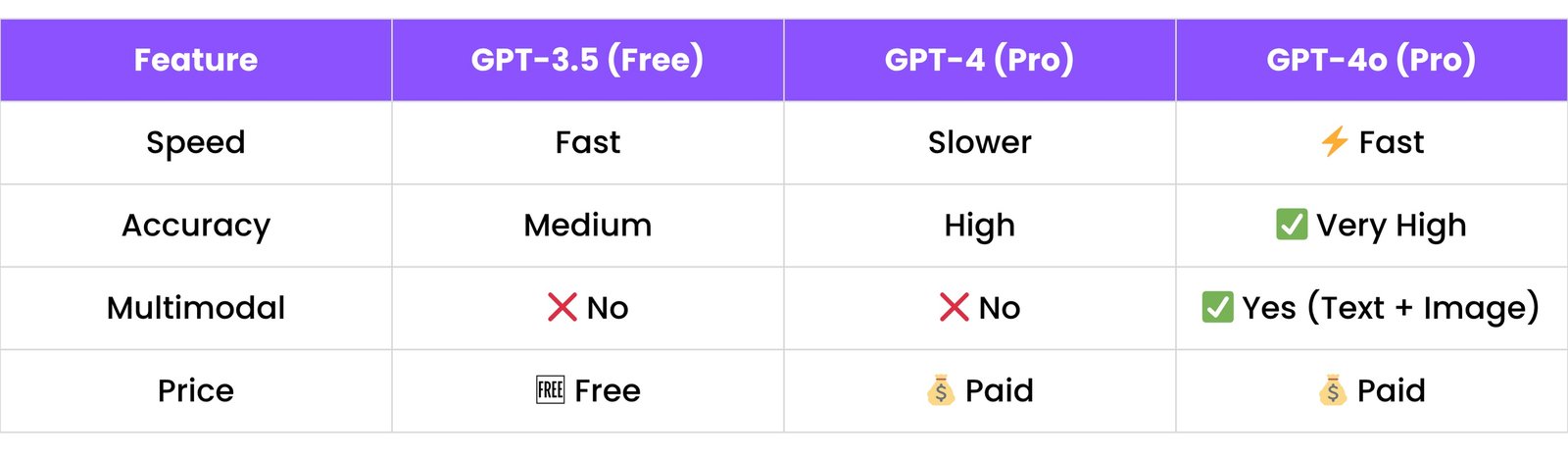
1.2 When to Use Free vs. Pro Version
Free Version (GPT-3.5)
- Good for beginners.
- You can try basic coding help, homework, small answers.
- No cost, but not always correct.
Pro Version (GPT-4 or GPT-4o)
- Use when you need better answers, coding help, or you want to build apps.
- Use if you are working on professional tasks, content writing, or ChatGPT plugins.
- Pro version costs $20/month.
Tip:
- Start with free. If you feel it gives wrong answers or can't understand your question, try the pro version.
1.3 ChatGPT Web UI vs. API Usage
Web UI (chat.openai.com)
- You type your question and get answers.
- Easy to use - no coding needed.
- Good for learning, testing, chatting, writing, and getting code examples.
API (for developers)
- Used to connect ChatGPT with your own app, software, or website.
- You send requests using code (like Python or JavaScript).
- Good for making chatbots, AI tools, or automating tasks.
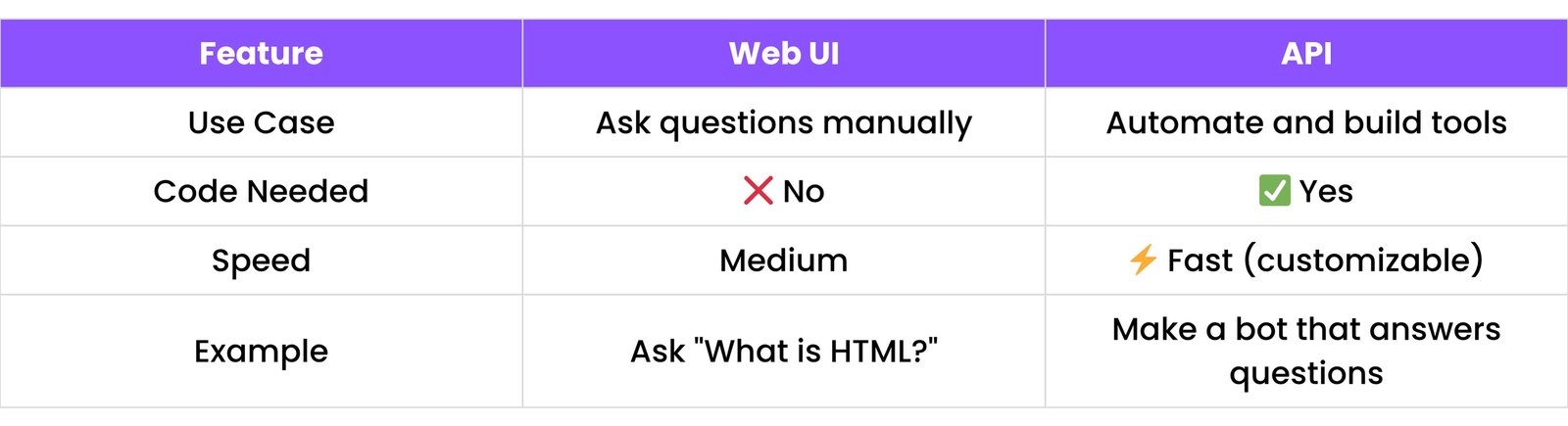
1.4 Token Limits and Pricing Overview (OpenAI API)
What is a token?
- A token is like a small piece of text.
- For example: "ChatGPT is great!" = 4 tokens
- Each word or part of a word counts as a token.
Token Limits (Max Text Length):
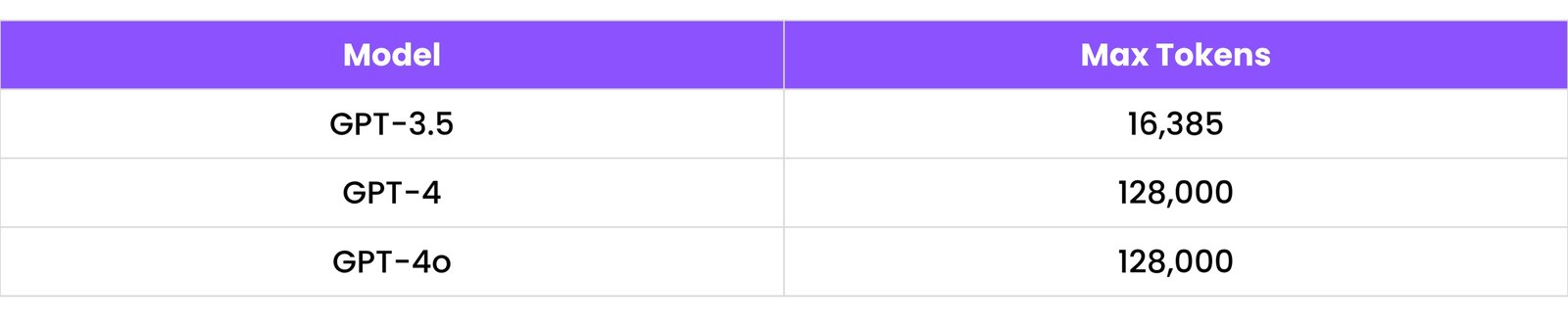
- This means GPT-4 can remember more in a single conversation.
1.4 Token Limits and Pricing Overview (OpenAI API)
Pricing (as of 2025, via OpenAI API):
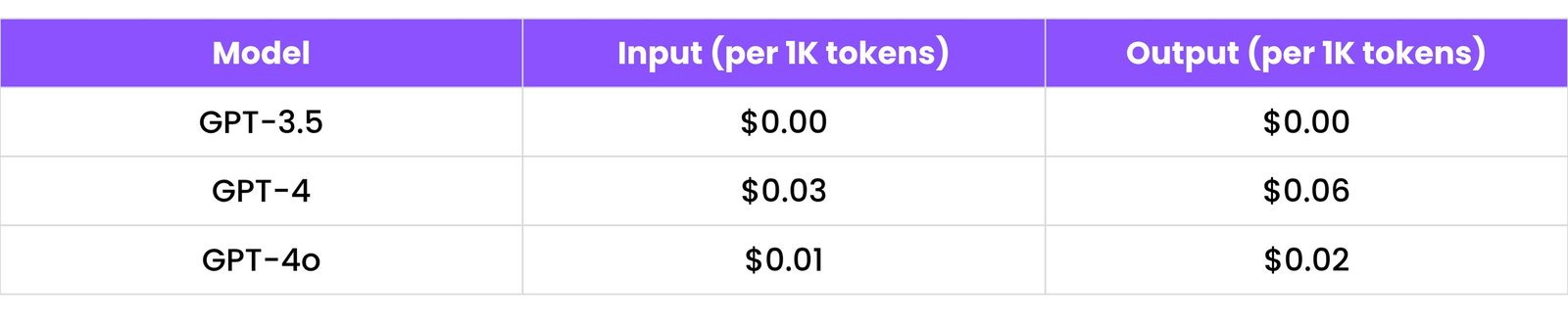
Note:
- Input tokens = what you send (your prompt).
- Output tokens = what ChatGPT replies.
- So if you send 1000 tokens and get 1000 tokens back, you pay for 2000 tokens.
2. PROMPT ENGINEERING FOR DEVELOPERS
This section helps you write better questions (called "prompts") so ChatGPT understands you clearly, especially for coding.
2.1 Prompt Formatting Tips (Bullets, Numbered Lists, Delimiters)
ChatGPT gives better answers when you write clearly.
Tips:
Use bullet points (-) to separate ideas
Explain the difference between:
- HTML
- CSS
- JavaScript
Use numbered lists to show steps
Give me the steps to create a login page:
1. Create HTML form
2. Add CSS styles
3. Write JavaScript for validation
Use triple backticks (```) to separate code
Write Python code to add two numbers:
```python
def add(a, b):
    return a + b
```
- Be specific in your question
- Not good: "Write code"
- Better: "Write Python code to reverse a string without using built-in functions"
2.2 Using ### for Sections in Prompts
Use ### to divide parts of your prompt. ChatGPT understands sections better this way.
### Goal:
Build a React login form

### Features:
- Email input
- Password input
- Show/hide password
- Submit button

### Output Format:
Give me only the final code with no explanation
- ChatGPT will now break the answer based on your sections.
2.3 How to Tell ChatGPT Your Programming Context
If you tell ChatGPT about your coding level or tools you are using, it will give better answers.
Examples:
- "I'm a beginner in JavaScript. Explain simply."
- "Use Tailwind CSS in the answer."
- "Use React 18 syntax only."
- "Show example using fetch() not axios."
Tip:
- Write your needs clearly at the top of your prompt. Like:
I want beginner-friendly explanation with small code snippets in Python only.
2.4 Using JSON or YAML in Prompts
You can use JSON or YAML formats to give structured instructions.
Why?
- ChatGPT understands structure better when data is clean and labeled.
JSON Prompt Example:
{
    "task": "Create a REST API",
    "language": "Node.js",
    "framework": "Express",
    "features": [
        "GET endpoint",
        "POST endpoint",
        "MongoDB connection"
    ]
}
2.4 Using JSON or YAML in Prompts (continued)
YAML Prompt Example:
task: Build To-Do App
language: Python
framework: Flask
features:
  - Add new task
  - Mark task complete
  - Delete task
Tip:
- Use this when asking for code generation, documentation, or templates.
2.5 Anchoring Responses with Examples (Prompt Technique)
If you give an example, ChatGPT will follow that style.
This is called "few-shot prompting."
Example Prompt:
Explain the following JavaScript functions like this:

Function: map()
Description: Used to transform every item in an array.
Example: [1,2,3].map(x => x * 2) => [2,4,6]

Now explain:
filter()
reduce()
Why it works:
- You show the format you want. ChatGPT follows the style exactly.
3. CODE GENERATION BY LANGUAGE
Learn how to ask ChatGPT for code in different programming languages and what it can do for you.
3.1 Python
What to ask ChatGPT:
- Simple scripts (like calculator, to-do list, file reader)
- APIs using Flask or Django
- Data analysis with pandas
Example Prompts:
- "Write a Python script to rename all files in a folder"
- "Build a REST API with Flask that has GET and POST routes"
- "Using pandas, how can I remove duplicate rows from a DataFrame?"
Good for:
- Beginners
- Automation
- Backend APIs
- Data analysis
3.2 JavaScript
What to ask ChatGPT:
- DOM manipulation (changing content on a web page)
- Async/await functions (handling delay in code)
- Working with APIs using fetch()
Example Prompts:
- "Write JavaScript to change the text of a button when clicked"
- "Create an async function that fetches JSON data from a URL"
- "Show how to use fetch to get user data from an API"
Good for:
- Web pages
- Frontend tasks
- Client-side scripting
3.3 TypeScript
What to ask ChatGPT:
- Type-safe code examples
- DTOs (Data Transfer Objects)
- Function/type definitions
Good for:
- Large projects
- Safer JavaScript
- Teams and structure
3.4 React / Vue / Angular
React
What to ask:
- Components
- Props and state
- Hooks (useState, useEffect, etc.)
Example Prompt:
- "Create a React component with a counter using useState"
Vue
What to ask:
- Options API or Composition API
- Reactive data
- Vue directives
Example Prompt:
- "Build a Vue component that toggles dark mode"
Angular
What to ask:
- Components, services, routing
- Angular CLI usage
Example Prompt:
- "Create an Angular component that shows a list of users"
Good for:
- Frontend development
- Building user interfaces
- Reusable components
3.5 Java / Kotlin
Java (Spring Boot):
- APIs
- Controllers
- Entity classes
Kotlin (Android):
- UI XML and Kotlin files
- Button click listeners
- Retrofit API usage
Example Prompts:
- "Create a Spring Boot REST API with CRUD for products"
- "Write Kotlin code to open a new Android activity on button click"
Good for:
- Enterprise apps
- Android development
- Backend services
3.6 PHP / Laravel
What to ask:
- PHP scripts
- Laravel routes, controllers, migrations
Example Prompts:
- "Create a Laravel controller for handling blog posts"
- "Write a PHP script to upload a file to the server"
3.7 Ruby on Rails
What to ask:
- Models, views, and controllers (MVC)
- Rails routes
- ActiveRecord queries
Example Prompts:
- "Create a Rails scaffold for a Task model with title and status"
- "Show how to write a migration to add a column to users"
3.8 Go (Golang)
What to ask:
- Simple HTTP servers
- REST APIs
- Go routines and channels
Example Prompts:
- "Create a Go server that responds with 'Hello World'"
- "Build a REST API in Go to manage products"
3.9 Rust
What to ask:
- Basic CLI tools
- Structs and enums
- Simple APIs (with Actix or Rocket)
Example Prompts:
- "Write Rust code to read a file line by line"
- "Create a simple Rust struct for a Book"
3.10 C++
What to ask:
- Programs using loops, arrays, functions
- OOP (classes, inheritance)
- File handling
Example Prompts:
- "Write a C++ program to sort an array"
- "Show how to create a class with a constructor and destructor"
4. DEBUGGING AND ERROR RESOLUTION
Learn how to ask ChatGPT to help you fix broken code, step by step.
4.1 Asking "Why is this not working?" with Code Context
If your code isn't working, don’t just say:
"My code doesn’t work."
Instead, follow this structure:
Example:
Here is my code (below). I was supposed to [what the code should do],
but the issue is [what was wrong].
Can you help me fix it?

[Your code goes here]
ChatGPT can now understand what’s wrong and help.
4.2 Common Bugs ChatGPT Can Catch
ChatGPT is very good at spotting common coding mistakes like:
- Wrong syntax:
- Example: Missing
;, wrong brackets (), {}, or quotes "".
- Typos in variable names:
- Using
userName vs username.
- Infinite loops:
- Loops that never end like:
- Missing
return or break statements
- Incorrect use of functions or APIs
4.3 Asking for Log-Level Debugging
You can tell ChatGPT to explain line-by-line what your code is doing.
Example Prompt:
Here is my code. Please explain it line by line (step-by-step), and help
me find why it fails.

[Your code]
Result: ChatGPT will go line by line, like:
1. Reads input from user
2. Calls function calculateResult()
3. Error on line 10 because variable 'tempValue' is undefined
This helps you understand not just the fix, but why the problem happened.
4.4 Copy-Pasting Error Output for Explanation
If you get an error message, just paste it in.
Example:
TypeError: Cannot read properties of undefined (reading 'length') at myFunction (script.js:10:1)
Then ask:
Can you explain this error and how to fix it in my code:
[Paste code]
ChatGPT will:
- Tell you what the error means
- Point out which line is causing it
- Suggest a fix
5. CODE OPTIMIZATION AND REFACTORING
Learn how to improve your code — make it faster, cleaner, and safer with ChatGPT's help.
5.1 Improving Performance (e.g., Big-O Reduction)
What is performance?
- It means how fast and efficient your code runs.
What is Big-O?
- Big-O tells how fast your code grows with bigger inputs.
- Example: Sorting 10 items is easy, but what about 1,000 or 1,000,000?
Common Big-O examples:
O(1) → Constant time (fast)O(n) → Slower as data growsO(n^2) → Much slower with big data
How ChatGPT helps:
You can ask:
Example Prompt:
This function checks for duplicates in an array.
Is there a faster way to do this with better Big O?

function hasDuplicates(arr) {
    for (let i = 0; i < arr.length; i++) {
        for (let j = i + 1; j < arr.length; j++) {
            if (arr[i] === arr[j]) {
                return true;
            }
        }
    }
    return false;
}
ChatGPT might suggest using a Set to improve it to O(n).
5.2 Rewriting Nested Code into Cleaner Logic
Nested code = Code with too many layers, like this:
if user:
    if user.active:
        if user.role == "admin":
            do_admin_task()
This is hard to read.
ChatGPT can help rewrite like:
if user and user.active and user.role == "admin":
    do_admin_task()
Prompt Example:
Can you rewrite this code to reduce nesting?
[Paste your code]
5.3 Transforming Imperative → Functional Programming
- Imperative = Step-by-step instructions
- Functional = Use of map, filter, reduce, pure functions
Example Prompt:
Change this imperative loop to a functional style with map() or filter().
Before:
let numbers = [1, 2, 3, 4, 5];
let doubled = [];
for (let i = 0; i < numbers.length; i++) {
    doubled.push(numbers[i] * 2);
}
After:
let numbers = [1, 2, 3, 4, 5];
let doubled = numbers.map(num => num * 2);
Functional code is shorter, cleaner, and often faster.
5.4 Secure Coding Practices (e.g., Input Validation)
Even if your code works, it must be safe.
What to ask:
How can I make this API endpoint more secure?
What ChatGPT can add:
- Input validation
- SQL injection protection
- XSS prevention
- Try/catch blocks
Example:
let username = req.query.username;
db.query("SELECT * FROM users WHERE name = '" + username + "'");
ChatGPT Suggestion:
- Use parameterized queries to prevent attacks.
6. DOCUMENTATION GENERATION
Learn how to ask ChatGPT to help you write clear, useful documentation for your code, APIs, and projects.
6.1 Automatic Docstring and Comment Generation
What is a docstring?
A docstring is a short explanation written inside a function or class.
It tells:
- What the function does
- What input it takes
- What output it gives
Example Prompt:
Add a Python docstring to this function:
def add(a, b):
    return a + b
ChatGPT Output:
def add(a: float, b: float) -> float:
    """
    Adds two numbers.

    Parameters:
    a (float): First number
    b (float): Second number

    Returns:
    float: Sum of the two numbers
    """
    return a + b
You can also ask:
- "Add inline comments to explain this code"
- "Explain what each line in this function does"
6.2 Swagger / OpenAPI Spec Creation
What is Swagger?
Swagger (now called OpenAPI) is a way to describe your API so others can use it easily.
Example Prompt:
Create a Swagger JSON for a REST API with /users GET and POST API.
ChatGPT Output:
{
    "paths": {
        "/users": {
            "get": {
                "summary": "Get all users",
                "responses": {
                    "200": {
                        "description": "List of users"
                    }
                }
            },
            "post": {
                "summary": "Add a new user",
                "requestBody": {
                    "required": true,
                    "content": {
                        "application/json": {
                            "schema": {
                                "$ref": "#/components/schemas/User"
                            }
                        }
                    }
                },
                "responses": {
                    "201": {
                        "description": "User created"
                    }
                }
            }
        }
    },
    "components": {
        "schemas": {
            "User": {
                "type": "object",
                "properties": {
                    "id": { "type": "integer" },
                    "name": { "type": "string" }
                }
            }
        }
    }
}
You can also say:
- "Generate OpenAPI YAML for my User API"
6.3 Markdown README Generator
What is a README?
- It tells others what your project is, how to install it, and how to use it.
Example Prompt:
Generate a README for my Weather App in Node.js. It uses Express.js.
ChatGPT Output (in Markdown):
# Weather App

This is a simple Node.js app that fetches weather data from an API.

## Features
- Get current weather
- Search by city name
- Simple UI

## Installation
```bash
npm install
```

## Usage
```bash
npm start
```
You can ask ChatGPT to create step-by-step tutorials for your blog or post.
Example Prompt:
Write a blog-style explanation for a JavaScript function that filters even
numbers.
Explanation:
**ChatGPT Output:**
## How to FILTER Even Numbers in JavaScript!

Sometimes you want to remove odd numbers from a list. Here's how:

### Code:
```javascript
let numbers = [1, 2, 3, 4, 5, 6];
let evenNumbers = numbers.filter(n => n % 2 === 0);
console.log(evenNumbers); // Output: [2, 4, 6]
```

### Explanation:
- `filter()` is a function that keeps only the values that return `true`.
- `n % 2 === 0` checks if the number is even.
6.4 Code Examples with Explanation for Blogs/Tutorials
You can ask ChatGPT to create step-by-step tutorials for your blog or post.
Example Prompt:
Write a blog-style explanation for a JavaScript function that filters even
numbers.
Explanation:
**ChatGPT Output:**
## How to FILTER Even Numbers in JavaScript!

Sometimes you want to remove odd numbers from a list. Here's how:

### Code:
```javascript
let numbers = [1, 2, 3, 4, 5, 6];
let evenNumbers = numbers.filter(n => n % 2 === 0);
console.log(evenNumbers); // Output: [2, 4, 6]
```

### Explanation:
- `filter()` is a function that keeps only the values that return `true`.
- `n % 2 === 0` checks if the number is even.
7. DEVOPS / TERMINAL COMMANDS
Learn how to use ChatGPT to write commands and files that automate deployment, scripting, and cloud tasks.
7.1 Dockerfile + docker-compose.yml Generation
What is Docker?
- Docker lets you package your app so it runs the same everywhere — on your PC, your server, or in the cloud.
What is a Dockerfile?
A Dockerfile is a script that tells Docker how to build your app.
Example Prompt:
Create a Dockerfile for a Node.js app that runs on port 3000.
ChatGPT Output:
FROM node:18
WORKDIR /app
COPY . .
RUN npm install
EXPOSE 3000
CMD ["node", "index.js"]
What is docker-compose?
- It lets you run many containers at once — like your app + database.
Example Prompt:
Create a docker-compose.yml file for a Node.js app with MongoDB.
ChatGPT Output:
version: '3.8'
services:
  app:
    build: .
    ports:
      - "3000:3000"
    depends_on:
      - mongo
  mongo:
    image: mongo
    ports:
      - "27017:27017"
7.2 Bash/Shell Scripts (Automate Git, Zipping, Cron Jobs)
You can ask ChatGPT to write terminal scripts that do tasks automatically.
Common tasks:
- Auto git push
- Zip folders
- Schedule tasks with cron
Example 1: Auto Git Push Script
Prompt:
Write a bash script to auto push to Git.
Output:
#!/bin/bash
git add .
git commit -m "Auto commit on $(date)"
git push
Example 2: Zip Folder Script
Write a bash script to zip a folder.
Example 3: Cron Job (Run every day at 7 PM)
Prompt:
Write a cron job that runs a Python script every day at 7 PM.
Output:
0 19 * * * /usr/bin/python3 /path/to/your/script.py
7.3 Kubernetes Manifest Templates
What is Kubernetes?
- It runs your app in the cloud using containers. You control how it runs using YAML manifest files.
Example Prompt:
Create a Kubernetes deployment file for a Node.js app.
ChatGPT Output:
apiVersion: apps/v1
kind: Deployment
metadata:
  name: node-app
spec:
  replicas: 1
  selector:
    matchLabels:
      app: node
  template:
    metadata:
      labels:
        app: node
    spec:
      containers:
      - name: node
        image: node:18
        ports:
        - containerPort: 3000
7.4 CI/CD Pipelines (GitHub Actions, GitLab CI)
What is CI/CD?
- It means automatically testing and deploying your code when you push it to Git.
Example: GitHub Actions
Prompt:
Create a GitHub Actions workflow to build and test my Node.js app on push to main.
Output:
name: Node.js CI

on:
  push:
    branches: [ main ]

jobs:
  build:
    runs-on: ubuntu-latest
    steps:
    - uses: actions/checkout@v2
    - name: Install dependencies
      run: npm install
    - name: Run tests
      run: npm test
Example: GitLab CI
Prompt:
Create a GitLab CI/CD pipeline for a Python app with unit tests.
Output:
stages:
  - test

test:
  image: python:3.9
  script:
    - pip install -r requirements.txt
    - python -m unittest
8. DATABASE HELP
Learn how to use ChatGPT to help with SQL, MongoDB, ORMs, and database design — even if you’re just starting out.
8.1 SQL Queries with JOINs, GROUP BY, and CTEs
JOINs (Combining tables)
Prompt Example:
Write a SQL query to join "users" and "orders" tables to get user names and order amounts.
Output:
SELECT users.name, orders.amount
FROM users
JOIN orders ON users.id = orders.user_id;
GROUP BY (Summarizing data)
Prompt Example:
Given orders table, find how many orders each user made.
Output:
SELECT user_id, COUNT(*) AS total_orders
FROM orders
GROUP BY user_id;
CTEs (Common Table Expressions – like temp queries)
Prompt Example:
Write a CTE to find users who spent more than $100.
Output:
WITH high_spenders AS (
    SELECT user_id, SUM(amount) AS total_spent
    FROM orders
    GROUP BY user_id
)
SELECT * FROM high_spenders WHERE total_spent > 100;
8.2 MongoDB Queries and Aggregation Pipelines
Basic Query
Prompt Example:
Find all users older than 30 in MongoDB.
Output:
db.users.find({ age: { $gt: 30 } })
Aggregation Example
Prompt Example:
Get total order amount per user.
Output:
db.orders.aggregate([
    { $group: { _id: "$user_id", total: { $sum: "$amount" } } }
])
ChatGPT can help write:
$match, $group, $lookup (MongoDB JOIN)- Paginated queries
- Complex filters
8.3 Sequelize / TypeORM Queries
Sequelize (Node.js ORM)
Prompt Example:
Find a user by ID and include their orders in Sequelize.
Output:
User.findByPk(1, {
    include: [{ model: Order }]
})
TypeORM (for NestJS / TS devs)
Prompt Example:
Write a TypeORM query to find users with their posts.
Output:
await this.usersRepository.find({
    relations: ['posts']
})
8.4 Migrations and Schema Design
ChatGPT can:
- Design your database tables
- Help you generate migration scripts
- Recommend field types (VARCHAR, INT, etc.)
Example: Schema Design Prompt
Design a database schema for a blog app with users, posts, and comments.
ChatGPT Output:
CREATE TABLE users (
    id INT PRIMARY KEY,
    name VARCHAR(255),
    email VARCHAR(255) UNIQUE
);

CREATE TABLE posts (
    id INT PRIMARY KEY,
    user_id INT (FK to users),
    title TEXT,
    content TEXT
);

CREATE TABLE comments (
    id INT PRIMARY KEY,
    post_id INT (FK to posts),
    user_id INT (FK to users),
    message TEXT
);
8.5 Example: Database Dump + Restore Commands
MySQL
Dump (Backup):
mysqldump -u username -p database_name > backup.sql
Restore:
mysql -u username -p database_name < backup.sql
MongoDB
Dump:
mongodump --db database_name --out /path/to/backup/directory
Restore:
mongorestore --db database_name /path/to/backup/directory/database_name
9. APIS AND BACKEND SUPPORT
Learn how to create APIs and make them secure, fast, and ready for real-world apps.
9.1 REST API Creation + Explanation
What is a REST API?
A REST API lets apps talk to each other using HTTP (like GET, POST).
Example Prompt:
Create a simple REST API for managing users in Node.js with Express.
Output:
const express = require('express');
const app = express();
const port = 3000;

app.use(express.json());

let users = [
    { id: 1, name: 'Alice' },
    { id: 2, name: 'Bob' }
];

app.get('/users', (req, res) => {
    res.json(users);
});

app.post('/users', (req, res) => {
    const newUser = { id: users.length + 1, name: req.body.name };
    users.push(newUser);
    res.status(201).json(newUser);
});

app.listen(port, () => {
    console.log(`Server running on http://localhost:${port}`);
});
Explanation:
GET /users → returns all usersPOST /users → adds a new user
You can do the same with other languages like Python, Java, etc.
9.2 Express.js, FastAPI, Flask, Spring Boot
Express.js (Node.js)
- Good for fast, simple APIs in JavaScript
Prompt:
Create an Express.js route to get a user by ID.
FastAPI (Python)
- Very fast and supports automatic docs
Prompt:
Create a FastAPI endpoint to add a new item.
Output:
from fastapi import FastAPI
from pydantic import BaseModel

app = FastAPI()

class Item(BaseModel):
    name: str
    price: float

@app.post("/items/")
async def create_item(item: Item):
    return item
Flask (Python)
- Lightweight and beginner-friendly
Prompt:
Create a Flask route to display "Hello from Flask!".
Spring Boot (Java)
- Used in enterprise-level apps, supports full backend features
Prompt:
Create a Spring Boot controller for a "/products" endpoint.
9.3 JWT and OAuth Implementation
JWT (JSON Web Token)
- Used to secure APIs — like a digital pass
Prompt:
Show me how to generate a JWT in Node.js.
Output (short example):
const jwt = require('jsonwebtoken');
const token = jwt.sign({ userId: 123 }, 'your_secret_key');
OAuth
- Used for logging in with Google, Facebook, etc.
Prompt:
Explain OAuth 2.0 flow for a web application.
ChatGPT will guide you step-by-step with packages like passport or firebase.
9.4 Rate Limiting, CORS, and Logging Setup
Rate Limiting
- Stops users from calling your API too many times.
Prompt:
Implement rate limiting in Express.js.
Output:
const rateLimit = require('express-rate-limit');
const limiter = rateLimit({
    windowMs: 15 * 60 * 1000, // 15 minutes
    max: 100, // limit each IP to 100 requests per windowMs
    message: 'Too many requests from this IP, please try again after 15 minutes'
});
app.use(limiter);
CORS (Cross-Origin Resource Sharing)
- Allows or blocks frontend apps from accessing your API.
Prompt:
How to enable CORS in Express.js?
Logging
- Keeps records of requests and errors.
Prompt:
Set up basic logging in Node.js.
10. FRONTEND / UI HELP
Learn how to use ChatGPT to build good-looking, mobile-friendly, and accessible user interfaces.
10.1 HTML / CSS UI Snippets
You can ask ChatGPT to build small UI parts like buttons, forms, cards, etc.
Example Prompt:
Create a simple login form with HTML and CSS.
ChatGPT Output:
<form class="login-form">
    <h2>Login</h2>
    <div class="form-group">
        <label for="username">Username:</label>
        <input type="text" id="username" name="username" required>
    </div>
    <div class="form-group">
        <label for="password">Password:</label>
        <input type="password" id="password" name="password" required>
    </div>
    <button type="submit">Login</button>
</form>

<style>
.login-form {
    max-width: 400px;
    margin: 50px auto;
    padding: 20px;
    border: 1px solid #ccc;
    border-radius: 8px;
    box-shadow: 0 2px 10px rgba(0,0,0,0.1);
    background-color: #fff;
}
.form-group {
    margin-bottom: 15px;
}
label {
    display: block;
    margin-bottom: 5px;
    font-weight: bold;
}
input[type="text"],
input[type="password"] {
    width: 100%;
    padding: 10px;
    border: 1px solid #ddd;
    border-radius: 4px;
    box-sizing: border-box;
}
button {
    width: 100%;
    padding: 10px;
    background-color: #007bff;
    color: white;
    border: none;
    border-radius: 4px;
    cursor: pointer;
    font-size: 16px;
}
button:hover {
    background-color: #0056b3;
}
</style>
You can also say:
- “Make a pricing card with CSS only”
- “Create a navbar with hover dropdown”
10.2 Tailwind CSS Components
Tailwind is a CSS framework where you use small utility classes.
Example Prompt:
Create a responsive card component using Tailwind CSS.
Output:
<div class="max-w-sm rounded-lg overflow-hidden shadow-lg bg-white m-4">
    <img class="w-full" src="[https://placehold.co/600x400/E0E7FF/3B82F6?text=Card+Image](https://placehold.co/600x400/E0E7FF/3B82F6?text=Card+Image)" alt="Card image">
    <div class="px-6 py-4">
        <div class="font-bold text-xl mb-2 text-gray-800">Card Title</div>
        <p class="text-gray-700 text-base">
            Lorem ipsum dolor sit amet, consectetur adipiscing elit. Sed do eiusmod tempor incididunt ut labore et dolore magna aliqua.
        </p>
    </div>
    <div class="px-6 pt-4 pb-2">
        <span class="inline-block bg-gray-200 rounded-full px-3 py-1 text-sm font-semibold text-gray-700 mr-2 mb-2">#tag1</span>
        <span class="inline-block bg-gray-200 rounded-full px-3 py-1 text-sm font-semibold text-gray-700 mr-2 mb-2">#tag2</span>
    </div>
</div>
You can also ask:
- “Make a responsive navbar using Tailwind”
- “Create a login form in Tailwind CSS”
10.3 Responsive Layout Generation
What is responsive design?
- It means your page works well on both mobile and desktop.
Example Prompt:
Create a responsive 3-column layout that stacks on mobile using Tailwind CSS.
ChatGPT Output:
<div class="grid grid-cols-1 md:grid-cols-3 gap-4">
    <div class="bg-blue-200 p-4 rounded-lg">Column 1</div>
    <div class="bg-green-200 p-4 rounded-lg">Column 2</div>
    <div class="bg-red-200 p-4 rounded-lg">Column 3</div>
</div>
Ask for:
- Grid layouts
- Flexbox layouts
- Mobile-first design
- Tailwind responsive classes like
md:flex, lg:grid
10.4 GSAP / Framer Motion Animations
- GSAP (GreenSock) → For vanilla JS animation
- Framer Motion → For React animations
Example: GSAP
gsap.to(".my-element", { duration: 1, x: 100, opacity: 0.5 });
Example: Framer Motion
import { motion } from "framer-motion";

function MyComponent() {
  return (
    <motion.div
      initial={{ opacity: 0 }}
      animate={{ opacity: 1 }}
      transition={{ duration: 1 }}
    >
      Hello
    </motion.div>
  );
}
Ask for:
- Slide in / fade in effects
- Scroll-based animation
- Button hover animations
10.5 Accessibility (a11y) Improvements
What is a11y?
- It means making your website usable for everyone, including people with disabilities.
Ask ChatGPT:
How can I make this HTML form more accessible?
ChatGPT might suggest:
- Use
<label for="id">
- Add
alt to images
- Use correct heading order (
<h1>, <h2>)
- Add ARIA labels for screen readers
Example Fix:
<label for="email">Email:</label>
<input type="email" id="email" aria-label="Enter your email address">
Other ideas:
- “Make this button keyboard accessible”
- “Add ARIA tags for screen readers”
11. TESTING
Learn how to ask ChatGPT to help you write and understand tests for your code.
11.1 Unit Test Generation (Jest, PyTest, JUnit)
Unit tests check if small parts of your code (like one function) work correctly.
Jest (JavaScript)
Example Prompt:
Write a Jest unit test for a function that adds two numbers.
Output:
// sum.js
function sum(a, b) {
  return a + b;
}
module.exports = sum;

// sum.test.js
const sum = require('./sum');

test('adds 1 + 2 to equal 3', () => {
  expect(sum(1, 2)).toBe(3);
});
You can also ask:
- “Test edge cases”
- “Test for negative numbers”
PyTest (Python)
Example Prompt:
Write a PyTest unit test for a Python function that reverses a string.
Output:
# my_functions.py
def reverse_string(s):
    return s[::-1]

# test_my_functions.py
from my_functions import reverse_string

def test_reverse_string():
    assert reverse_string("hello") == "olleh"
    assert reverse_string("") == ""
JUnit (Java)
Example Prompt:
Write a JUnit test for a Java class with a method that multiplies two numbers.
Output:
// Calculator.java
public class Calculator {
    public int multiply(int a, int b) {
        return a * b;
    }
}

// CalculatorTest.java
import org.junit.jupiter.api.Test;
import static org.junit.jupiter.api.Assertions.assertEquals;

public class CalculatorTest {
    @Test
    void testMultiply() {
        Calculator calc = new Calculator();
        assertEquals(6, calc.multiply(2, 3));
        assertEquals(0, calc.multiply(5, 0));
    }
}
11.2 End-to-End (E2E) Test Flows (Cypress, Selenium)
E2E tests check the entire user experience — from clicking buttons to submitting forms.
Cypress (Frontend JS testing)
Example Prompt:
Write a Cypress test to log in a user and verify dashboard text.
Output:
// cypress/integration/login_spec.js
describe('Login Test', () => {
  it('Successfully logs in and shows dashboard', () => {
    cy.visit('/login');
    cy.get('#username').type('testuser');
    cy.get('#password').type('password123');
    cy.get('button[type="submit"]').click();
    cy.url().should('include', '/dashboard');
    cy.contains('Welcome to your Dashboard');
  });
});
Selenium (cross-browser testing)
Example Prompt:
Write a Selenium (Python) script to open Google, search for "ChatGPT", and click the first result.
Output:
from selenium import webdriver
from selenium.webdriver.common.keys import Keys
from selenium.webdriver.common.by import By

driver = webdriver.Chrome() # Or Firefox, Edge
driver.get("[https://www.google.com](https://www.google.com)")
search_box = driver.find_element(By.NAME, "q")
search_box.send_keys("ChatGPT" + Keys.RETURN)
first_result = driver.find_element(By.CSS_SELECTOR, "h3")
first_result.click()
# driver.quit()
11.3 Test Data: Mocks and Stubs
Mocks and stubs simulate real data or functions in tests.
Example: Mocking a function in Jest
Prompt:
How to mock an API call in Jest?
Example: Using Pytest fixture to fake data
Prompt:
How to use Pytest fixture to provide fake user data for tests?
Use mocks when:
- You don’t want to call the real API
- You want to test faster
- You want to avoid side effects (like deleting real files)
11.4 TDD Workflow with ChatGPT Prompts
What is TDD?
- Test-Driven Development = Write the test first, then write the code to pass the test.
Ask ChatGPT:
Guide me through TDD for a Python function that checks if a number is prime.
ChatGPT will respond like:
Step 1: Write the test
# test_prime.py
def is_prime(number):
    pass # Placeholder for now

def test_is_prime():
    assert is_prime(2) == True
    assert is_prime(4) == False
    assert is_prime(7) == True
    assert is_prime(1) == False
Step 2: Then write the function
# prime.py
def is_prime(number):
    if number < 2:
        return False
    for i in range(2, int(number**0.5) + 1):
        if number % i == 0:
            return False
    return True
You can do this in:
- Python with PyTest
- Java with JUnit
- JavaScript with Jest
12. AI & DATA PROJECTS
Learn how to use ChatGPT to get help with data analysis, machine learning, NLP, and image processing.
12.1 NumPy, pandas, scikit-learn Helpers
These are popular Python libraries for data science:
- NumPy → For arrays and math
- pandas → For data tables
- scikit-learn (sklearn) → For machine learning
NumPy Examples
Prompt:
How to create a NumPy array of zeros?
Output:
import numpy as np
arr = np.zeros((3, 3)) # 3x3 array of zeros
pandas Examples
Prompt:
How to read a CSV file into a pandas DataFrame?
Output:
import pandas as pd
df = pd.read_csv('data.csv')
scikit-learn Example
Prompt:
Show me a simple Linear Regression example with scikit-learn.
Output:
from sklearn.linear_model import LinearRegression
import numpy as np

X = np.array([[1], [2], [3], [4]])
y = np.array([2, 4, 5, 4])

model = LinearRegression()
model.fit(X, y)
print(model.predict([[5]]))
12.2 NLP and Image Processing Examples
NLP (Natural Language Processing)
Prompt:
How to tokenize a sentence in Python using NLTK?
Output:
import nltk
from nltk.tokenize import word_tokenize
nltk.download('punkt') # Download tokenizer data if not already present
text = "Hello, how are you?"
tokens = word_tokenize(text)
print(tokens) # Output: ['Hello', ',', 'how', 'are', 'you', '?']
Other NLP tasks ChatGPT can help with:
- Text classification
- Sentiment analysis
- Summarization
Image Processing
Prompt:
How to resize an image in Python using OpenCV?
Output:
import cv2

image = cv2.imread('image.jpg')
resized_image = cv2.resize(image, (100, 100)) # width, height
cv2.imwrite('resized_image.jpg', resized_image)
You can ask for:
- Grayscale conversion
- Face detection
- Drawing shapes on images
12.3 Dataset Generation and Augmentation
Dataset Generation (Synthetic)
Prompt:
Generate a synthetic dataset of 100 customer records with name, age, and purchase amount.
Data Augmentation (Images)
Prompt:
Show me how to perform image augmentation (rotation, flip) using TensorFlow/Keras.
Output (TensorFlow):
from tensorflow.keras.preprocessing.image import ImageDataGenerator
import matplotlib.pyplot as plt
import cv2
import numpy as np # Import numpy for dummy image creation

# Load an example image (replace with your image path)
# Assuming you have 'my_image.jpg' in the same directory
try:
    image = cv2.imread('my_image.jpg') # Changed to local file
    if image is None: # Check if image loaded successfully
        raise FileNotFoundError("Image not found: 'my_image.jpg'")
    image = cv2.cvtColor(image, cv2.COLOR_BGR2RGB) # Convert BGR to RGB
    image = image.reshape((1,) + image.shape) # Add batch dimension
except Exception as e:
    print(f"Error loading image: {e}. Please ensure you have an image file (e.g., 'my_image.jpg') in the same directory.")
    # Create a dummy image if loading fails
    image = np.zeros((1, 200, 200, 3), dtype=np.uint8) + 128 # Grey image

datagen = ImageDataGenerator(
    rotation_range=20,
    width_shift_range=0.2,
    height_shift_range=0.2,
    horizontal_flip=True,
    zoom_range=0.2
)

# Generate augmented images
i = 0
for batch in datagen.flow(image, batch_size=1):
    plt.figure(figsize=(4, 4))
    plt.imshow(batch[0].astype('uint8'))
    plt.axis('off')
    plt.show()
    i += 1
    if i > 3: # Show 4 augmented images
        break
12.4 Code Explanation for ML Pipelines
If you're confused by a pipeline or ML model, just ask:
Prompt:
Explain this scikit-learn pipeline step-by-step.
ChatGPT can:
- Break down
fit(), predict(), transform()
- Explain preprocessing steps
- Describe model evaluation
Example Prompt:
from sklearn.pipeline import Pipeline
from sklearn.preprocessing import StandardScaler
from sklearn.linear_model import LogisticRegression

pipeline = Pipeline([
    ('scaler', StandardScaler()),
    ('logreg', LogisticRegression())
])
# Assume X_train, y_train are defined
# pipeline.fit(X_train, y_train)

Explain this pipeline.
ChatGPT Output:
- First scales data using StandardScaler
- Then trains logistic regression on scaled data
13. PROJECT ASSISTANCE
Learn how to ask ChatGPT to help with project ideas, building your MVP (Minimum Viable Product), planning features, and tracking bugs.
13.1 Project Ideas Based on Skill Level
You can ask ChatGPT:
Give me project ideas for a beginner React developer.
Examples:
Beginner in HTML/CSS:
- Personal Portfolio Website
- Restaurant Menu Page
- Login Form UI
- Basic Blog Page
- Responsive Landing Page
Intermediate in JavaScript:
- To-Do List with LocalStorage
- Calculator App
- Weather App using API
- Quiz Game
- Expense Tracker
Advanced in React/Node:
- Real-time Chat App (with Socket.io)
- Job Portal
- E-commerce Dashboard
- Blogging Platform with Login
- AI-powered note taker using OpenAI API
13.2 How to Ask ChatGPT to Build MVP Step-by-Step
What is MVP?
MVP means Minimum Viable Product — a very simple working version of your project.
Prompt:
Guide me through building a simple note-taking app MVP step-by-step.
ChatGPT might reply with steps like:
- Set up project folder with HTML, CSS, JS
- Create UI: input, textarea, save button
- Store notes in local storage
- Add basic login with dummy credentials
- Save notes per user
Then you can ask:
Okay, what's the code for step 1?
...and continue one step at a time.
13.3 Feature Planning and Task Breakdown
Prompt:
I'm building a To-Do app. Suggest features and break them into smaller tasks.
ChatGPT might give you:
Features:
- User registration/login
- Add/edit/delete tasks
- Set due date and priority
- Mark tasks as complete
- Filter by status
Tasks:
- Create login page
- Connect frontend to backend API
- Store tasks in database
- Add filters on UI
- Add authentication with JWT
You can also ask:
- "Suggest user stories for an e-commerce app"
- "Break down 'Implement payment gateway' into smaller tasks"
13.4 Bug Tracking and Feature Refinement with Prompts
If something is broken or you want to improve a feature, just say:
Example:
My task filtering feature is not working when I filter by 'completed' status.
Here is the code: [Paste code]
ChatGPT will:
- Debug your code
- Suggest improvements
- Help track fixed vs. pending issues
You can also ask:
What new features can I add to my existing To-Do app to make it better?
ChatGPT might reply:
- Add search bar
- Enable dark mode
- Sort tasks by date
- Export task list as PDF
- Add voice input for new tasks
14. INTEGRATIONS & PLUGINS
Learn how to use ChatGPT with your favorite tools like VS Code, Postman, GitHub, and even make your own custom GPT.
14.1 ChatGPT for VS Code / Cursor IDE
A. ChatGPT in VS Code
What it does:
- Writes code while you type
- Explains code blocks
- Helps with debugging
- Adds comments and docstrings
How to install:
- Open VS Code
- Go to Extensions tab (left sidebar)
- Search:
ChatGPT - Code Companion
- Click Install
- Sign in with your OpenAI account
What you can do after:
- Right-click code → “Explain code”
- Select code → "Fix this code"
- Ask: "Refactor this" or "Optimize it"
B. Cursor IDE (Built-in ChatGPT)
- Cursor is a full IDE like VS Code, but it has ChatGPT built-in and better integrated.
- Website: [https://www.cursor.so](https://www.cursor.so)
- Best features:
- Ask questions inside your code
- Autocomplete using GPT
- Highlight bugs with natural-language explanations
- Fast responses without copying code manually
14.2 Using ChatGPT in Postman
Postman is used for testing APIs. You can now add ChatGPT directly to help:
Option 1: Use Postbot (AI in Postman)
- Built-in tool that helps you write tests, create requests, and debug APIs directly in Postman.
Option 2: Use ChatGPT externally
Prompt Example:
Write a Postman test script to check if API response status is 200.
ChatGPT Output:
pm.test("Status code is 200", function () {
    pm.response.to.have.status(200);
});
14.3 GitHub Copilot vs ChatGPT
Use both together for best results!
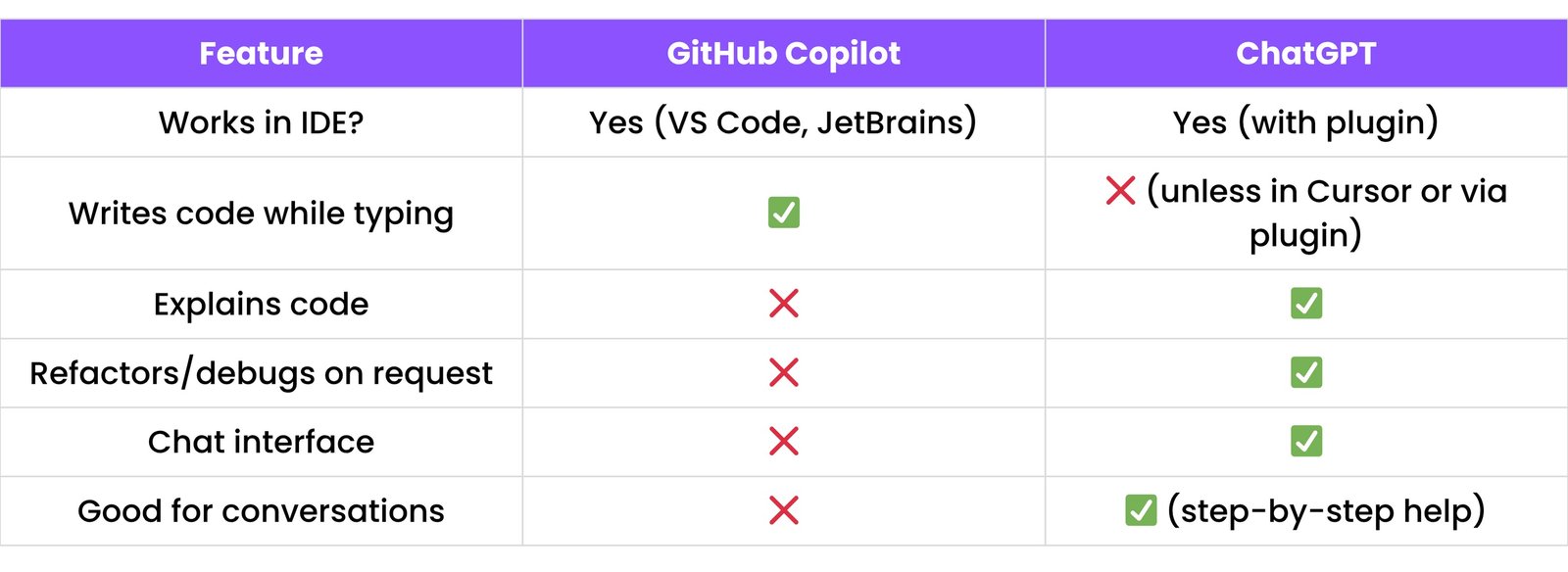
14.4 Creating Your Own Custom GPT for Dev Workflows
You can make a Custom GPT that acts like your personal coding assistant.
Use Case Examples:
- A GPT that explains your company’s codebase
- A GPT that helps only with HTML + Tailwind
- A GPT that responds in Gujarati for devs
How to create one:
- Go to [https://chat.openai.com/gpts](https://chat.openai.com/gpts)
- Click
Create a GPT
- Use the GPT Builder to guide setup
- Set instructions like:
- “You are a code helper for JavaScript projects”
- “Respond with simple explanations like for 4th graders”
- Upload files, docs, or code samples if needed
- Share with your dev team or community
Example Prompt to Create Custom GPT:
Create a Custom GPT that is an expert in React.js.
It should provide clean code, explain concepts simply,
and help with debugging React hooks.
15. INTERVIEW PREP & CAREER HELP
Get help from ChatGPT for coding interviews, resumes, GitHub, and creating your own portfolio site.
15.1 Solving DSA (Data Structures & Algorithms) Questions
What you can ask:
- "Give me easy DSA questions in Python/JavaScript"
- "Explain binary search with dry run and code"
- "Solve this LeetCode problem step-by-step"
Example Prompt:
Explain how Binary Search works step-by-step with an example list: [2, 5, 8, 12, 16, 23, 38, 56, 72] and target = 23.
ChatGPT Output (Short Version):
- Start: Low=0, High=8, Target=23
- Mid=4 (value 16). 16 < 23, so Low=Mid+1 (5)
- New range: [23, 38, 56, 72]
- Mid=6 (value 38). 38 > 23, so High=Mid-1 (5)
- New range: [23]
- Mid=5 (value 23). Found! Return index 5.
Then it explains step-by-step how the value is searched in the list.
15.2 Simulating System Design Interviews
System design = how big apps work, like WhatsApp, Netflix, etc.
What you can ask:
- "Simulate a system design round for me"
- "How to design a URL shortener"
- "What are the key components of designing an e-commerce app?"
Example Prompt:
Design a system for a simple URL shortener like bit.ly.
ChatGPT Output:
- Frontend (input field, short URL display)
- Backend (API, logic to shorten URLs)
- Database (store original and short URL)
- Optional: Analytics, User Login, Expiry
15.3 Improving GitHub Profile & Resume
GitHub Optimization Prompts:
- "Review my GitHub profile and suggest improvements"
- "Give ideas for good beginner-friendly repositories"
- "Generate a clean README for my JavaScript project"
Example Prompt:
Suggest 5 project ideas for a beginner React developer to add to GitHub.
Resume Review Prompts:
- "Improve this resume for a front-end role"
- "Rewrite this resume section to make it stronger"
- "Create a resume using only my GitHub projects"
Extra Tip:
You can also ask ChatGPT to format your resume for ATS (Applicant Tracking Systems).
(ATS = applicant tracking system used by HRs)
15.4 Creating a Personal Dev Portfolio
ChatGPT can help you:
- Plan the structure
- Design in HTML/CSS or React
- Write content for About, Skills, Projects, Contact
- Add responsiveness and animations
Prompt Example:
Write an "About Me" section for a front-end developer portfolio.
ChatGPT Output:
I'm a passionate front-end developer who enjoys turning ideas into
interactive web apps...
Prompt Example:
Give me a simple HTML structure for a portfolio website.
16. BEST PRACTICES & PITFALLS
Learn how to use ChatGPT the right way when writing code, and what to avoid.
16.1 Avoiding Over-Reliance
What this means:
- Don’t become fully dependent on ChatGPT for every line of code.
Why?
- You may stop learning how things really work
- You might not understand errors when they happen
- Not everything generated is always correct
What to do instead:
- Use ChatGPT as a helper, not a replacement
- Try first → then ask ChatGPT to review or improve
- Learn the “why,” not just the “what”
16.2 Validating Generated Code
What does "validate" mean?
- It means you check that the code works and makes sense before using it.
Why it matters:
- Sometimes, ChatGPT can make mistakes
- Code might look right but give wrong results
What you should do:
- Run the code on your computer or IDE
- Use
console.logs / print statements to test output
- Ask: “Can you explain what this code does line-by-line?”
- Use comments to understand
Extra Tip:
If unsure, ask:
Is there any edge case this code might fail?
16.3 When to Avoid Using ChatGPT
ChatGPT is not always the right tool.
Here’s when not to use it:
- For very sensitive data or company secrets (privacy risks)
- For legal advice or medical diagnoses (it's not a human expert)
- If the problem is too simple (just Google it quickly or think for 5 mins)
- If you want to practice problem-solving yourself (use it only to check later)
- For real-time coding or live debugging where a human pair programmer is better
16.4 How to Give Clear Context in Prompts
What is "context"?
- It means extra details that help ChatGPT understand your situation better.
Why it's important:
- Better context = better answers
Example 1 — Bad prompt:
"Write a function to add numbers."
Example 2 — Good prompt:
"I am learning Python. Write a function called 'calculate_sum' that takes two
integer numbers as input and returns their sum. Please include a docstring
and a simple example of how to use it."
What to include in your prompt:
- What the code is supposed to do
- What’s not working
- What you’ve already tried
- The language or framework you’re using
- If you want a beginner explanation
17. SMART PROMPTS FOR DEVELOPERS
These are smart ways to talk to ChatGPT so it can help you code better, faster, and easier.
17.1 Code Writing & Generation Prompts
Prompts that help you write new code in any language.
Example:
- "Write a login form in HTML and CSS"
- "Create a calculator app using React"
17.2 Code Refactoring & Optimization Prompts
Prompts to help make your code cleaner and faster.
Example:
- "Make this Python code more efficient"
- "Refactor this JS function to use async/await"
17.3 Bug Fixing & Debugging Prompts
Prompts to find and fix errors in your code.
Example:
- "Why is this code crashing? Here's the error..."
- "Fix this bug: [Paste code]"
17.4 Code Explanation Prompts
Prompts that explain what your code does in simple terms.
Example:
- "Explain this JavaScript function line-by-line"
- "What does this regex mean?"
17.5 Documentation & Commenting Prompts
Prompts to generate comments or docstrings for your code.
Example:
- "Add comments to this function"
- "Write a Python docstring for this class"
17.6 Testing (Unit, Integration, E2E) Prompts
Prompts to help write tests for your code, from small functions to full user flows.
Example:
- "Write a Jest test for this React component"
- "How to write an integration test for my Express API?"
17.7 DevOps & CLI Prompts
Prompts to help you with terminal commands, Docker, CI/CD, etc.
Example:
- "Create a Dockerfile for my Node app"
- "Write a bash script to zip files and push to Git"
17.8 Database Query & Design Prompts
Prompts for writing SQL queries or designing a database schema.
Example:
- "Write SQL to find users who signed up last week"
- "Create a schema for a blog app"
17.9 API Design & Implementation Prompts
Prompts to help build and test APIs (REST, GraphQL, etc).
Example:
- "Create a REST API with Express and MongoDB"
- "Write Postman test script for status code check"
17.10 UI/UX & Frontend Prompts
Prompts to design beautiful user interfaces and frontend layouts.
Example:
- "Make a responsive navbar using Tailwind CSS"
- "Animate button on hover using CSS"
17.11 Learning New Tech Stack Prompts
Prompts to help you learn new frameworks or tools quickly.
Example:
- "Explain React Hooks with examples"
- "What is Tailwind CSS and how do I use it?"
17.12 Data Structures & Algorithms Prompts
Prompts to learn and practice DSA concepts and problem-solving.
Example:
- "Explain Big O notation with examples"
- "Write Python code for a binary search tree"
17.13 Project & MVP Building Prompts
Prompts to help with project ideas, planning, and building your Minimum Viable Product.
Example:
- "Give me a step-by-step guide to build a to-do app in Vue.js"
- "Suggest features for a social media app"
17.14 Version Control (Git) Prompts
Prompts to help you with Git and GitHub commands.
Example:
- "How to resolve a merge conflict?"
- "Write a bash script to auto push to Git"
17.15 Productivity & Automation Prompts
Prompts to make your coding faster using automation scripts or tools.
Example:
- "Automate file renaming with Python"
- "Make a VS Code shortcut to format code"
17.16 Resume, GitHub & Portfolio Optimization Prompts
Prompts to improve your online presence as a developer.
Example:
- "Review my resume for a front-end developer role"
- "Suggest GitHub projects to add to my portfolio"
17.17 Interview Preparation Prompts
Prompts to practice for coding interviews or technical rounds.
Example:
- "Mock interview questions for JavaScript developer"
- "System design interview questions for beginners"
17.18 Prompt Engineering for Better Results
Prompts to help you ask better prompts — so ChatGPT gives better answers.
Example:
- "How to structure a prompt for generating clean code?"
- "What details should I add to get correct output?"