1. Introduction to JavaScript
1.1 What is JavaScript?
JavaScript (JS) is a high-level, interpreted programming language that is one of the core technologies of the World Wide Web, alongside HTML and CSS. It is used to make web pages interactive and dynamic, allowing for features like animations, form validation, and real-time content updates without needing to reload the page.
1.2 Features of JavaScript
- Interpreted and Just-In-Time (JIT) Compiled: JavaScript code is executed directly by an interpreter in the browser, without the need for a separate compilation step. Modern engines also use JIT compilation for performance optimization.
- Client-Side Scripting: It runs directly in the user's web browser, enabling dynamic behavior on the client side.
- Event-Driven and Asynchronous: JavaScript is well-suited for handling user interactions (like clicks and key presses) and can perform tasks like fetching data from a server without blocking the main thread.
- Dynamically Typed: Variable types are determined at runtime, not compile time, which offers flexibility but requires careful coding.
- Multi-paradigm: It supports procedural, object-oriented (via prototypes and classes), and functional programming styles.
1.3 How JavaScript Works in the Browser
JavaScript code is executed by a JavaScript engine, which is a component of modern web browsers (e.g., V8 in Google Chrome, SpiderMonkey in Firefox). The engine parses the script, compiles it into bytecode, and executes it. It also interacts with the Document Object Model (DOM) to manipulate the structure and content of the web page.
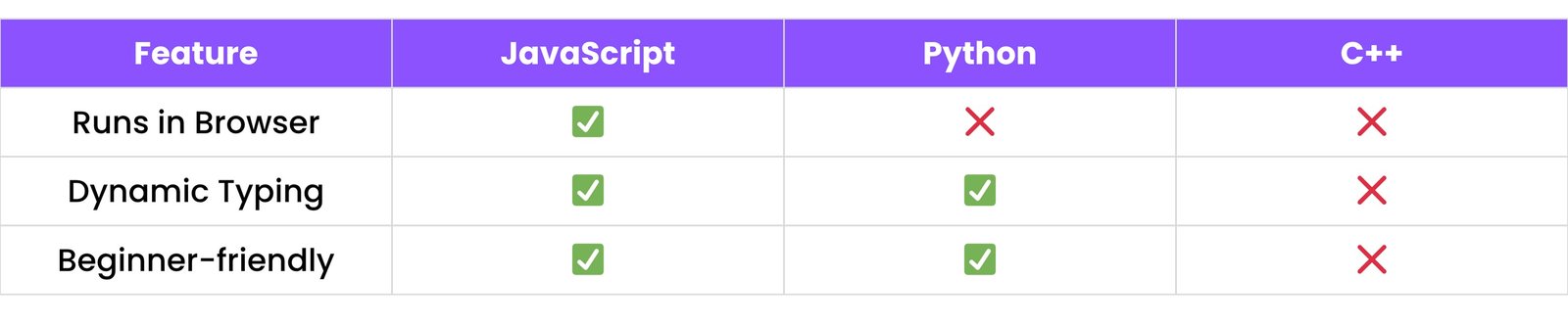
1.4 JavaScript vs Other Languages
2. BASIC SYNTAX
2.1 Variables (var, let, const)
var: The oldest keyword for declaring variables. It is function-scoped, which can sometimes lead to unexpected behavior (hoisting).let: The modern way to declare variables that can be reassigned. It is block-scoped (limited to the {} block it's defined in).const: Used for declaring variables that cannot be reassigned. It is also block-scoped.
let name = "Rudra";
const age = 19;
2.2 Data Types
JavaScript has several primitive and complex data types:
- Primitive Types:
String, Number, Boolean, Null, Undefined, Symbol, BigInt.
- Complex Type:
Object (which includes arrays, functions, and other objects).
2.3 Comments
Comments are used to add explanatory notes to your code. They are ignored by the JavaScript engine.
// This is a single-line comment

/* This is a
multi-line comment */
2.4 Operators
JavaScript includes various operators for different purposes:
- Arithmetic Operators - for mathematical operations.
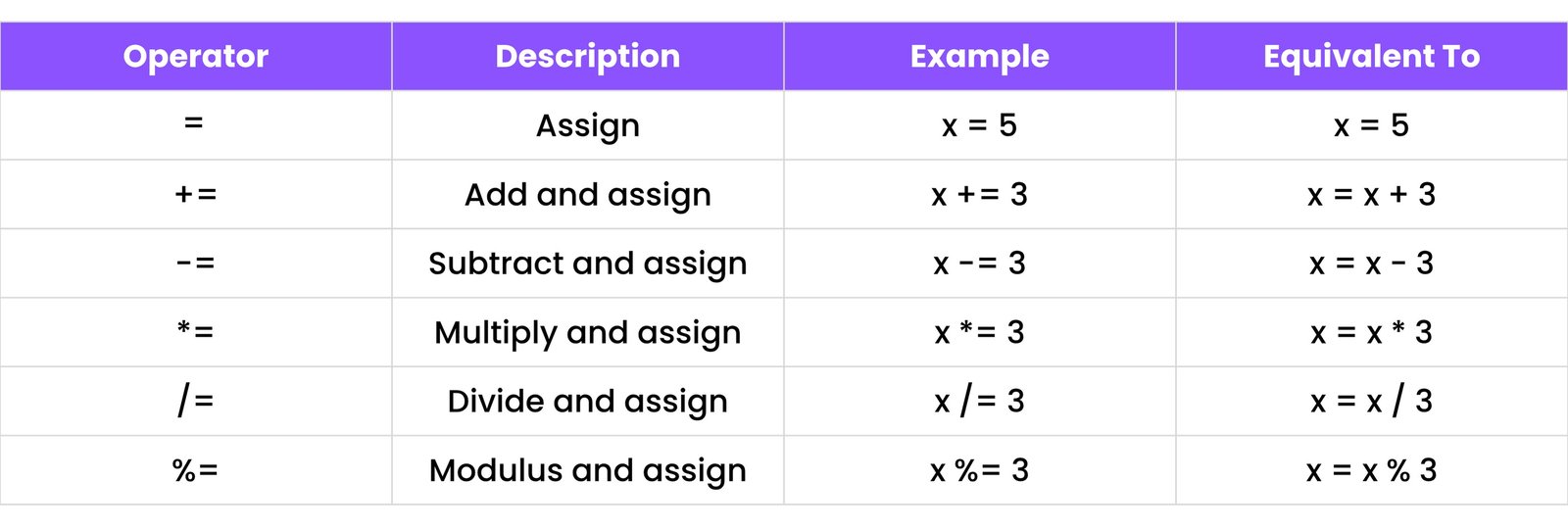
- Assignment Operators - to assign values to variables.
- Comparison Operators - to compare values.
- Logical Operators - to handle true/false logic.
2.4.1 - Arithmetic Operators:
Used to perform basic mathematical operations.
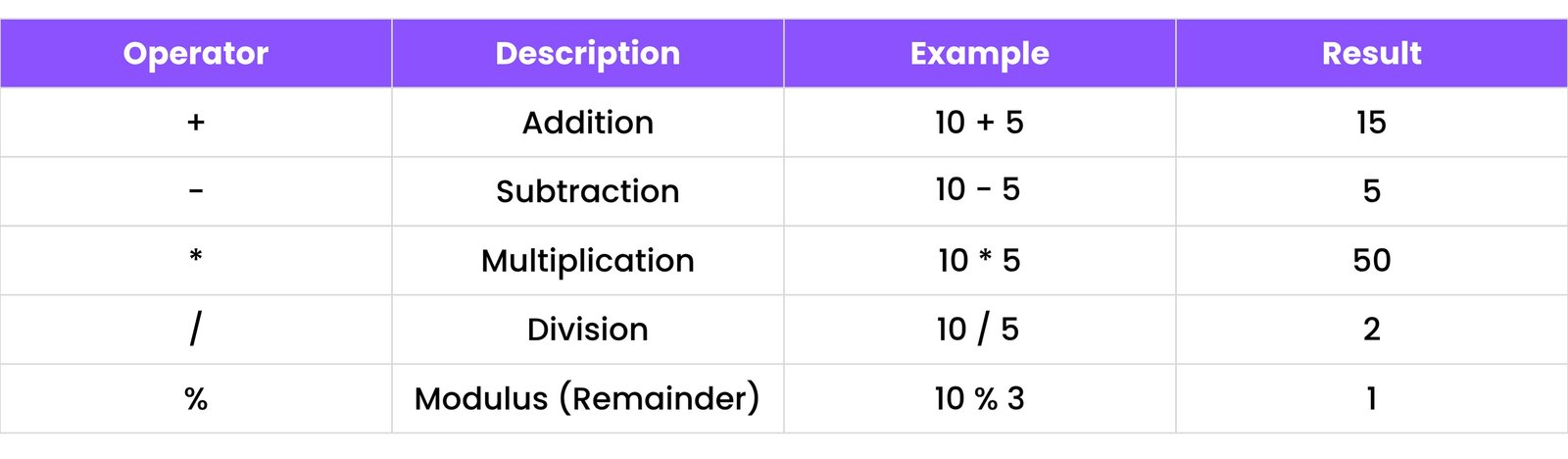
Note: + is also used for string concatenation:
"Hello" + " " + "World" // "Hello World"
2.4.2 - Assignment Operators
Used to assign values to variables.
2.4.3 - Comparison Operators
Used to compare two values, returning a boolean (true or false).
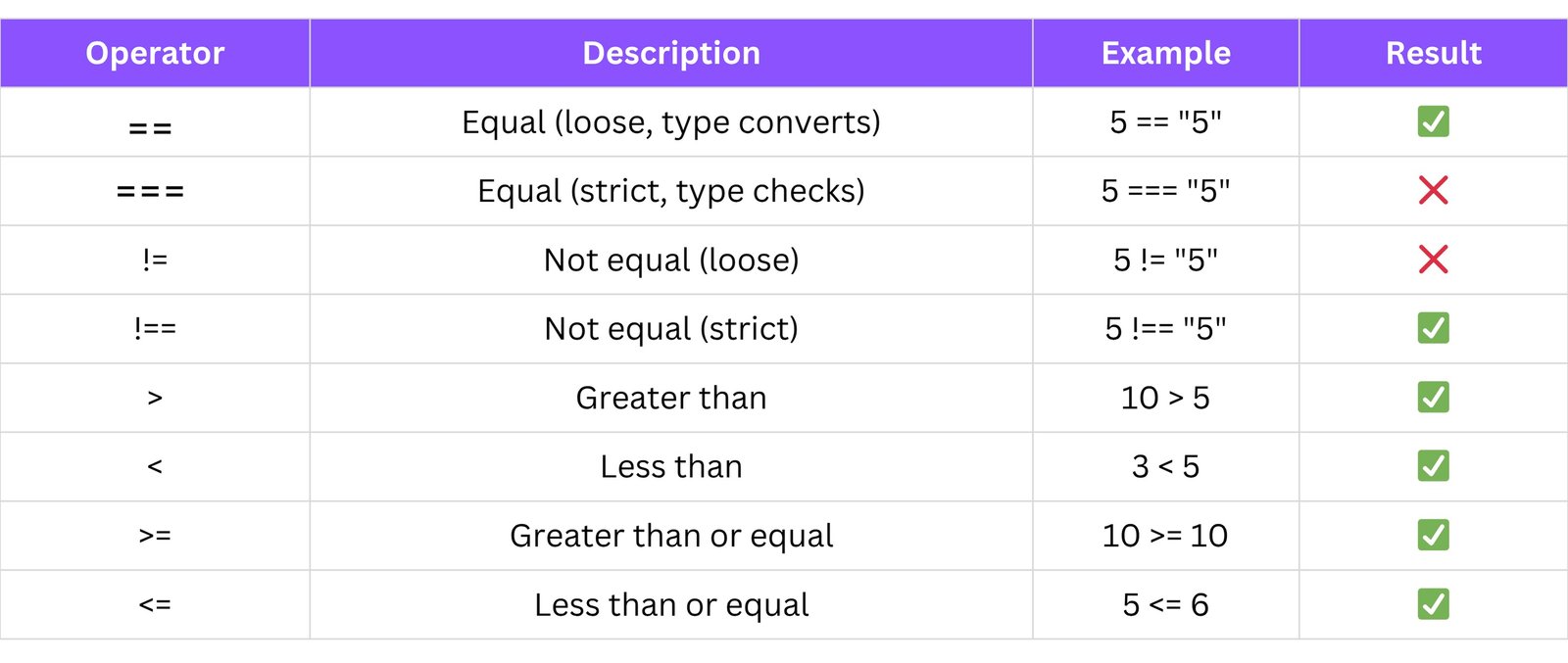
Tip: Always prefer using === and !== for strict equality checks to avoid unexpected type coercion issues.
2.4.4 - Logical Operators
Used to combine or invert boolean expressions.
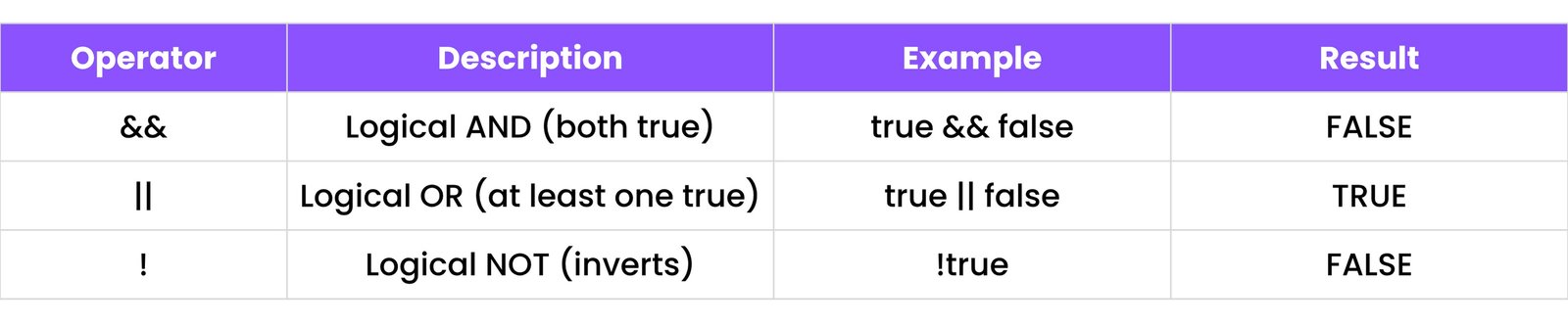
Example:
let age = 20;
if (age >= 18 && age <= 65) {
    console.log("Eligible to work");
}
2.5 Type Conversion & Coercion
JavaScript often automatically converts types (coercion), but you can also convert them manually (conversion).
// Manual Conversion
let numStr = "123";
let num = Number(numStr); // 123

let val = 50;
let strVal = String(val); // "50"

// Coercion (automatic)
console.log("5" + 2); // "52" (string concatenation)
console.log("5" - 2); // 3 (numeric subtraction)
3. CONTROL STRUCTURES
Control structures help your program make decisions and control the flow based on conditions.
3.1 if, else, else if
The if statement is used to run code based on a condition.
let score = 75;
if (score >= 90) {
    console.log("Excellent");
} else if (score >= 50) {
    console.log("Good job");
} else {
    console.log("Try again");
}
- If score is 90 or more → "Excellent"
- Else if score is 50 or more → "Good job"
- Else → "Try again"
3.2 switch Statement
Used for checking multiple values of a variable.
let day = "Monday";
switch (day) {
    case "Monday":
        console.log("Start of the week");
        break;
    case "Friday":
        console.log("Weekend is near");
        break;
    default:
        console.log("Just another day");
}
- Each "case" is a possible value.
- "break" stops further checking.
- "default" runs if no match is found.
3.3 Ternary Operator
A shorter way to write if...else.
- "
?" means "if true"
- "
:" means "else"
let age = 18;
let result = (age >= 18) ? "Adult" : "Minor";
console.log(result);
4. LOOPS AND ITERATION
Loops help you repeat tasks easily.
4.1 for, while, do...while
for loop — repeats a block a fixed number of times
for (let i = 0; i < 5; i++) {
    console.log("Count:", i);
}
while loop — runs while a condition is true
let i = 0;
while (i < 3) {
    console.log(i);
    i++;
}
do...while loop — runs at least once
let i = 0;
do {
    console.log(i);
    i++;
} while (i < 3);
4.2 for...in, for...of
for...in — loops through object keys
const person = { name: "Rudra", age: 19 };
for (let key in person) {
    console.log(key, "=", person[key]);
}
for...of — loops through array values
const colors = ["red", "blue", "green"];
for (let color of colors) {
    console.log(color);
}
4.3 Loop Control (break, continue)
break: exits the loop completelycontinue: skips to the next iteration
for (let i = 1; i <= 5; i++) {
    if (i == 3) continue; // skips 3
    if (i == 5) break;    // stops at 5
    console.log(i);
}
5. FUNCTIONS
Functions are blocks of code that perform a task. They help reuse code.
5.1 Function Declaration & Expression
function greet() {
    console.log("Hello!");
}
greet();
Function Expression
const greet = function() {
    console.log("Hi!");
};
greet();
5.2 Arrow Functions
A shorter syntax for functions.
const add = (a, b) => a + b;
console.log(add(1, 2)); // 3
If only one parameter:
const square = x => x * x;
5.3 Parameters & Arguments
- Parameters are like variables in the function.
- Arguments are actual values you pass in.
function sayHi(name) {
    console.log("Hello " + name);
}
sayHi("Rudra");
5.4 Default Parameters
Set a default value if no argument is passed.
function greet(name = "Guest") {
    console.log("Hello " + name);
}
greet();       // Hello Guest
greet("Rudra"); // Hello Rudra
5.5 Rest & Spread Operators
- Rest (...) — for gathering values
function total(...nums) {
    return nums.reduce((a, b) => a + b);
}
console.log(total(1, 2, 3)); // 6
Spread (...) — for spreading values
let arr = [1, 2, 3];
let copy = [...arr]; // [1, 2, 3]
5.6 Callback Functions
A function passed as an argument to another function.
function show(callback) {
    console.log("Start");
    callback();
}
show(() => {
    console.log("Callback executed!");
});
5.7 IIFE (Immediately Invoked Function Expression)
Runs immediately after it’s defined.
(function() {
    console.log("This runs immediately!");
})();
6. SCOPES AND CLOSURES
6.1 Global vs Local Scope
Variables declared outside functions are global; inside functions, they are local.
let globalVar = "Global";
function test() {
    let localVar = "Local";
    console.log(globalVar); // Global
    // console.log(localVar); // Local
}
// console.log(localVar); // Error if uncommented
6.2 Block Scope
let and const create block-level variables that only exist within {}.
if (true) {
    let a = 10;
    const b = 20;
}
// console.log(a); // Error
6.3 Lexical Scope
Inner functions can access variables from their outer functions.
function outer() {
    let msg = "Hi";
    function inner() {
        console.log(msg); // "Hi"
    }
    inner();
}
6.4 Closures Explained
A function that remembers its outer variables even after the outer function is done.
function outer() {
    let count = 0;
    return function () {
        count++;
        return count;
    };
}
const inc = outer();
console.log(inc()); // 1
console.log(inc()); // 2
7. OBJECTS
7.1 Object Literals
Objects are collections of key-value pairs.
let user = { name: "Rudra", age: 19 };
7.2 Dot vs Bracket Notation
Use dot (obj.key) or bracket (obj["key"]) to access object properties.
console.log(user.name);  // Rudra
console.log(user["age"]); // 19
7.3 Object Methods
Functions inside objects that define behavior.
let person = {
    greet: function() {
        console.log("Hello!");
    }
};
person.greet(); // Hello!
7.4 this Keyword
Refers to the object that is calling the method.
let obj = {
    name: "Rudra",
    intro() {
        console.log(`I am ${this.name}`);
    }
};
obj.intro(); // I am Rudra
7.5 Object Destructuring
Extract values from an object into variables easily.
let { name, age } = user;
console.log(name); // Rudra
7.6 Object Utility Methods
Get keys, values, or key-value pairs using built-in methods.
Object.keys(user);   // ["name", "age"]
Object.values(user); // ["Rudra", 19]
Object.entries(user); // [["name", "Rudra"], ["age", 19]]
8. ARRAYS
8.1 Creating Arrays
Use [] to create a list of values.
let arr = [1, 2, 3];
8.2 Common Methods
Add/remove elements or extract parts of an array.
arr.push(4);    // [1, 2, 3, 4]
arr.pop();      // [1, 2, 3]
arr.shift();    // [2, 3]
arr.unshift(0); // [0, 2, 3]
arr.splice(1, 1); // removes 1 element at index 1
arr.slice(0, 2);  // [0, 2]
8.3 Array Iteration
Loop over arrays using forEach, map, filter, etc.
arr.forEach(x => console.log(x));
let double = arr.map(x => x * 2);
let even = arr.filter(x => x % 2 == 0);
let total = arr.reduce((sum, x) => sum + x, 0);
let found = arr.find(x => x == 3);
let hasEven = arr.some(x => x % 2 == 0);
let allEven = arr.every(x => x % 2 == 0);
8.4 Destructuring Arrays
Easily unpack array values into variables.
let [a, b] = [10, 20];
console.log(a); // 10
9. STRINGS
9.1 String Methods
Built-in methods to manipulate and inspect strings.
let str = "Hello JavaScript ";
str.length;       // 18
str.slice(1, 6);  // "ello "
str.substring(0, 5); // "Hello"
str.substr(1, 4); // "ello"
str.replace("Java", "JS"); // "Hello JSScript "
str.includes("Java"); // true
str.split(" ");   // ["", "Hello", "JavaScript", ""]
str.trim();       // "Hello JavaScript"
9.2 Template Literals
Embed variables in strings using backticks ` and ${} for cleaner string formatting.
let lang = "JS";
console.log(`I love ${lang}`); // I love JS
10. DATE AND TIME
10.1 Creating Date Objects
Use new Date() to get current or specific dates.
let now = new Date();
let birthday = new Date("2000-01-01");
10.2 Getting and Setting Date Values
Use methods like getFullYear(), setDate(), etc. to work with dates.
now.getFullYear(); // 2024
now.getMonth();    // 6 (July)
now.setFullYear(2025);
10.3 Formatting Dates
Convert date objects to readable formats using toDateString() and others.
now.toDateString(); // "Tue Jul 15 2025"
now.toLocaleDateString(); // formats based on locale
11. MATH AND NUMBERS
11.1 Math Object Methods
Provides built-in math functions like rounding, power, etc.
Math.round(4.7); // 5
Math.floor(4.9); // 4
Math.ceil(4.1);  // 5
Math.pow(2, 3);  // 8
Math.sqrt(16);   // 4
Math.max(1, 5, 3); // 5
11.2 Number Methods
Help format and convert numbers.
let num = 123.456;
num.toFixed(2);    // "123.46"
num.toString();    // "123.456"
parseInt("100");   // 100
parseFloat("3.14"); // 3.14
11.3 Random Numbers
Generate random values.
Math.random(); // Between 0 and 1
Math.floor(Math.random() * 10); // 0 to 9
12. DOM MANIPULATION
12.1 Selecting Elements
Use built-in methods to access HTML elements.
document.getElementById("demo");
document.querySelector(".box");
document.querySelectorAll("p");
12.2 Changing Text & HTML Content
Modify content dynamically.
element.textContent = "New text";
element.innerHTML = "Bold text";
12.3 Changing Styles
Apply CSS using JavaScript.
element.style.color = "red";
element.style.backgroundColor = "yellow";
12.4 Event Listeners
React to user actions.
button.addEventListener("click", function() {
    console.log("Button clicked!");
});
12.5 Creating and Removing Elements
Dynamically manage HTML structure.
let div = document.createElement("div");
div.textContent = "Hello";
document.body.appendChild(div);
div.remove();
13. EVENTS
13.1 Event Types
Common user-driven events.
"click", "submit", "keydown", "mouseover"
13.2 Event Object
Provides data about the event.
element.addEventListener("click", function(e) {
    console.log(e.target); // The clicked element
});
13.3 Event Bubbling and Capturing
Controls event flow through elements.
// Bubbling (default)
parent.addEventListener("click", handler);

// Capturing
parent.addEventListener("click", handler, true);
14. ERROR HANDLING
14.1 try, catch, finally
Handle runtime errors safely.
try {
    let result = x + y;
} catch (error) {
    console.log("Error:", error.message);
} finally {
    console.log("Always runs");
}
14.2 throw Statement
Manually trigger an error.
throw new Error("Something went wrong");
14.3 Common JavaScript Errors
ReferenceError: using undefined variableTypeError: using value in the wrong waySyntaxError: incorrect code structure
15. ES6+ MODERN JAVASCRIPT
15.1 let and const
Block-scoped variable declarations.
let x = 10;
const PI = 3.14;
15.2 Arrow Functions
Shorter syntax for functions.
const greet = () => console.log("Hi!");
15.3 Template Literals
Embed variables in strings using backticks.
let name = "Rudra";
console.log(`Hello, ${name}!`);
15.4 Destructuring
Unpack values from arrays or objects.
let [a, b] = [1, 2];
let { name, age } = { name: "John", age: 25 };
15.5 Spread and Rest Operators
let nums = [1, 2, 3];
let copy = [...nums]; // Spread
function sum(...args) { return args.reduce((a, b) => a + b); } // Rest
15.6 for...of Loop
Iterate over iterable objects.
for (let val of [10, 20, 30]) { console.log(val); }
15.7 Default Parameters
Set default values for function parameters.
function greet(name = "Guest") { console.log("Hello " + name); }
15.8 Enhanced Object Literals
Simplified syntax for object properties and methods.
let name = "JS";
let obj = { name, greet() { return "Hi!"; } };
15.9 Optional Chaining (?.)
Safely access deeply nested properties.
user?.profile?.email;
15.10 Nullish Coalescing (??)
Returns right-hand value only if left-hand is null or undefined.
let name = user.name ?? "Guest";
16. ASYNCHRONOUS JAVASCRIPT
16.1 setTimeout() & setInterval()
Delay or repeat function execution.
setTimeout(() => {
    console.log("Runs after 2 seconds");
}, 2000);

setInterval(() => {
    console.log("Repeats every 1 second");
}, 1000);
16.2 Callbacks
Functions passed as arguments to be executed later.
// Covered in section 5.6
16.3 Promises
Handle asynchronous operations with then and catch.
const myPromise = new Promise((resolve, reject) => {
    // Asynchronous operation
    if (/* success */ true) {
        resolve("Data fetched!");
    } else {
        reject("Error fetching data.");
    }
});

myPromise
    .then(data => console.log(data))
    .catch(error => console.error(error));
16.4 async / await
Syntactic sugar over Promises for cleaner code.
async function fetchData() {
    try {
        const response = await fetch('https://api.example.com/data');
        const data = await response.json();
        console.log(data);
    } catch (error) {
        console.error("Fetch error:", error);
    }
}
fetchData();
16.5 Fetch API
Make HTTP requests in modern JavaScript.
fetch('https://api.example.com/items')
    .then(response => response.json())
    .then(data => console.log(data))
    .catch(error => console.error('Error:', error));
17. OBJECT-ORIENTED JAVASCRIPT
17.1 Constructor Functions
Create objects using function templates.
function Person(name, age) {
    this.name = name;
    this.age = age;
    this.greet = function() {
        console.log(`Hello, my name is ${this.name}`);
    };
}
const person1 = new Person("Alice", 30);
person1.greet(); // Hello, my name is Alice
17.2 Prototypes
Add methods to all instances of a constructor.
Person.prototype.sayAge = function() {
    console.log(`I am ${this.age} years old.`);
};
person1.sayAge(); // I am 30 years old.
17.3 ES6 Classes
Cleaner syntax for object-oriented patterns.
class Animal {
    constructor(name) {
        this.name = name;
    }
    speak() {
        console.log(`${this.name} makes a noise.`);
    }
}
const dog = new Animal("Dog");
dog.speak(); // Dog makes a noise.
17.4 Inheritance
Extend classes for reusability.
class Dog extends Animal {
    constructor(name, breed) {
        super(name);
        this.breed = breed;
    }
    speak() {
        console.log(`${this.name} barks!`);
    }
}
const myDog = new Dog("Buddy", "Golden Retriever");
myDog.speak(); // Buddy barks!
18. MODULES
18.1 import & export
Split code across files and reuse with modules.
// In math.js
export const add = (a, b) => a + b;
export const subtract = (a, b) => a - b;

// In main.js
import { add, subtract } from './math.js';
console.log(add(5, 3)); // 8
18.2 CommonJS vs ES Modules
- CommonJS: used in Node.js (
require, module.exports)
// CommonJS (Node.js)
// math.js
module.exports = {
    add: (a, b) => a + b
};
// main.js
const math = require('./math');
console.log(math.add(2, 2));
ES Modules: modern browsers and JS (import, export)
// ES Modules (Browser/Modern JS)
// math.js
export const add = (a, b) => a + b;
// main.js
import { add } from './math.js';
console.log(add(2, 2));
19. USEFUL BUILT-IN APIS
19.1 Console API
Used for debugging output.
console.log("Hello Console!");
console.warn("Warning message");
console.error("Error message");
console.info("Information");
console.table([{a:1, b:2}, {a:3, b:4}]);
19.2 Local Storage / Session Storage
Store data in the browser.
// Local Storage (persists across sessions)
localStorage.setItem('username', 'JohnDoe');
let user = localStorage.getItem('username');
localStorage.removeItem('username');

// Session Storage (cleared when browser tab closes)
sessionStorage.setItem('tempData', 'someValue');
let data = sessionStorage.getItem('tempData');
19.3 Geolocation API
Access user's location.
if (navigator.geolocation) {
    navigator.geolocation.getCurrentPosition(position => {
        console.log("Latitude:", position.coords.latitude);
        console.log("Longitude:", position.coords.longitude);
    }, error => {
        console.error("Geolocation error:", error.message);
    });
} else {
    console.log("Geolocation is not supported by this browser.");
}
19.4 Clipboard API
Copy/paste text via code.
function copyTextToClipboard(text) {
    // Using document.execCommand('copy') for broader compatibility in iframes
    const textarea = document.createElement('textarea');
    textarea.value = text;
    document.body.appendChild(textarea);
    textarea.select();
    try {
        document.execCommand('copy');
        console.log('Text copied to clipboard');
    } catch (err) {
        console.error('Failed to copy text', err);
    }
    document.body.removeChild(textarea);
}

// Example usage:
// copyTextToClipboard("Hello, clipboard!");
19.5 Web Storage API
Web APIs for local/session storage operations.
// This is a general term for Local Storage and Session Storage.
// See section 19.2 for examples.
20. REGULAR EXPRESSIONS (REGEX)
20.1 Syntax and Flags
Patterns for matching strings.
// Basic regex
const pattern = /abc/;
const text = "abcdef";
console.log(pattern.test(text)); // true

// Flags: i (case-insensitive), g (global), m (multiline)
const patternFlags = /abc/ig;
console.log("ABCabc".match(patternFlags)); // ["ABC", "abc"]
20.2 Common RegEx Patterns
Example:
// Match digits
/\d+/ // Matches one or more digits

// Match letters
/[a-zA-Z]+/ // Matches one or more letters

// Match email
/^[\w-\.]+@([\w-]+\.)+[\w-]{2,4}$/ // A common email pattern

// Replace all occurrences of a word
let sentence = "Hello world, world!";
let newSentence = sentence.replace(/world/g, "JS"); // "Hello JS, JS!"