1. INTRODUCTION TO PYTHON
1.1 What is Python?
Python is a high-level, interpreted, and general-purpose programming language known for its simple syntax and readability. It's a great language for beginners and professionals alike.
1.2 History & Features
- Created by: Guido van Rossum
- Released: 1991
- Key Features:
- Easy to learn and read
- Open-source and free
- Dynamically typed (you don't need to declare variable types)
- Huge standard library
- Portable across different platforms
- Supports Object-Oriented and Functional programming paradigms
1.3 Applications of Python
Python is used in a wide variety of fields:
- Web Development (e.g., Django, Flask)
- Data Science & Machine Learning (e.g., Pandas, NumPy, Scikit-learn)
- Automation and Scripting
- Game Development
- Cybersecurity
- Internet of Things (IoT)
- Desktop & Mobile Applications
1.4 Installing Python
- Go to python.org/downloads.
- Download and run the installer for the latest version.
- Important: Check the box that says "Add Python to PATH" during installation.
1.5 Running Python Code
You can run Python code in several ways:
- IDLE (the simple editor that comes with Python)
print("Hello from Coders_Section!")
Terminal/Command Prompt
python script.py
VS Code (or any modern code editor)
- Save your code in a file named
example.py.
- Run it in the integrated terminal:
python example.py
Interactive Shell (REPL)
- Just type
python in your terminal and start typing Python code directly.
>>> 2 + 3
5
2. BASIC SYNTAX
2.1 Comments
Comments are used to explain your code and are ignored by the Python interpreter.
# This is a single-line comment

"""
This is a
multi-line comment or docstring.
"""
2.2 Variables
Variables are containers for storing data values. You don't need to declare their type explicitly.
name = "Ravi"
age = 20
pi = 3.14
2.3 Keywords
Keywords are reserved words in Python that have special meanings and cannot be used as variable names.
- Examples:
if, else, for, while, def, class, return, import.
To see a list of all keywords:
import keyword
print(keyword.kwlist)
2.4 Indentation
Python uses indentation (spaces or tabs) to define blocks of code, unlike other languages that use curly braces {}.
age = 20
if age > 18:
    print("You are an adult.") # This block is indented
else:
    print("You are a child.")
❗ Incorrect indentation will raise an IndentationError.
2.5 Input/Output
- `input()` - Takes input from the user (always as a string):
name = input("Enter your name: ")
print("Hello, " + name)
`print()` - Displays output to the console:
print("Python is fun!")
print("Your age is:", age)
You can also format output using f-strings (formatted string literals):
print(f"My name is {name} and I am {age} years old.")
3. DATA TYPES
3.1 Numbers (int, float, complex)
Python supports various numerical types.
int: Integer (whole number) → 5, 100float: Floating-point number (with a decimal) → 3.14, 2.0complex: Complex number → 2+3j (used in advanced mathematics)
a = 5     # int
b = 3.14  # float
c = 2 + 3j # complex
3.2 Strings
Strings are sequences of characters, enclosed in single (`'`) or double (`"`) quotes.
name = "Rudra"
message = 'Welcome to Python!'
3.3 Boolean
A special data type that can only have one of two values: True or False.
is_sunny = True
is_raining = False
3.4 None Type
The None type represents the absence of a value. It's like an empty box.
x = None
print(x) # Output: None
3.5 Type Conversion
You can convert data from one type to another using functions like `int()`, `float()`, `str()`.
age_string = "25"
age_number = int(age_string) # Converts string to integer
3.6 `type()` and `isinstance()`
These functions help you check the data type of a variable.
x = 10
print(type(x))             # Output: <class 'int'>
print(isinstance(x, int))  # Output: True
4. OPERATORS
4.1 Arithmetic Operators
These are standard mathematical symbols:
print(5 + 2)  # 7 (Addition)
print(5 * 2)  # 10 (Multiplication)
print(10 / 3) # 3.33... (Division)
print(10 // 3)# 3 (Floor Division - rounds down)
print(10 % 3) # 1 (Modulus - remainder)
print(2 ** 3) # 8 (Exponentiation)
4.2 Comparison Operators
Used to compare two values, resulting in a Boolean (`True` or `False`).
print(10 > 5)  # True
print(3 == 3)  # True
print(4 != 5)  # True
Operators: == (equal), != (not equal), > (greater than), < (less than), >=, <=.
4.3 Logical Operators
Used to combine multiple conditions.
print(True and False) # False
print(True or False)  # True
print(not True)       # False
4.4 Assignment Operators
Used to assign values to variables.
x = 10
x += 2 # Equivalent to x = x + 2
4.5 Bitwise Operators
These operators work on the binary (0s and 1s) representation of numbers. They are used in more advanced, low-level programming.
4.6 Identity & Membership Operators
a = [1, 2, 3]
b = a
print(a is b)      # True (Identity - checks if they are the same object)
print(1 in a)      # True (Membership - checks if a value is in a sequence)
print(4 not in a)  # True
4.7 Operator Precedence
Determines the order in which operations are performed (e.g., multiplication before addition).
result = 5 + 2 * 3 # Result is 11, because 2 * 3 is calculated first
5. CONTROL FLOW
5.1 if, elif, else
These statements help your code make decisions based on conditions.
age = 18
if age >= 18:
    print("You are an adult.")
elif age >= 13:
    print("You are a teenager.")
else:
    print("You are a child.")
5.2 Nested Conditions
You can place an `if` statement inside another `if` statement.
score = 85
if score > 80:
    if score < 90:
        print("You got a good score!")
5.3 Ternary Operator
A concise, one-line way to write an `if...else` statement.
age = 17
status = "Adult" if age >= 18 else "Child"
print(status) # Output: Child
6. LOOPS
6.1 for Loops
A `for` loop is used for iterating over a sequence (like a list, tuple, or string).
for i in range(5):
    print(i) # Prints numbers from 0 to 4
6.2 while Loops
A `while` loop continues as long as a condition is `True`.
x = 0
while x < 3:
    print(x)
    x += 1
6.3 Loop Control Statements
break: Immediately terminates the loop.continue: Skips the current iteration and moves to the next.pass: Does nothing; acts as a placeholder.
for i in range(5):
    if i == 2:
        continue # Skips printing 2
    if i == 4:
        break    # Stops the loop at 4
    print(i)
6.4 `range()` Function
Generates a sequence of numbers, commonly used in `for` loops.
range(5)       # Generates 0, 1, 2, 3, 4
range(1, 5)    # Generates 1, 2, 3, 4
range(0, 10, 2) # Generates 0, 2, 4, 6, 8 (with a step of 2)
6.5 List Comprehension
A short and elegant way to create lists from other iterables.
squares = [x*x for x in range(5)]
print(squares) # Output: [0, 1, 4, 9, 16]
7. FUNCTIONS
7.1 Defining & Calling Functions
Functions are reusable blocks of code that perform a specific task.
def say_hello():
    print("Hello!")

say_hello() # Calling the function
7.2 Parameters & Arguments
You can pass data, known as arguments, into functions.
def greet(name): # 'name' is a parameter
    print("Hello,", name)

greet("Rudra") # "Rudra" is an argument
7.3 Default, Keyword & Arbitrary Arguments
- Default Argument: A value used if no argument is provided.
def hello(name="Friend"):
    print("Hi,", name)
hello()       # Hi, Friend
hello("Rudra") # Hi, Rudra
Keyword Argument: Specify arguments by their parameter name.
Arbitrary Arguments: Handle multiple arguments using *args (for non-keyword arguments) and **kwargs (for keyword arguments).
7.4 `return` Statement
A function can send back a value using the `return` statement.
def add(a, b):
    return a + b

result = add(1, 2)
print(result) # Output: 3
7.5 Lambda Functions
Small, anonymous functions defined with the `lambda` keyword, often used for short, one-time operations.
square = lambda x: x * x
print(square(7)) # Output: 49
7.6 `map()`, `filter()`, `reduce()`
Functional tools for working with lists:
nums = [1, 2, 3, 4]
# map applies a function to all items
doubled = list(map(lambda x: x*2, nums)) # [2, 4, 6, 8]

# filter selects items based on a condition
evens = list(filter(lambda x: x % 2 == 0, nums)) # [2, 4]
8. DATA STRUCTURES
8.1 Lists
Ordered, mutable (changeable) collections of items.
fruits = ["apple", "banana", "cherry"]
print(fruits[0]) # "apple"
fruits.append("mango")
8.2 Tuples
Ordered, immutable (unchangeable) collections of items.
colors = ("red", "green", "blue")
8.3 Sets
Unordered collections of unique items. No duplicates allowed!
nums = {1, 2, 2, 3}
print(nums) # Output: {1, 2, 3}
You can perform mathematical set operations like union and intersection.
8.4 Dictionaries
Unordered collections of key-value pairs. Think of it like a real dictionary.
student = {"name": "Rudra", "age": 19}
print(student["name"]) # Output: Rudra
8.5 Strings (Advanced)
- String Formatting (f-strings, .format(), %): Different ways to embed variables inside strings.
name = "Rudra"
print(f"Hi, {name}!")
print("Hi, {}".format(name))
print("Hi, %s" % name)
String Methods: Useful built-in functions like `.upper()`, `.lower()`, `.replace()`, `.split()`.
text = "hello world"
print(text.upper()) # Output: HELLO WORLD
9. MODULES AND PACKAGES
9.1 Importing Modules
Python has a rich standard library of ready-made tools called modules. You can use them with the `import` keyword:
import math
print(math.sqrt(25)) # Output: 5.0
9.2 `import` vs `from...import`
import math imports the whole module. You access functions with `math.function()`.from math import sqrt imports only the `sqrt` function, so you can call it directly.
from math import sqrt
print(sqrt(16)) # Output: 4.0
9.3 Creating Custom Modules
You can create your own module by saving a Python file with functions, then importing it into another file.
greetings.py:
def say_hello():
    print("Hello!")
main.py:
import greetings
greetings.say_hello()
9.4 Using `pip` to Install Packages
pip is Python's package installer. You can install third-party libraries from the Python Package Index (PyPI).
pip install numpy
9.5 Popular Libraries Overview
- NumPy: For numerical operations with arrays and matrices.
- pandas: For data manipulation and analysis (like Excel in Python).
- requests: For making HTTP requests to websites and APIs.
- matplotlib: For creating static charts and graphs.
- tkinter: For building simple desktop applications with graphical user interfaces.
10. FILE HANDLING
10.1 Reading and Writing Files
You can open files to read data from them or write new data to them.
# Writing to a file (overwrites existing content)
with open("file.txt", "w") as f:
    f.write("Hello, Python!")

# Reading from a file
with open("file.txt", "r") as f:
    content = f.read()
    print(content)
10.2 Working with File Paths
You can specify paths to files in different folders.
# This might not work on all operating systems
file = open("my_folder/data.txt")

# A better, cross-platform way:
import os
path = os.path.join("my_folder", "data.txt")
10.3 The `with` Statement
The `with` statement is the recommended way to work with files because it automatically closes the file for you, even if errors occur.
with open("file.txt", "r") as f:
    print(f.read())
# The file is automatically closed here
10.4 CSV and JSON Handling
- CSV (Comma-Separated Values): Used for tabular data (like spreadsheets).
import csv
with open("data.csv", "r") as file:
    reader = csv.reader(file)
    for row in reader:
        print(row)
JSON (JavaScript Object Notation): Used for storing structured data (like dictionaries).
import json
person = {"name": "Rudra", "age": 19}
json_data = json.dumps(person) # Convert dict to JSON string
print(json_data)
11. ERROR HANDLING
Sometimes, your code might encounter errors during execution. These are called exceptions. You can handle them gracefully to prevent your program from crashing.
11.1 `try`, `except`, `finally`
try: Encloses the code that might raise an exception.except: Catches and handles the exception if one occurs.finally: This block of code always runs, whether an exception occurred or not.
try:
    number = int("hello") # This will cause a ValueError
except ValueError:
    print("Oops! That's not a valid number.")
finally:
    print("This block will always execute.")
11.2 `raise` Statement
You can create and raise your own exceptions using the `raise` keyword.
age = -1
if age < 0:
    raise ValueError("Age cannot be negative!")
11.3 Common Exceptions
ValueError: An operation receives an argument of the right type but an inappropriate value.TypeError: An operation is performed on an object of an inappropriate type.ZeroDivisionError: Occurs when dividing by zero.FileNotFoundError: Raised when a file or directory is requested but doesn’t exist.IndexError: Occurs when trying to access an index that is out of range for a sequence.KeyError: Raised when a dictionary key is not found.
12. OBJECT-ORIENTED PROGRAMMING (OOP)
OOP is a programming paradigm that lets us bundle data (attributes) and functions (methods) that operate on the data into objects. It's like building with LEGO blocks!
12.1 Classes and Objects
A class is a blueprint for creating objects. An object is an instance of a class.
class Dog:
    def bark(self):
        print("Woof!")

my_dog = Dog() # Creating an object
my_dog.bark()  # Calling a method
12.2 `__init__` Constructor
The `__init__` method is a special method that runs automatically when a new object is created.
class Dog:
    def __init__(self, name):
        self.name = name

dog1 = Dog("Bruno")
print(dog1.name) # Output: Bruno
12.3 `self` Keyword
The `self` parameter is a reference to the current instance of the class and is used to access variables that belong to the class.
12.4 Methods
Functions defined inside a class are called methods.
class Calculator:
    def add(self, a, b):
        return a + b
12.5 Inheritance
Allows a new class (child class) to inherit attributes and methods from an existing class (parent class).
class Animal:
    def sound(self):
        print("Some generic animal sound")

class Cat(Animal):
    def sound(self):
        print("Meow")

kitty = Cat()
kitty.sound() # Output: Meow
12.6 Encapsulation & Abstraction
- Encapsulation: Bundling data and methods within a class, and restricting access to some of the object's components.
- Abstraction: Hiding complex implementation details and showing only the essential features of the object.
12.7 `super()` Function
Allows a child class to call methods from its parent class.
class Animal:
    def __init__(self):
        print("Animal created")

class Dog(Animal):
    def __init__(self):
        super().__init__() # Calls the parent's __init__ method
        print("Dog created")
12.8 `@staticmethod` & `@classmethod`
class MyClass:
    @staticmethod
    def say_hello():
        print("Hi!")

    @classmethod
    def show_class(cls):
        print(cls)

MyClass.say_hello()
MyClass.show_class()
@staticmethod: A method that does not receive an implicit first argument (`self`). It's like a normal function that happens to live inside a class.@classmethod: A method that receives the class itself as the first argument, conventionally called `cls`.
13. ADVANCED TOPICS
13.1 Iterators & Generators
- Iterator: An object that allows you to iterate over collections of data, like lists.
nums = [1, 2, 3]
it = iter(nums)
print(next(it)) # Output: 1
Generator: A simpler way to create iterators using a function with the `yield` keyword. It remembers its state between calls.
def count_up():
    yield 1
    yield 2
gen = count_up()
print(next(gen)) # Output: 1
13.2 Decorators
A decorator is a function that takes another function and extends its behavior without explicitly modifying it.
def greet_decorator(func):
    def wrapper():
        print("Hello!")
        func()
    return wrapper

@greet_decorator
def say_name():
    print("I'm Python")

say_name()
# Output:
# Hello!
# I'm Python
13.3 Recursion
A programming technique where a function calls itself to solve a problem.
def countdown(n):
    if n == 0:
        return
    print(n)
    countdown(n - 1)

countdown(3)
# Output:
# 3
# 2
# 1
13.4 `*args` and `**kwargs`
*args: Allows a function to accept any number of non-keyword arguments.
def add(*nums):
    return sum(nums)
print(add(1, 2, 3)) # Output: 6
**kwargs: Allows a function to accept any number of keyword arguments.
def show_info(**info):
    print(info)
show_info(name="Ravi", age=20) # Output: {'name': 'Ravi', 'age': 20}
13.5 Comprehensions (List, Dict, Set)
A concise way to create lists, sets, or dictionaries.
# List comprehension
squares = [x*x for x in range(5)] # [0, 1, 4, 9, 16]

# Set comprehension
unique_squares = {x*x for x in [1, -1, 2]} # {1, 4}

# Dictionary comprehension
names = {i: f"user{i}" for i in range(3)} # {0: 'user0', 1: 'user1', 2: 'user2'}
13.6 `enumerate()` and `zip()`
enumerate(): Adds a counter to an iterable.
for index, value in enumerate(["a", "b"]):
    print(index, value)
# 0 a
# 1 b
zip(): Combines multiple iterables into a single iterator of tuples.
names = ["Alice", "Bob"]
scores = [90, 85]
for name, score in zip(names, scores):
    print(name, score)
# Alice 90
# Bob 85
14. DATE AND TIME
14.1 `datetime` Module
The `datetime` module supplies classes for working with dates and times.
from datetime import datetime

# Get the current date and time
now = datetime.now()
print(now) # e.g., 2024-07-15 19:30:00.123456

# Create a specific date
birthday = datetime(2000, 1, 1)
print(birthday) # 2000-01-01 00:00:00
14.2 Formatting Dates
You can format date objects into readable strings using `.strftime()`.
Common Format Codes:
%d → Day of the month (01-31)%m → Month as a number (01-12)%B → Full month name (e.g., January)%Y → Year with century%I:%M %p → 12-hour clock with AM/PM
from datetime import datetime
date_obj = datetime.now()
formatted_date = date_obj.strftime("%d-%B-%Y %I:%M %p")
print(formatted_date) # e.g., "15-July-2024 07:30 PM"
14.3 Timestamp Conversions
A timestamp is the number of seconds that have passed since the Unix epoch (January 1, 1970).
import time
timestamp = time.time() # Get current timestamp
print(timestamp)

from datetime import datetime
# Convert timestamp to datetime object
dt_object = datetime.fromtimestamp(timestamp)
print(dt_object)
15. MATH AND STATISTICS
15.1 `math` Module
The `math` module provides access to mathematical functions for complex calculations.
import math
print(math.sqrt(64)) # 8.0
print(math.pi)       # 3.14159...
print(math.ceil(4.2)) # 5 (rounds up)
print(math.floor(4.8))# 4 (rounds down)
15.2 `random` Module
The `random` module is used for generating random numbers, which is great for games, simulations, and data shuffling.
import random
# Random integer between 1 and 10 (inclusive)
print(random.randint(1, 10))

# Random choice from a list
print(random.choice(['rock', 'paper', 'scissors']))
15.3 `statistics` Module
The `statistics` module provides functions for calculating mathematical statistics of numeric data.
import statistics
data = [1, 2, 2, 3, 4, 5]
print(statistics.mean(data))   # 2.833...
print(statistics.median(data)) # 2.5
print(statistics.mode(data))   # 2
16. REGULAR EXPRESSIONS
Regular Expressions (or RegEx) are powerful tools for finding and manipulating patterns in text, such as validating emails, phone numbers, or passwords.
16.1 `re` Module Basics
To use RegEx in Python, you import the built-in re module:
import re
16.2 Pattern Matching
Let’s say you want to check if a word exists within a sentence:
text = "Hello world!"
pattern = "world"
if re.search(pattern, text):
    print("Pattern found!") # Output: Pattern found!
You can also find all occurrences of a pattern:
text = "apple banana apple"
matches = re.findall("apple", text)
print(matches) # Output: ['apple', 'apple']
16.3 Common Regex Patterns
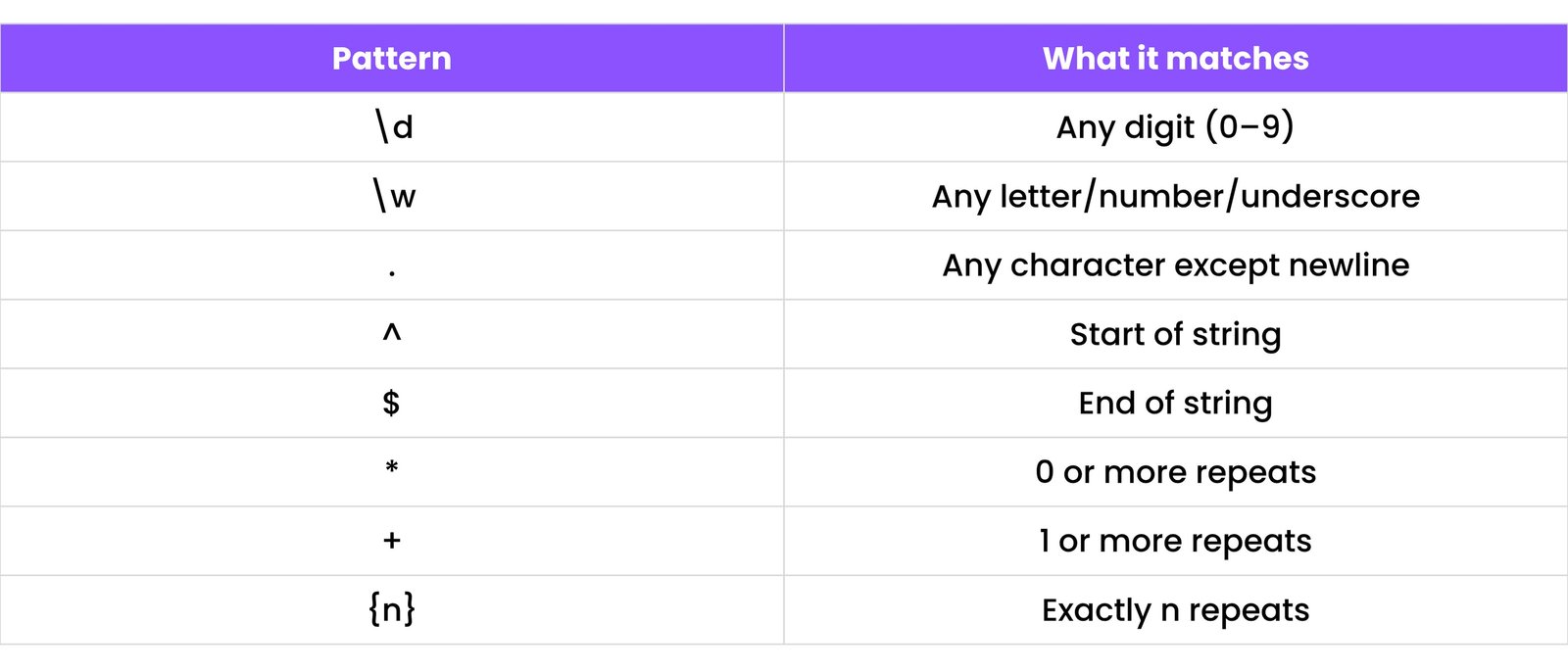
Example: Match an email pattern
email_pattern = r"^[a-zA-Z0-9._%+-]+@[a-zA-Z0-9.-]+\.[a-zA-Z]{2,}$"
test_email = "test@example.com"
if re.match(email_pattern, test_email):
    print("Valid email") # Output: Valid email
else:
    print("Invalid email")
17. WORKING WITH APIS
APIs (Application Programming Interfaces) allow your Python code to interact with other websites and services to get or send data.
17.1 `requests` Library Basics
To work with APIs, we use the popular requests library. First, install it:
pip install requests
Then, you can make a request:
import requests
response = requests.get("https://api.github.com/events")
print(response.status_code) # 200 means success
17.2 GET and POST Requests
GET → Used to retrieve data from a server.POST → Used to send data to a server to create a new resource.
# GET request example
response = requests.get("https://jsonplaceholder.typicode.com/posts/1")
print(response.json())

# POST request example
data_to_send = {'title': 'foo', 'body': 'bar', 'userId': 1}
response = requests.post("https://jsonplaceholder.typicode.com/posts", json=data_to_send)
print(response.json())
17.3 Handling JSON Data
Most modern APIs return data in JSON format. The `requests` library makes it easy to work with:
import requests

response = requests.get("https://jsonplaceholder.typicode.com/todos/1")
todo_item = response.json() # Automatically decodes JSON
print(todo_item['title']) # Output: delectus aut autem
18. PYTHONIC CONVENTIONS
Writing "Pythonic" code means writing code that is clean, readable, and follows the conventions of the Python community.
18.1 PEP 8 Style Guide
PEP 8 is the official style guide for Python code. Following it makes your code more readable for others.
Some key guidelines:
- Use 4 spaces for indentation.
- Limit all lines to a maximum of 79 characters.
- Use meaningful, lowercase names for variables and functions (e.g., `user_name`).
- Use blank lines to separate functions and classes.
18.2 Docstrings
Use triple quotes ("""...""") right after a function or class definition to explain what it does.
def greet(name):
    """
    This function greets the person passed in as a parameter.
    """
    print(f"Hello, {name}!")

greet("Alice")
18.3 Code Optimization Tips
- Use list comprehensions instead of `for` loops to create lists:
[x*x for x in range(5)].
- Avoid unnecessary loops by using built-in functions like `sum()`, `max()`, and `sorted()`.
- Write readable and DRY (Don't Repeat Yourself) code by creating reusable functions.
19. VIRTUAL ENVIRONMENTS & DEPENDENCY MANAGEMENT
When working on different Python projects, you may need different versions of libraries. A Virtual Environment creates an isolated sandbox for each project to avoid conflicts.
19.1 `venv` Module
Create a virtual environment for your project:
python -m venv myenv
Then, activate it:
.\myenv\Scripts\activate
On Mac/Linux:
source myenv/bin/activate
You’ll now see `(myenv)` in your terminal prompt, indicating you're inside the virtual environment.
19.2 `requirements.txt`
This file lists all the external libraries your project depends on.
Create it with:
pip freeze > requirements.txt
To install all dependencies on another computer:
pip install -r requirements.txt
19.3 `pip freeze`
This command lists all installed Python packages and their exact versions in the current environment.
pip freeze
Use it to keep track of what your project needs to run.
20. POPULAR LIBRARIES (OVERVIEW)
Python has a vast ecosystem of helpful libraries that make complex tasks much easier. Here are some of the most famous ones:
20.1 Data Science
- NumPy: For fast numerical operations on large arrays and matrices.
- pandas: For organizing, manipulating, and analyzing data in tables (DataFrames).
- matplotlib: For creating static charts, graphs, and visualizations.
- seaborn: For creating more attractive and informative statistical graphics.
20.2 Web Development
- Flask: A simple, lightweight framework for building websites and APIs quickly.
- Django: A powerful, high-level framework for building full-featured web applications.
20.3 Automation
- selenium: For automating web browsers to perform tasks like testing or web scraping.
- pyautogui: For programmatically controlling the mouse and keyboard.
- schedule: For running Python functions at specific times or intervals.
20.4 Machine Learning
- scikit-learn: For traditional machine learning algorithms like regression, classification, and clustering.
- TensorFlow & PyTorch: Advanced libraries for building and training deep learning models (neural networks).
21. DEBUGGING & TESTING
Debugging and testing are essential skills for finding and fixing mistakes in your code and ensuring it works as expected.
21.1 Using `pdb`
pdb is Python's built-in interactive debugger. It lets you pause your code's execution and inspect variables step-by-step.
import pdb

def my_function(a, b):
    pdb.set_trace() # Sets a breakpoint here
    result = a + b
    return result

# my_function(10, 20)
Use commands like n (next line), c (continue), and p variable_name (print variable) while in the debugger.
21.2 Unit Testing with `unittest` or `pytest`
Tests verify that individual parts (units) of your code are working correctly.
Example using `unittest`:
import unittest

def add(a, b):
    return a + b

class TestAddFunction(unittest.TestCase):
    def test_add_positive_numbers(self):
        self.assertEqual(add(2, 3), 5)

    def test_add_negative_numbers(self):
        self.assertEqual(add(-1, -1), -2)

# To run the tests, you would typically run the file from the command line.
# if __name__ == '__main__':
#     unittest.main()
pytest is another popular testing framework known for its simpler syntax and powerful features.
22. MINI PROJECTS (PRACTICE MAKES PERFECT!)
Building small projects is the best way to practice your Python skills and apply what you've learned.
22.1 Calculator
Take two numbers and an operator from the user and perform the calculation.
def calculator():
    num1 = float(input("Enter first number: "))
    op = input("Enter operator (+, -, *, /): ")
    num2 = float(input("Enter second number: "))

    if op == '+':
        print(num1 + num2)
    elif op == '-':
        print(num1 - num2)
    elif op == '*':
        print(num1 * num2)
    elif op == '/':
        if num2 != 0:
            print(num1 / num2)
        else:
            print("Error: Division by zero!")
    else:
        print("Invalid operator")

# calculator()
22.2 To-Do List
Use lists and functions to allow users to add, remove, and display tasks.
todos = []

def add_todo(task):
    todos.append(task)
    print(f"Added: {task}")

def view_todos():
    if not todos:
        print("No tasks yet.")
    for i, task in enumerate(todos, 1):
        print(f"{i}. {task}")

# add_todo("Learn Python")
# view_todos()
22.3 Web Scraper
Use `requests` and `BeautifulSoup` to extract information from websites.
# You may need to install these libraries first: pip install requests beautifulsoup4
import requests
from bs4 import BeautifulSoup

def scrape_title(url):
    response = requests.get(url)
    soup = BeautifulSoup(response.content, 'html.parser')
    print(soup.title.string)

# scrape_title("https://www.google.com")
22.4 Weather App using an API
Use a free weather API (like OpenWeatherMap) to get and display the current weather for a city.
# import requests
# API_KEY = "YOUR_API_KEY" # Replace with your actual API key from a weather API provider
# CITY = "London"
# url = f"http://api.openweathermap.org/data/2.5/weather?q={CITY}&appid={API_KEY}&units=metric"
# response = requests.get(url)
# data = response.json()
# print(f"Temperature in {CITY}: {data['main']['temp']}°C")
22.5 Alarm Clock
Use the `datetime` and `playsound` modules to create a simple alarm clock.
# You may need to install playsound: pip install playsound
# import datetime
# from playsound import playsound
#
# alarm_time = input("Enter the alarm time (HH:MM): ")
# while True:
#     now = datetime.datetime.now().strftime("%H:%M")
#     if now == alarm_time:
#         print("Time to wake up!")
#         playsound('alarm.mp3') # You'll need an alarm.mp3 file in your project folder
#         break