Java Cheatsheet

A comprehensive Java cheatsheet to help you master programming.

1. Introduction to Java

1.1 What is Java?

Java is a high-level, class-based, object-oriented programming language that is designed to have as few implementation dependencies as possible. It is a general-purpose programming language intended to let application developers "write once, run anywhere" (WORA), meaning that compiled Java code can run on all platforms that support Java without the need for recompilation.

  • Games
  • Mobile apps (especially Android)
  • Web applications
  • Large-scale enterprise systems

1.2 History and Features

  • Java was created in 1995 by James Gosling at Sun Microsystems.
  • It was later acquired by Oracle Corporation.
  • Key Features of Java:
    • Platform Independent: Java code is compiled into bytecode, which can be run on any machine with a Java Virtual Machine (JVM).
    • Object-Oriented: Java organizes code around objects, promoting modularity and reusability through concepts like inheritance and polymorphism.
    • Secure: Java provides a secure environment with features like a security manager and bytecode verifier.
    • Robust: Java is known for its reliability, with strong memory management and exception handling.

1.3 Java Editions (JSE, JEE, JME)

  • Java is available in three editions to suit different application development needs:
  • JSE (Java Standard Edition):
    • This is the core Java platform. It provides the fundamental libraries and APIs for developing desktop applications, applets, and server-side applications.
  • JEE (Java Enterprise Edition):
    • Built on top of JSE, JEE provides an API and runtime environment for developing and running large-scale, multi-tiered, scalable, reliable, and secure network applications.
  • JME (Java Micro Edition):
    • A platform for developing applications that run on mobile and embedded devices with limited resources.

1.4 JVM, JRE, and JDK

  • These are the three core components of the Java platform:
  • JDK (Java Development Kit):
    • A software development environment used for developing Java applications. It includes the JRE, a compiler (javac), a debugger, and other development tools.
  • JRE (Java Runtime Environment):
    • A software package that provides the Java class libraries, the JVM, and other components to run applications written in the Java programming language.
  • JVM (Java Virtual Machine):
    • An abstract machine that enables a computer to run a Java program. It interprets the compiled Java bytecode and executes it on the host machine.

1.5 How Java Works

  • You write your program in a .java file.
  • The Java compiler (javac) compiles the source code into Bytecode (a .class file).
  • The JVM then interprets this bytecode and executes the program on the underlying operating system.

2. BASIC SYNTAX

2.1 Structure of a Java Program

A simple program in Java looks like this:


public class Hello {
    public static void main(String[] args) {
        System.out.println("Hello, world!");
    }
}
                            

What it does:

  • It prints "Hello, world!" on the screen.

2.2 Comments

Comments are notes for humans reading the code. Computers ignore comments.


// This is a single-line comment

/* This is
a multi-line comment */
                            

2.3 Main Method Explained


public static void main(String[] args) {
    // code goes here
}
                            
  • This is the starting point of every Java program. It's like the "Start" button in a game.

2.4 Data Types and Variables

  • Variables are like boxes to store information.
  • Data types tell us what kind of information is in the box.

Example:


int age = 10;           // number
float price = 5.5f;     // decimal number
char grade = 'A';       // single letter
String name = "Ravi";   // group of letters (text)
boolean isCool = true;  // true or false
                            

2.5 Type Casting

  • Changing from one data type to another:

Example (auto type casting):


int a = 10;
double b = a;
                            

Example (manual type casting):


double x = 5.6;
int y = (int)x;
                            

2.6 Keywords

  • Java has special words that are already reserved. You can't use them as names.
  • Examples: class, int, if, else, while

2.7 Input/Output (Scanner, System.out)

  • System.out.println() is used to show output on screen.
  • Example:

    
    System.out.println("Hi!");
                                    
  • Scanner is used to take input from the user:
  • Example:

    
    import java.util.Scanner;
    Scanner sc = new Scanner(System.in);
    int age = sc.nextInt(); // user enters a number
                                    

3. OPERATORS

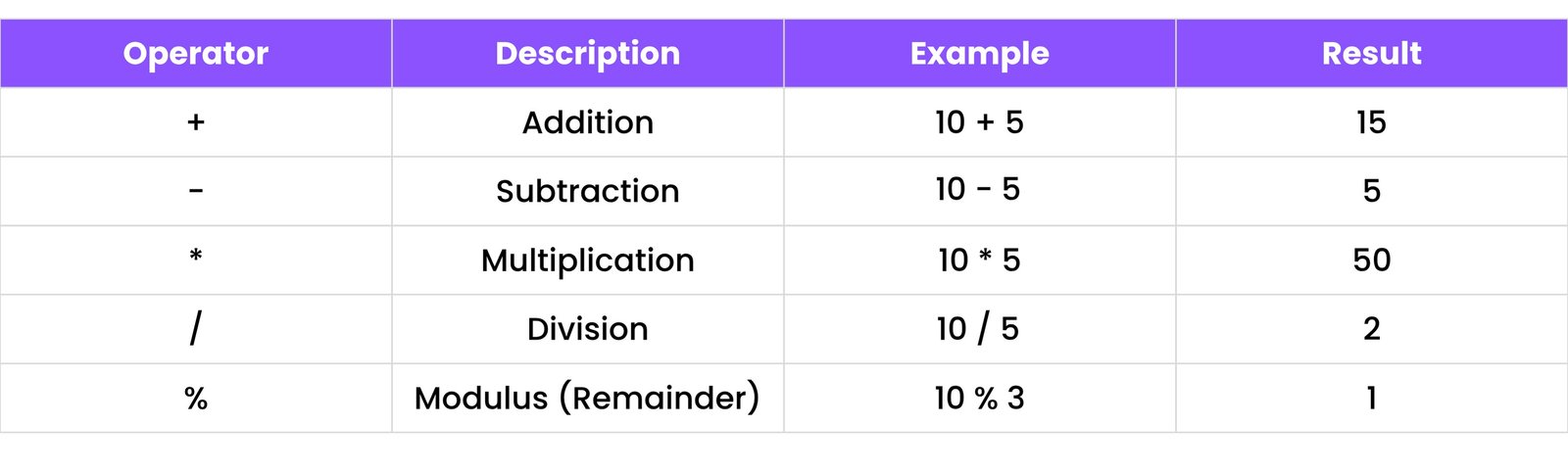
Operators are symbols that perform operations on variables and values.

3.1 Arithmetic Operators

Used to do math:

JAVA

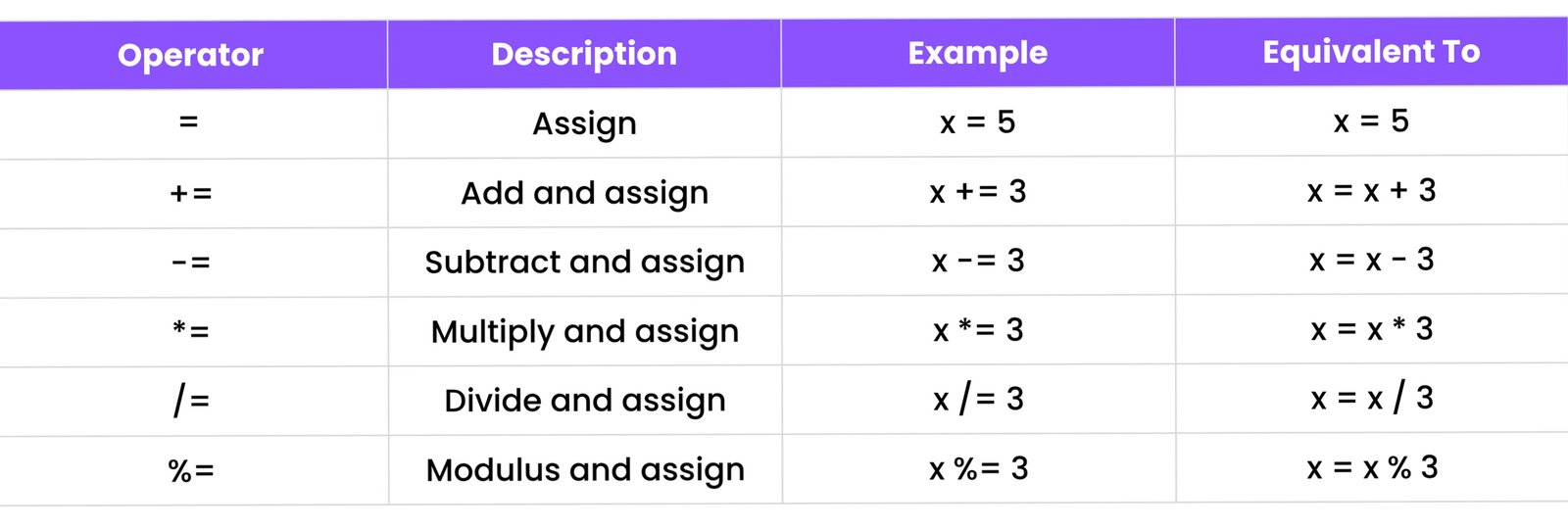
3.2 Assignment Operators

Used to give values to variables:

JAVA

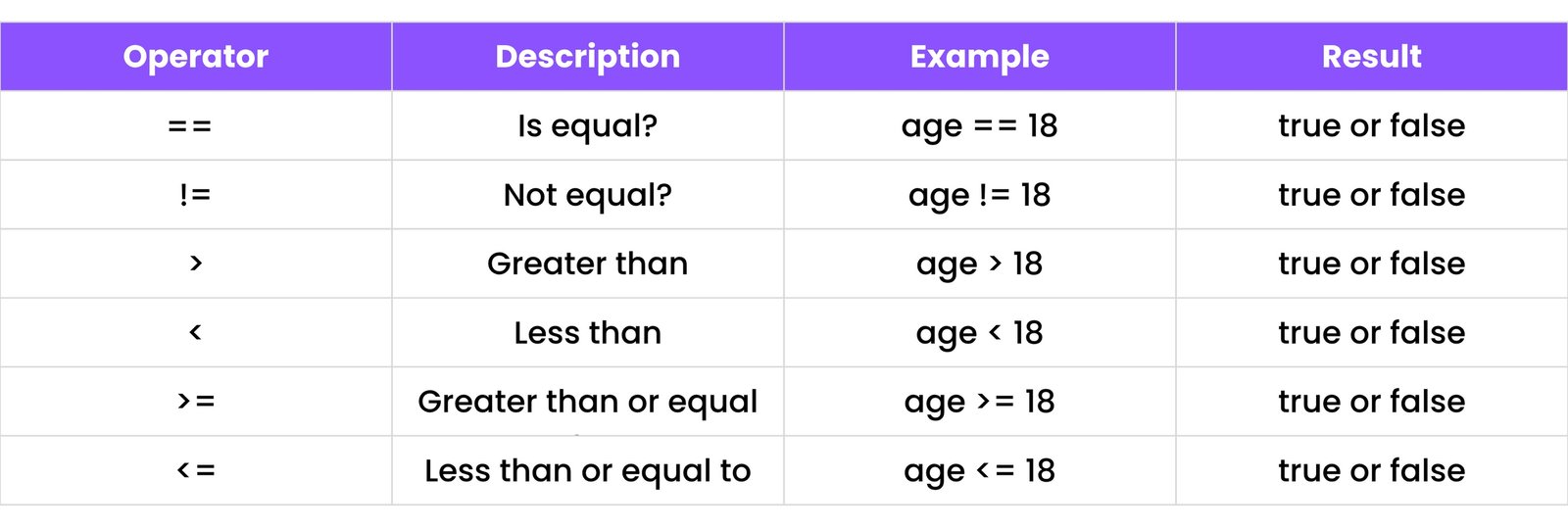
3.3 Comparison Operators

Used to compare things:

JAVA

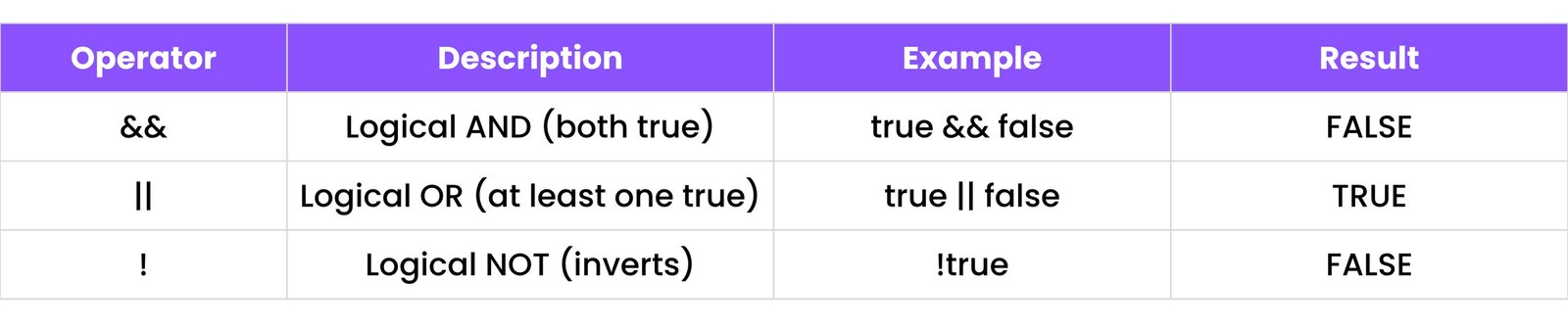
3.4 Logical Operators

Used to combine conditions:

JAVA

3.5 Bitwise Operators

Used in advanced calculations using 0s and 1s. (Not needed for beginners.)

3.6 Ternary Operator

Shortcut for if...else:


int a = 10;
int b = 5;
int max = (a > b) ? a : b; // max will be 10
                            

It means: if a > b, then max = a, else max = b.

3.7 Operator Precedence

Some operators happen before others (e.g., multiplication before addition).


int x = 5 + 2 * 3; // x will be 11
                            

Because multiplication happens before addition.

4. CONTROL STATEMENTS

Control statements help your program make decisions and control the flow based on conditions.

4.1 if, else if, else

Used to make decisions:


int age = 15;
if (age < 13) {
    System.out.println("You are a child");
} else if (age >= 13 && age < 18) {
    System.out.println("You are a teenager");
} else {
    System.out.println("You are an adult");
}
                            

4.2 switch Statement

Checks many values:


int day = 3;
switch (day) {
    case 1:
        System.out.println("Monday");
        break;
    case 2:
        System.out.println("Tuesday");
        break;
    default:
        System.out.println("Other day");
}
                            

4.3 Nested if Statements

One if inside another:


int age = 16;
if (age > 10) {
    if (age == 16) {
        System.out.println("You are in school");
    }
}
                            

5. LOOPS

Loops help you repeat tasks easily.

5.1 for, while, do...while

  • for loop:
  • 
    for (int i = 1; i <= 5; i++) {
        System.out.println(i);
    }
                                    
  • while loop:
  • 
    int i = 1;
    while (i <= 3) {
        System.out.println(i);
        i++;
    }
                                    
  • do...while loop:
  • 
    int i = 1;
    do {
        System.out.println(i);
        i++;
    } while (i <= 3);
                                    

5.2 Enhanced for-each Loop

Used for arrays (list of items):


int[] numbers = {10, 20, 30};
for (int num : numbers) {
    System.out.println(num);
}
                            

5.3 Loop Control (break, continue)

  • break: Stop the loop
  • continue: Skip to the next loop

for (int i = 1; i <= 5; i++) {
    if (i == 3) {
        continue;
    }
    System.out.println(i);
}
                            

6. ARRAYS

6.1 Single-Dimensional Arrays

An array is like a row of boxes πŸ§ƒ where each box holds a value (like numbers, names, etc.).


int[] numbers = {1, 2, 3, 4, 5};
System.out.println(numbers[0]); // Output: 1
                            

You can also create an empty array:


int[] marks = new int[5]; // An array of 5 integers, all initialized to 0
marks[0] = 90;
                            

6.2 Multi-Dimensional Arrays

These are like tables or grids (rows and columns).


int[][] matrix = {
    {1, 2, 3},
    {4, 5, 6}
};
System.out.println(matrix[1][0]); // Output: 4
                            

First number = row, second = column.

6.3 Array Methods

Java has helpful tools (methods) to work with arrays:


import java.util.Arrays;
int[] nums = {3, 1, 4, 2};
Arrays.sort(nums); // Sorts the array: {1, 2, 3, 4}
System.out.println(Arrays.toString(nums)); // Output: [1, 2, 3, 4]
                            

Other common methods:

  • Arrays.copyOf()
  • Arrays.equals()
  • Arrays.fill()

6.4 Array Iteration

You can go through each item using a loop:


int[] nums = {10, 20, 30};
for (int i = 0; i < nums.length; i++) {
    System.out.println(nums[i]);
}
                            

Or use for-each:


for (int num : nums) {
    System.out.println(num);
}
                            

7. STRINGS

7.1 String Declaration

A String is a group of characters (letters, words).


String name = "Ravi";
                            

You can also do:


String city = new String("Ahmedabad");
                            

7.2 String Methods

Here are some magic tricks πŸͺ„ you can do with Strings:


String name = "Ravi";
System.out.println(name.length());         // Output: 4
System.out.println(name.charAt(0));        // Output: R
System.out.println(name.concat(" Patel")); // Output: Ravi Patel
System.out.println(name.equals("Ravi"));   // Output: true
System.out.println(name.compareTo("Ravi"));// Output: 0 (equal)
                            

7.3 StringBuilder and StringBuffer

Both are used to build strings faster (like for games or apps where speed matters):


StringBuilder sb = new StringBuilder("Hi");
sb.append(" there!");
System.out.println(sb); // Output: Hi there!
                            

StringBuffer is similar but safe for multi-users (thread-safe).

7.4 String Formatting

You can make strings look fancy:


String name = "Ravi";
int age = 20;
System.out.printf("My name is %s and I am %d years old.", name, age);
// Output: My name is Ravi and I am 20 years old.
                            

8. METHODS (FUNCTIONS)

Methods are blocks of code that do a task.

8.1 Defining and Calling Methods


public static void sayHello() {
    System.out.println("Hello!");
}
sayHello(); // Call the method
                            

You can also send info:


public static void greet(String name) {
    System.out.println("Hi, " + name);
}
greet("Ravi"); // Call with "Ravi"
                            

8.2 Method Overloading

You can make methods with the same name, but different inputs:


public static int add(int a, int b) {
    return a + b;
}
public static double add(double a, double b) { // Same name, different type
    return a + b;
}
                            

8.3 Recursion

When a method calls itself:


public static void countdown(int n) {
    if (n == 0) return; // Stop case
    System.out.println(n);
    countdown(n - 1); // Call itself with smaller number
}
                            

It’s like a loop, but using self-calls.

8.4 static Keyword

If a method or variable is marked as static, it belongs to the class β€” not just one object.


public class MathHelper {
    public static int square(int x) {
        return x * x;
    }
}
System.out.println(MathHelper.square(5)); // Call static method using class name
                            

You don’t need to create an object to use static methods.

9. OBJECT-ORIENTED PROGRAMMING (OOP)

Object-Oriented Programming helps you organize your code better using objects. Think of it like building things in real life: You make blueprints (classes) and then build objects from them.

9.1 Classes and Objects

A class is like a blueprint. An object is something you create from that blueprint.


class Car { // Blueprint
    String color; // Property
    void start() { // Action
        System.out.println("Car is starting");
    }
}
public class Main {
    public static void main(String[] args) {
        Car myCar = new Car(); // Create an object
        myCar.color = "Red";   // Set property
        myCar.start();         // Do action
    }
}
                            

9.2 Constructors

A constructor is a special method that runs when an object is created.


class Car {
    String color;
    Car() { // No parameter constructor
        System.out.println("Car is created");
    }
    Car(String c) { // With parameter
        color = c;
        System.out.println("Car with color " + color + " is created");
    }
}
                            

9.3 this Keyword

The this keyword refers to the current object. Used to avoid confusion between names.


class Car {
    String color;
    Car(String color) {
        this.color = color; // refers to the Car's color
    }
}
                            

9.4 Inheritance

Inheritance means a class (child) can use things (like properties and actions) from another class (parent).


class Animal { // Parent
    void sound() { System.out.println("Animal makes sound"); }
}
class Dog extends Animal { // Dog is a child of Animal
    void bark() { System.out.println("Dog barks!"); }
}
                            

9.5 super Keyword

super is used to call the parent class methods or constructors.


class Animal {
    Animal() { System.out.println("Animal created"); }
}
class Dog extends Animal {
    Dog() { super(); } // Calls Animal() constructor
}
                            

9.6 Method Overriding

When a child class changes a method from the parent class (same method name and inputs).


class Animal { void sound() { System.out.println("Animal sound"); } }
class Cat extends Animal {
    @Override
    void sound() { System.out.println("Meow"); } // Cat's own sound
}
                            

9.7 Polymorphism (Compile-time and Runtime)

Polymorphism means "many forms".

  • Compile-time (Method Overloading):
  • 
    class Math {
        int add(int a, int b) { return a + b; }
        int add(int a, int b, int c) { return a + b + c; } // Overloaded
    }
                                    
  • Runtime (Method Overriding):
  • 
    class Animal { void sound() { /* ... */ } }
    class Cow extends Animal { @Override void sound() { System.out.println("Moo"); } }
                                    

9.8 Abstraction (abstract Classes)

Abstraction hides unnecessary details. Use abstract classes to create base templates.


abstract class Animal {
    abstract void sound(); // No body here
    void sleep() { System.out.println("Sleeping"); }
}
                            

9.9 Encapsulation

Encapsulation means hiding data (making attributes private) and accessing it with methods.


class Student {
    private int age; // Hidden
    public void setAge(int a) { age = a; } // Controlled access
}
                            

9.10 Interfaces

Interfaces are like 100% abstract classes. All methods are without body.


interface Animal {
    void sound(); // No body
}
class Dog implements Animal {
    public void sound() { System.out.println("Bark"); }
}
                            

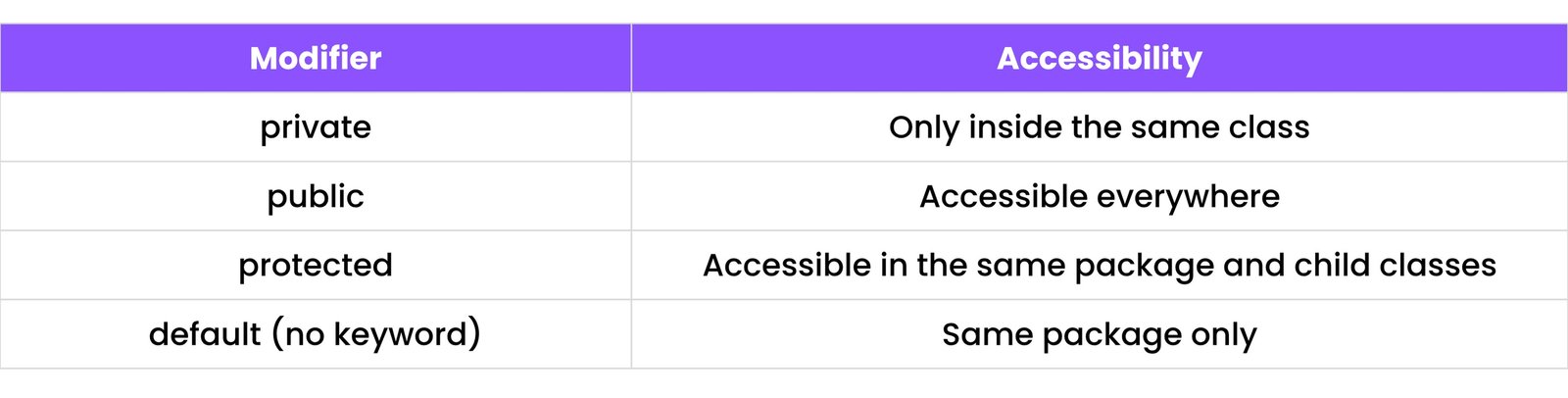
9.11 Access Modifiers (private, public, protected, default)

JAVA

10. EXCEPTION HANDLING

Java handles errors using try-catch blocks.

10.1 try, catch, finally


try {
    int x = 10 / 0; // Error happens here
} catch (ArithmeticException e) {
    System.out.println("Can't divide by zero!");
} finally {
    System.out.println("Always runs");
}
                            

10.2 throw and throws

  • throw is used to throw an exception.
  • 
    throw new ArithmeticException("Error happened");
                                    
  • throws is used in method signature:
  • 
    void Test() throws IOException { /* ... code that might throw IOException */ }
                                

10.3 Custom Exceptions

You can create your own exception class.


class MyException extends Exception {
    MyException(String msg) { super(msg); }
}
public class Test {
    public static void main(String[] args) throws MyException {
        throw new MyException("Custom error!");
    }
}
                            

10.4 Common Exceptions

  • ArithmeticException – divide by zero
  • NullPointerException – object is null
  • ArrayIndexOutOfBoundsException – index too big
  • NumberFormatException – wrong format for numbers
  • IOException – input/output error

11. PACKAGES & IMPORTS

Packages are used to organize classes. Imports help use them.

11.1 Built-in Packages

Java comes with many ready-made packages (groups of classes).

  • java.util – for tools like ArrayList, Scanner
  • 
    import java.util.Scanner;
                                    
  • java.io – for reading/writing files
  • 
    import java.io.File;
                                    

11.2 Creating Custom Packages

A package is a folder to organize your Java files.

Step 1: Create a package


package mypackage;
public class Hello {
    public void sayHi() {
        System.out.println("Hello from mypackage");
    }
}
                            

Step 2: Use it in another file


import mypackage.Hello;
public class Main {
    public static void main(String[] args) {
        Hello h = new Hello();
        h.sayHi();
    }
}
                            

11.3 import Statement

import helps bring in other classes or packages into your file.


import java.util.Scanner; // Only Scanner class
import java.util.*;      // All classes from java.util
                            

11.4 static import

You can use static import to use methods directly without writing class name.


import static java.lang.Math.sqrt;
public class Test {
    public static void main(String[] args) {
        System.out.println(sqrt(64)); // Output: 8.0
    }
}
                            

12. JAVA COLLECTIONS FRAMEWORK

The Collection Framework lets you store and manage groups of data.

12.1 List, Set, Map Interfaces

  • List: Ordered collection (can have duplicates)
  • Set: No duplicates allowed
  • Map: Key-value pairs (like a dictionary)

12.2 ArrayList, LinkedList

  • ArrayList – fast to access, like an expandable array
  • 
    import java.util.ArrayList;
    ArrayList<String> names = new ArrayList<>();
    names.add("John");
    System.out.println(names.get(0)); // Output: John
                                
  • LinkedList – better for inserting/deleting elements
  • 
    import java.util.LinkedList;
    LinkedList<Integer> numbers = new LinkedList<>();
    numbers.add(10);
                                

12.3 HashSet, TreeSet

  • HashSet – no duplicates, no order
  • 
    import java.util.HashSet;
    HashSet<String> set = new HashSet<>();
    set.add("A");
    set.add("B");
    set.add("A"); // won't add duplicate
                                
  • TreeSet – sorted automatically
  • 
    import java.util.TreeSet;
    TreeSet<Integer> sortedSet = new TreeSet<>();
    sortedSet.add(5);
    sortedSet.add(1);
    sortedSet.add(10); // Automatically sorted
                                

12.4 HashMap, TreeMap

  • HashMap – key-value pair, fast access
  • 
    import java.util.HashMap;
    HashMap<Integer, String> map = new HashMap<>();
    map.put(1, "One");
    map.put(2, "Two");
                                
  • TreeMap – sorted keys
  • 
    import java.util.TreeMap;
    TreeMap<String, Integer> sortedMap = new TreeMap<>();
    sortedMap.put("B", 20);
    sortedMap.put("A", 10); // Automatically sorted by key
                                

12.5 Stack, Queue, PriorityQueue

  • Stack – Last In First Out (LIFO)
  • 
    import java.util.Stack;
    Stack<Integer> stack = new Stack<>();
    stack.push(10);
    stack.push(20);
    System.out.println(stack.pop()); // Output: 20
                                
  • Queue – First In First Out (FIFO)
  • 
    import java.util.Queue;
    import java.util.LinkedList; // Commonly used implementation
    Queue<String> q = new LinkedList<>();
    q.add("X");
    q.add("Y");
    System.out.println(q.remove()); // Output: X
                                
  • PriorityQueue – sorted automatically (smallest first by default)
  • 
    import java.util.PriorityQueue;
    PriorityQueue<Integer> pq = new PriorityQueue<>();
    pq.add(5);
    pq.add(1);
    pq.add(10);
    System.out.println(pq.poll()); // Output: 1 (removes smallest)
                                

12.6 Iterators and Enhanced for-each

  • Iterator – moves through a collection
  • Enhanced for-each – simple loop for collections

13. FILE HANDLING

Java provides classes to read from and write to files.

13.1 FileReader, FileWriter

  • FileWriter – write to a file
  • FileReader – read from file

13.2 BufferedReader, BufferedWriter

Reads/writes faster by using a buffer.

  • BufferedReader
  • BufferedWriter

13.3 Scanner for File Input

You can use Scanner to read from files too.

13.4 File Class Operations

Check if file exists, or get file info:

14. MULTITHREADING

Java can do many tasks at once using threads.

14.1 Threads using Thread Class and Runnable Interface

  • Using Thread class:
  • Using Runnable:

14.2 Thread Lifecycle

States:

  • New
  • Runnable
  • Running
  • Blocked
  • Terminated

14.3 Synchronization

Stops threads from interfering with each other.

14.4 wait() and notify()

  • wait() – pauses the thread
  • notify() – wakes up waiting thread

15. JAVA 8+ FEATURES

Java 8 introduced many new, cool features.

15.1 Lambda Expressions

Short way to write a method.

15.2 Functional Interfaces

Interfaces with only one abstract method.

15.3 Streams API

For working with data like lists.

15.4 Optional Class

Helps avoid null pointer errors.

15.5 Method References

Use :: to call methods.

15.6 forEach and filter

  • forEach – loop through each item
  • filter – choose only some items

16. GENERICS

Generics help to reuse the same code for different data types without worrying about type errors.

For example, if you want a list to store numbers, you use β€œList<Integer>”.

Generics allow you to create classes, methods, and interfaces that work with any data type without losing type safety.

16.1 Why Generics?

Generics provide type safety.

16.2 Generic Classes and Methods

  • Generic Class: You can create a class that works with any type.
  • Generic Methods: A method can also be generic to accept different data types.

16.3 Bounded Type Parameters

You can restrict the types to specific classes.

16.4 Wildcards (<?>, <? extends>, <? super>)

Wildcards let you use unknown types.

  • <?> – Any type
  • <? extends T> – Any type that is a subclass of T
  • <? super T> – Any type that is a superclass of T

17. ANNOTATIONS

Annotations are special labels that add metadata to your code.

17.1 Built-in Annotations

  • @Override – tells the program that a method is overriding a parent method.
  • @Deprecated – marks a method as old or no longer used.
  • @SuppressWarnings – prevents warnings from appearing for specific code.

17.2 Custom Annotations

You can create your own annotations.

18. WRAPPER CLASSES

Wrapper classes allow you to treat primitive data types (like int, char) as objects.

18.1 Autoboxing and Unboxing

  • Autoboxing – automatically converts primitive types to wrapper objects.
  • Unboxing – automatically converts wrapper objects back to primitive types.

18.2 Common Methods

  • intValue() – returns the int value from an Integer object
  • doubleValue() – returns the double value from a Double object

19. ENUMS

Enums are used to represent fixed sets of constants.

19.1 Declaring and Using Enums

Enums are used for things like days of the week.

19.2 Enum Methods

Enums come with built-in methods like:

  • values() – returns an array of all enum constants.
  • ordinal() – returns the position of the constant.

20. DATE AND TIME API

Java provides special classes to work with dates and times.

20.1 LocalDate, LocalTime, LocalDateTime

  • LocalDate – represents only the date (e.g., 2025-05-07)
  • LocalTime – represents only the time (e.g., 10:30 AM)
  • LocalDateTime – represents both date and time

20.2 DateTimeFormatter

You can format dates and times with DateTimeFormatter.

20.3 Legacy Date Classes (Date, Calendar)

  • Date – represents a specific point in time, now outdated.
  • Calendar – used for calculating date/time (e.g., adding days).

21. JAVA MATH & UTILITY CLASSES

Java has built-in classes that help with mathematical operations and various utilities for better coding practices.

21.1 Math Class

The Math class is used for mathematical operations like rounding, square roots, trigonometric functions, etc.

  • Math.pow(a, b) – raises a to the power of b.
  • Math.round() – rounds a number to the nearest integer.

21.2 Random Class

The Random class is used to generate random numbers.

21.3 Arrays Utility Class

The Arrays class helps with operations on arrays, such as sorting and searching.

21.4 Collections Utility Class

The Collections class is used for manipulating collections like lists and sets.

22. BASIC GUI (OPTIONAL)

Creating a Graphical User Interface (GUI) allows you to build applications with windows, buttons, text fields, and other interactive elements.

22.1 Swing Components Overview

Swing is a popular library for creating GUI applications in Java. It provides components like:

  • JFrame – represents a window.
  • JButton – represents a button.
  • JLabel – represents a text label.
  • JTextField – represents a text input field.

22.2 AWT Basics

AWT (Abstract Window Toolkit) is an older toolkit used for GUI creation. It includes components like buttons, labels, and text areas.

23. JAVA BEST PRACTICES

Following best practices helps you write clean, efficient, and maintainable code.

23.1 Naming Conventions

Java has specific naming rules:

  • Classes: Start with an uppercase letter, e.g., MyClass.
  • Variables: Start with a lowercase letter, e.g., myVariable.
  • Constants: Use all uppercase letters, e.g., MAX_SIZE.
  • Methods: Start with a lowercase letter, e.g., calculateTotal().

23.2 Code Optimization Tips

  • Use loops efficiently, avoid unnecessary calculations.
  • Use StringBuilder for string concatenation to improve performance.
  • Always use final for variables that should not change.

23.3 Clean Coding Principles

  • Meaningful variable names – e.g., totalAmount instead of a.
  • Comment only when necessary – code should be self-explanatory.
  • Avoid magic numbers – use constants instead, e.g., final int MAX_STUDENTS = 30;

24. MINI PROJECTS

Building small projects is a great way to practice Java and improve your skills.

24.1 Calculator

A simple console-based calculator app that performs operations like addition, subtraction, etc.

24.2 ATM Simulation

A simulation of an ATM where the user can check balance, withdraw, and deposit money.

24.3 To-Do List Console App

A simple To-Do List application where you can add, view, and delete tasks.

24.4 File Encryption Tool

This tool can encrypt and decrypt files using basic cryptography techniques.

25. JAVA INTERVIEW QUESTIONS (BONUS)

Here’s a list of common Java interview questions you can prepare for:

25.1 Core Java Concepts

  • What is the difference between JVM, JRE, and JDK?
  • What are interfaces and abstract classes?
  • How does exception handling work in Java?

25.2 OOP-based Questions

  • What is inheritance in Java?
  • Explain the concept of polymorphism with an example.
  • How does encapsulation help in making code more secure?

25.3 Code Snippet Challenges

  • Write a program to reverse a string.
  • Write a program to find the factorial of a number.
  • Write a program to sort an array without using built-in methods.

Download the Full JAVA Cheatsheet PDF!

Click the button below to get your copy of this Java cheatsheet in a handy PDF format. Download will be ready in 5 seconds.

Ready for the C++ Cheatsheet?

Explore our comprehensive C++ Cheatsheet to enhance your programming skills. Click below to dive in!

Other Cheatsheets

Stay Updated

Receive coding tips and resources updates. No spam.

We respect your privacy. Unsubscribe at any time.